



Transport Layer Security (TLS) 1.3 is now enabled by default on Windows 10 Insider Preview builds, starting with Build 20170, the first step in a broader rollout to Windows 10 systems. TLS 1.3 is the latest version of the internet’s most deployed security protocol, which encrypts data to provide a secure communication channel between two endpoints. TLS 1.3 eliminates obsolete cryptographic algorithms, enhances security over older versions, and aims to encrypt as much of the handshake as possible.
Security and performance enhancements in TLS 1.3
TLS 1.3 now uses just 3 cipher suites, all with perfect forward secrecy (PFS), authenticated encryption and additional data (AEAD), and modern algorithms. This addresses challenges with the IANA TLS registry defining hundreds of cipher suite code points, which often resulted in uncertain security properties or broken interoperability.
The new TLS version also improves privacy by using a minimal set of cleartext protocol bits on the wire, which helps prevent protocol ossification and will facilitate the deployment of future TLS versions. In addition, in TLS 1.3, content length hiding is enabled by a minimal set of cleartext protocol bits. This means that less user information is visible on the network.
In previous TLS versions, client authentication exposed client identity on the network unless it was accomplished via renegotiation, which entailed extra round trips and CPU costs. In TLS 1.3, client authentication is always confidential.
Integrating your application or service with TLS 1.3 protocol
We highly recommend for developers to start testing TLS 1.3 in their applications and services. The streamlined list of supported cipher suites reduces complexity and guarantees certain security properties, such as forward secrecy (FS). These are the supported cipher suites in Windows TLS stack (Note: TLS_CHACHA20_POLY1305_SHA256 is disabled by default):
- TLS_AES_128_GCM_SHA256
- TLS_AES_256_GCM_SHA384
- TLS_CHACHA20_POLY1305_SHA256
The protocol enables encryption earlier in the handshake, providing better confidentiality and preventing interference from poorly designed middle boxes. TLS 1.3 encrypts the client certificate, so client identity remains private and renegotiation is not required for secure client authentication.
Enabling TLS 1.3
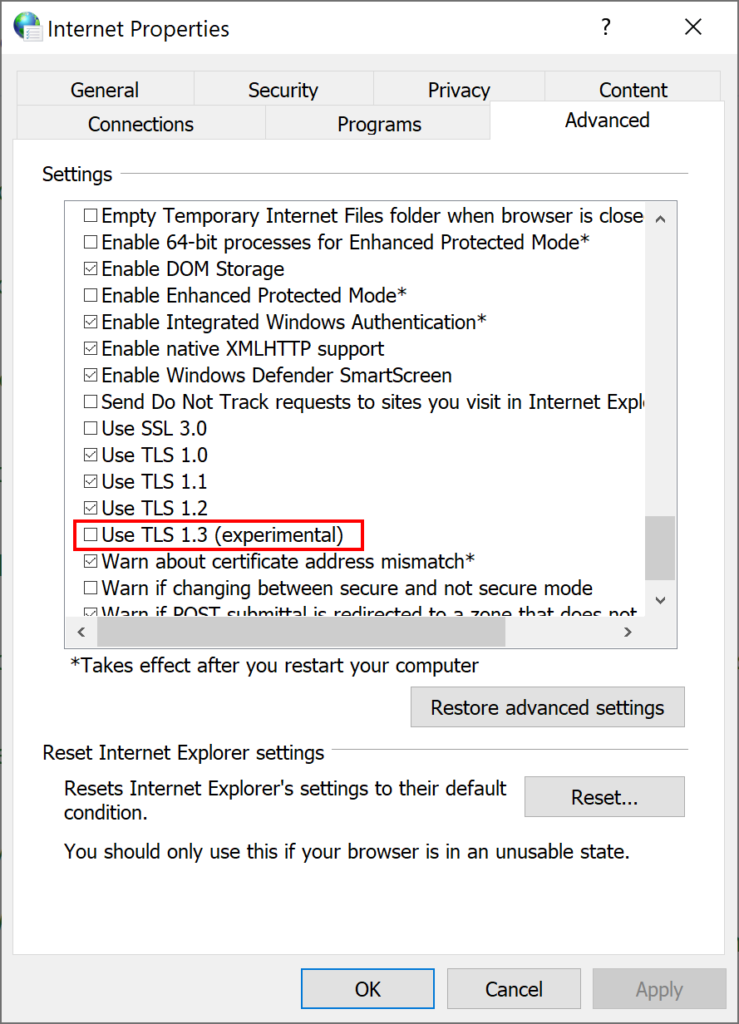
TLS 1.3 is enabled by default in IIS/HTTP.SYS. Microsoft Edge Legacy and Internet Explorer can be configured to enable TLS 1.3 via the Internet options > Advanced settings. (Note: The browser needs to be restarted after TLS 1.3 is enabled.)
The Chromium-based Microsoft Edge does not use the Windows TLS stack and is configured independently using the Edge://flags dialog.
Security support provider interface (SSPI) callers can use TLS 1.3 by passing the new crypto-agile SCH_CREDENTIALS structure when calling AcquireCredentialsHandle, which will enable TLS 1.3 by default. SSPI callers using TLS 1.3 need to make sure their code correctly handles SEC_I_RENEGOTIATE.
TLS 1.3 support will also be added to .NET beginning with version 5.0.
For more information about TLS 1.3, refer to the Microsoft TLS 1.3 support reference.
Sunny Zankharia
Program Manager, Enterprise and OS Security
Andrei Popov
Principal Software Engineer, Enterprise and OS Security


