
What changes after compromise recovery?
After a successful compromise recovery effort, you are back in control. Likely, you gave your team a round of applause and took a sigh of relief.
Now what? Is everything going back to as it was in the past? Absolutely not! A compromise recovery engagement is an accelerated way of doing numerous amounts of cybersecurity configuration and upgrades in a short amount of time. Just because the Domain Admins have basic protection it doesn’t mean that the full environment is secure yet.
After a compromise recovery engagement, Microsoft’s compromise recovery team follows up with what we call security strategic recovery. This is the plan for moving forward to get the environment up to date with security posture. The plan consists of different components like Securing Privileged Access and extended detection and response (XDR), depending on the organizational needs, but it all points in the same direction: moving ahead with Zero Trust strategy over traditional network-based security.
Privileged administration
After we have secured the most critical privileged servers (including Domain Controllers, called also “Tier 0” server for on-premises environment) and privileged accounts (Domain Admins), the next step is to mitigate unauthorized privilege escalation for the Data/Workload and Management plane (called also “Tier 1” for on-premises environment).
An encryption attack that gets local admin permissions on all member servers will still be devastating, so a proper delegation model must be implemented. Ransomware can utilize this account to encrypt application and database servers in the same way as using a Domain Admin account. Different tools like PIM/PAM and strategies can be used to strengthen the security of the Data/Workload administrators and services. Please refer to the enterprise access model for additional details.
Privileged Access Workstation
During a compromise recovery, we are implementing what we call a “Tactical” Privileged Access Workstation. While functional for the purpose of providing a secure workstation with a “clean keyboard” to operate in a compromised environment, it is not meant to be long-lasting and engineered for broader enterprise deployment.
Implementing a proper Privileged Access Workstation together with a broader Privileged Access environment for all administrative tasks is necessary to reduce attack vectors and risk of re-compromise.
The Privileged Access Workstation configuration must include security controls and policies that restrict local administrative access and productivity tools to minimize the attack surface to only what is absolutely required for performing sensitive job tasks. Please refer to Why are privileged access devices important for additional details.
From tactical monitoring to XDR
While performing compromise recovery, we implement “tactical monitoring” to supplement the customer’s investigation, leveraging a targeted implementation of Microsoft Defender suite and Microsoft Sentinel on all critical systems.
This is key to obtain visibility on the environment and respond quickly and efficiently to abnormal or suspicious activities before it turns into another security incident.
As part of a strategic security roadmap, we strongly recommend completing the implementation of XDR with Microsoft Defender Threat Protection and leveraging automated investigation and remediation capabilities to save security operations teams’ time and effort.
Additional help to our customers to defend and manage their environment is now available from Microsoft through Microsoft Security Experts.
Zero Trust journey
The Strategic Recovery recommendation listed previously on using least privileged access for privileged administration and XDR for improving defenses are just initial steps into a broader Zero Trust journey (see Figure 1).
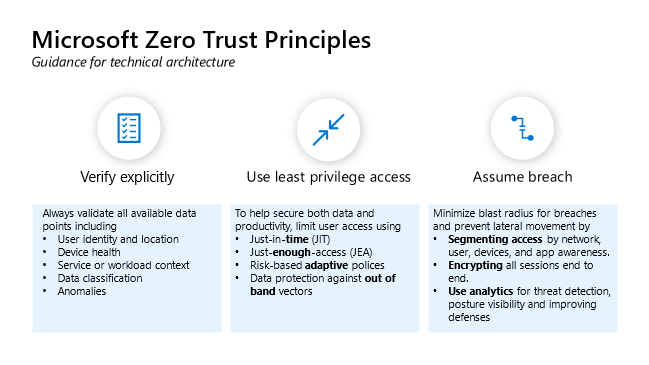
Figure 1 outlines the Microsoft Zero Trust Principles. The first principle is to verify explicitly, which means to always validate all available data points including user identity and location, device health, service or workload context, data classification, and anomalies. The second principle is to use least privileged access, meaning to help secure both data and productivity and limit user access using iust-in-time access (JIT), just-enough-access (JEA), risk-based adaptive policies, and data protection against out of band vectors. Finally, the third principle is assume breach, which is when you minimalize blast radius for breaches and prevent lateral movement by segmenting access by network, user, devices, and app awareness; encrypting all sessions end-to-end; and use analytics for threat detection and posture.
As observed during most of our compromise recovery engagements, the attackers usually came in through the abuse of user identity and then perform lateral movement and escalation to privileged access.
Most organizations have built security controls over the years based on network and perimeter protection and are still underestimating the “identity risk” in the current threat landscape.
With Strategic Recovery also comes the need for a mind shift from network and perimeter protection to identity-based protection, leveraging Zero Trust principles. Implementing a Zero Trust security strategy is a journey that needs both technology and training, but it is necessary moving forward.
Organizations may leverage the Microsoft Zero Trust Maturity Assessment Quiz to assess their current state of Zero Trust maturity and recommendations on the next steps. More details of how Microsoft can empower organizations in their Zero Trust journeys can be found in the Zero Trust Essentials eBook.
Who is CRSP?
The Microsoft Compromise Recovery Security Practice (CRSP) is a worldwide team of cybersecurity experts operating in most countries, across both public and private organizations, with deep expertise to secure an environment post-security breach and to help you prevent a breach in the first place. The CRSP is a specialist team within the wider Microsoft Security Experts. Microsoft Security Experts help customers through the entire cyberattack from investigation to successful containment and recovery related activities. The response and recovery services are offered via two highly integrated teams, the Detection and Response Team (DART) with a focus on the investigation and groundwork for recovery, and the Compromise Recovery Security Practice (CRSP), which focuses on the containment and recovery aspects.
Learn more
To learn more about Microsoft Security solutions, visit our website. Bookmark the Security blog to keep up with our expert coverage on security matters. Also, follow us at @MSFTSecurity for the latest news and updates on cybersecurity.