Today’s post was written by Arpan Shah, senior director for the Office 365 team.
Over the past year, we released over 450 updates to Office 365, as noted by Julia White in this recent Office Mechanics show. As customers move from on-premises software to the cloud, they need new tools and processes to manage and administer change. We are committed to not only deliver the best productivity experience to end users but also provide an optimum experience to admins and developers who run and build on the service.
On today’s Office Mechanics show, I’m excited to tell you about some of the improvements we’ve made to Office 365 change management and tools—all based on your feedback.
Rolling out updates
I want to assure you that we recognize how Office 365 updates can potentially impact your organization. To ensure we deliver high quality updates and give you time to prepare, we will continue to improve the way updates are rolled out (illustrated below) to catch issues and obtain your feedback early.
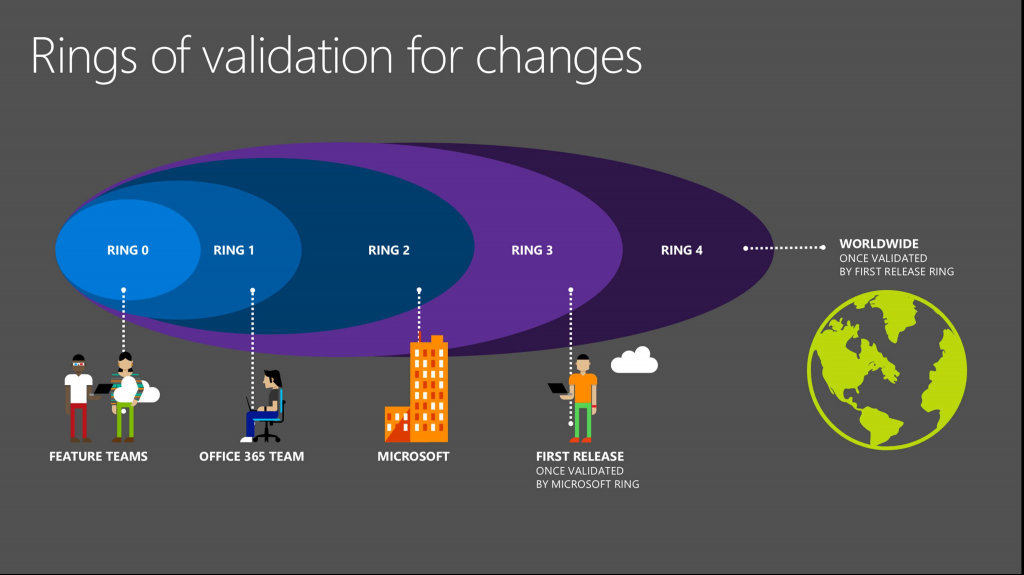
It begins with our feature teams of engineers (Ring 0) who build and test proposed changes. Next, our Office 365 team (Ring 1) takes a test drive before releasing proposed updates to all Microsoft employees (Ring 2). Only after passing three internal hurdles do updates begin rolling out to our First Release customers (Ring 3). Once validated by our First Release customers, we incorporate their feedback before worldwide rollout (Ring 4). The sheer scale of Office 365 means that we stagger release to tenants, with some changes taking a few weeks or more before they’re implemented worldwide.
First Release lets you try updates early
First Release is designed to help customers prepare for updates. You can opt in to experience updates ahead of worldwide rollout within your tenant. In the show, I demonstrate how easy it is to turn on First Release in the Office 365 admin center for your organization as well as the new capability—based on your feedback—which allows you to select specific people to receive updates early. Learn how you can see changes before the rest of your organization when you enable First Release.
Making your life easier
We’re working hard to make your life easier in other ways, including some great resources:
- Office 365 Roadmap—Follow Office 365 features as they progress through the development lifecycle, from development to rollout and launch. To stay up-to-date, it’s best to check the Roadmap every couple of weeks, or at least once a month. We added a “Recently updated” filter based on your feedback.
- Message Center—This is where we post messages related to key changes to the service that you need to either be aware of or take some action. We recommend checking the Message Center on a daily basis. Note, you must be an Office 365 admin to access the Message Center.
- Admin App—We updated the Office 365 Admin App on Windows Phone, iOS and Android so you can access Message Center, monitor service health and do simple admin tasks from whatever phone you prefer.
- Success.Office.com—This is your one-stop shop for everything you need to deploy and drive adoption of Office 365. Announcement and flyer templates and other great resources are here to help end users onboard and get excited about upcoming changes.
—Arpan Shah