


Corporate Vice President Brad Anderson recently shared his insights on how Windows Defender Advanced Threat Protection (Windows Defender ATP) evolved to achieve important quality milestones. Our Windows Defender ATP team is committed to delivering industry-leading protection, customer choice, and transparency on the quality of our solutions. In the continued spirit of these principles, we want to share the results of the January-February 2018 test conducted by independent antivirus tester AV-TEST and provide a transparency report that augments the test findings with contextual information to help our customers make informed decisions about Windows Defender ATP adoption.
Download the complete transparency report on January-February 2018 test results
At a high-level, the transparency report shows:
Protection: Windows Defender Antivirus (Windows Defender AV) achieved a perfect score in Protection, maintaining consistently high scores in this category. Usability (false positives): Windows Defender AV achieved an improved.
Usability score of 5.5/6.0. Per our telemetry, samples that Windows Defender AV incorrectly classified (false positive) had very low prevalence and are not commonly used in business context.
Performance: Windows Defender AV improved this cycle, achieving a 5.5/6.0 Performance score and outperforming the industry in almost all areas. These results reflect the investments we put in optimizing Windows Defender AV performance for high-frequency actions (e.g., application run).
While independent tests can help assess a security solution’s capabilities and protections, it is important to understand that antivirus tests are only one part of a complete quality assessment. To truly understand the protection quality of an endpoint protection platform (EPP) and endpoint detection and response (EDR) solution like Windows Defender ATP, its entire set of capabilities must be evaluated.
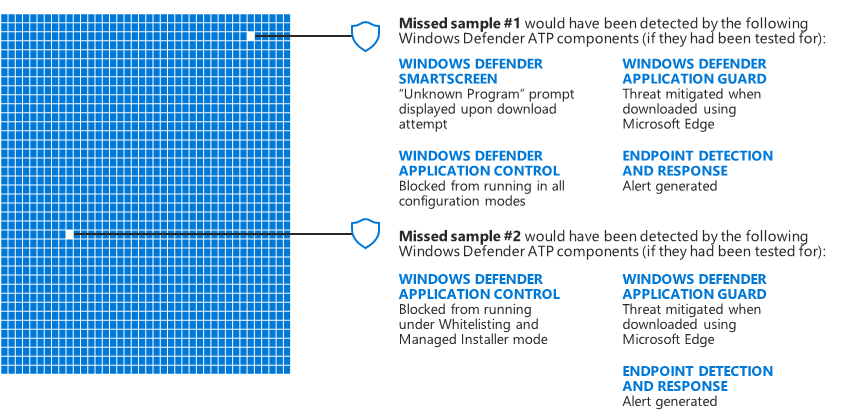
For instance, while Windows Defender ATP’s antivirus capability achieved a perfect overall Protection score in the January-February 2018 tests and only missed two out of thousands of samples tested, it performed even better than the results suggest. The Windows Defender Security Intelligence team tested the two missed samples against the entire Windows Defender ATP stack to assess these samples’ ability to infect machines in real-world enterprise environments. The team was able to confirm that the two missed samples were detected and mitigated by other components of the Windows Defender ATP stack.
As threats become more sophisticated, Microsoft and other security platform vendors continue evolving their product capabilities to detect threats across different attack stages. We hope to see independent testers evolve their methodologies as well. Our customers need greater transparency and optics into what an end-to-end solution can accomplish in terms of total preventive protection, including the quality of individual components like antivirus. Microsoft is highly engaged in working with several independent testers to evolve security testing to focus on end-to-end security stack testing.
Meanwhile, we continue to focus on improving our next-generation antivirus solution while at the same time delivering new innovative capabilities like attack surface reduction and hardware-based isolation, just to name a few. In the Windows 10 April 2018 Update, you can experience these new and improved capabilities in Windows Defender ATP, which provides a complete endpoint protection platform (EPP) and endpoint detection and response (EDR) solution. To see these capabilities for yourself sign up for a 90-day trial of Windows Defender ATP today, or enable Preview features on existing tenants.
Zaid Arafeh
Senior Program Manager, Windows Defender Research team
Talk to us
Questions, concerns, or insights on this story? Join discussions at the Microsoft community and Windows Defender Security Intelligence.
Follow us on Twitter @WDSecurity and Facebook Windows Defender Security Intelligence.


