
In the digital world, when you meet professional contacts for the first time online, you need additional trust signals to increase your confidence that they are who they say they are. We’re thrilled to announce that millions of LinkedIn members will be able to verify their place of work with a Microsoft Entra Verified ID credential. By simply looking for a Verification, members and organizations can be more confident that the people they collaborate with are authentic and that work affiliations on their profiles are accurate.
Verifying a LinkedIn member’s workplace
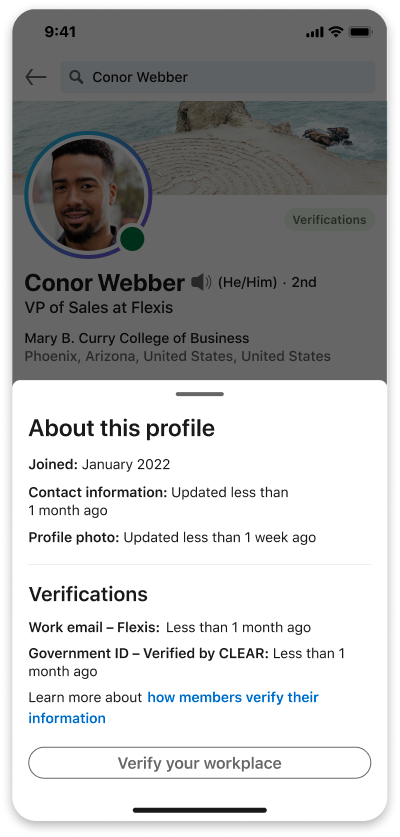
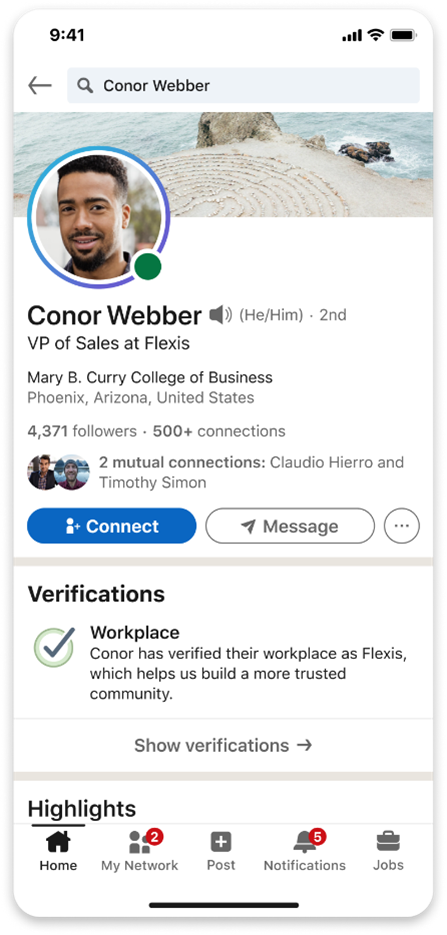
In just minutes, organizations can use Verified ID to create customized digital employee IDs that reflect their brand and business needs. On LinkedIn, members will see an option to verify their workplace on their profile. With a few taps on their phone, members can get their digital employee ID from their organization and choose to share it on LinkedIn. After they send the credential, a Workplace verification will be displayed on their profile.
A trustworthy approach to verification
In our everyday lives, we use identity documents like driver’s licenses or passports as convenient and secure ways to prove our identity. Until now, we have not had a good digital equivalent. Verified ID provides an easy-to-use and secure experience for digitally verifying many aspects of our identity, such as education, skills, and workplace affiliation.
Verified ID is built on open standards for decentralized identity, which operates on a “triangle of trust” model involving three parties: an issuer, a holder, and a verifier. For instance, an organization can act as an issuer by cryptographically signing a digital credential and issuing it to an employee as a digital employee ID. As the credential holder, the employee can decide to share their credential with apps and websites, such as LinkedIn. Then the verifier can cryptographically authenticate that the digital employee ID is genuine and was issued by the place of work the employee claims. This approach represents a more secure, convenient, and trustworthy way to verify digital information at scale.
Best of all, because Verified ID is based on open standards, it can work with existing HR systems, as well as a range of identity systems, such as Microsoft Azure Active Directory, now part of Microsoft Entra product family, and even identity systems that are on-premises.
Looking ahead
To help ensure that this new capability in LinkedIn is an easy-to-use, secure experience, we’re testing and gathering feedback from more than 70 organizations representing millions of LinkedIn members, including companies like Accenture, Avanade, and Microsoft. We plan to start rolling out this new capability by the end of the month.
Verifying workplace credentials for use on LinkedIn is just one example of how Verified ID can make digital interactions simpler and more trustworthy, whether they involve organizations or individuals. This new way to verify can be useful for background checks, rewards programs, help desk support, and a host of other scenarios that require proof of workplace affiliation. It will also make the process of verifying a prospective employee’s identity and qualifications less manual, time-consuming, and expensive.
But this is just the beginning. Verified ID credentials can increase trust, authenticity, and verifiability while reducing cost, time, and friction in many scenarios. You can issue employee IDs using Verified ID today. It only takes a few minutes. To get started, check out these tutorials.
To learn more about Microsoft Security solutions, visit our website. Bookmark the Security blog to keep up with our expert coverage on security matters. Also, follow us on LinkedIn (Microsoft Security) and Twitter (@MSFTSecurity) for the latest news and updates on cybersecurity.