

Tools for Thought
Better thinking through AI
A People-Centric AI Project
Promptions Open Source Repository
If You’re Building UI for AI, Give Users the Power of Choice
Dynamic UI for prompting can transform users’ AI experiences. You can use Promptions whether you’re just starting out or building advanced systems.
The Challenge of Prompting AI
Prompting an AI might seem simple—just type what you want and wait for the magic. But for many users, especially developers trying to build engaging AI-powered tools, the reality is more complex.Getting the AI to respond the way you want often requires nuanced prompt engineering, which can be:
- Hard to learn: Knowing what context the AI needs isn’t always obvious.
- Tedious to write: Even when you know what to say, crafting the right prompt takes time.

“I have to do so much [work] around my prompt to give it the context to make it specific, point it to the tone to do, and a lot of times I’m repeating … those same things. I felt like [this] would really help me shortcut what I’m doing manually today.”
(Dynamic Prompt Middleware study (opens in new tab), Participant 15)
Enter Promptions: Ephemeral UI to Make Steering Easy
Promptions (“Prompt” plus “options”) helps users steer AI responses more effectively. Instead of manually refining prompts, Promptions generates contextual UI elements, like radio buttons, checkboxes, or toggles.
As users interact with these elements, Promptions updates the AI’s response in real time, making it more relevant and useful.
This is an example of “Ephemeral UI”, an emerging development paradigm in which user interfaces are created on-the-fly by AI systems and last just long enough to serve a specific purpose.
What Can Promptions Do
Promptions is best suited for any end-user interface where parameterizing prompts to add context can help steer AI output toward the user’s preferences—without requiring them to write or speak that context. It’s simple, effective, and easily customizable, making it suitable for developers from individual vibe-coders to enterprise software engineers.
| Domain | Description |
| Customer support chatbots | Users refine support queries on the fly (e.g., specify tone or detail level) and see updated answers instantly, improving resolution speed and satisfaction. |
| Content creation platforms | Writers and marketers tweak style, length, or format parameters through GUI controls, iterating drafts faster while maintaining creative direction. |
| Data analytics and BI dashboards | Analysts adjust filters, aggregation levels, or visualization styles via checkboxes and sliders, regenerating AI-driven reports and insights instantly. |
| Educational tutoring systems | Students select difficulty, focus topics, or feedback style, prompting the AI tutor to adapt explanations and examples to individual learning needs. |
| Healthcare decision-support tools | Clinicians refine symptom context, risk factors, or treatment priorities through guided options, obtaining tailored diagnostic suggestions and care pathways. |
| Data annotation and curation | Promptions can parameterize labeling decisions into structured GUI inputs (e.g. sentiment sliders, style toggles), improving consistency, speed, and auditability in dataset creation. |
| Interactive explainability & auditing | Promptions allows users to explore how AI outputs shift with different refinement choices, offering a lightweight way to probe bias, model boundaries, or failure modes through UI interaction. |
Why Promptions Works
Promptions is grounded in our CHIWORK 2025 Dynamic Prompt Middleware research (opens in new tab), which shows that users benefit from contextual UI elements that help them refine prompts without needing deep expertise in prompt engineering. This approach:
- Lowers barriers to providing useful context
- Encourages task exploration and reflection
- Improves control over AI responses
- Enhances the overall user experience of generative AI workflows
“[It] generated options that were things that I would maybe assume the system couldn’t handle….”
(Dynamic Prompt Middleware study (opens in new tab), Participant 1)
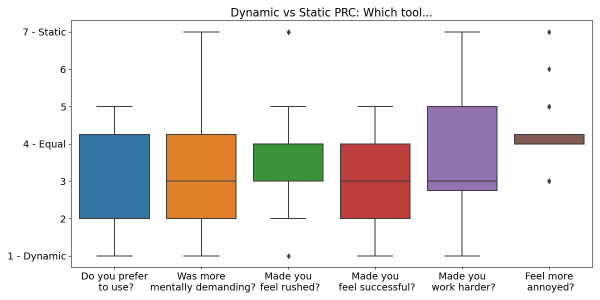
In the study, participants reported greater preferring dynamic elements, that it made them feel more successful with AI.
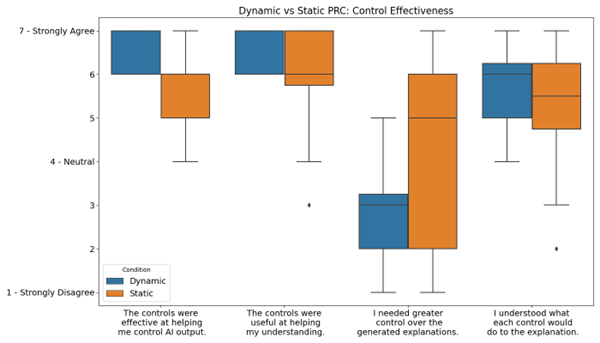
Participants perceived the dynamic controls as more effective in managing AI output and expressed greater satisfaction with the degree of control provided, in contrast to the static condition, where many reported a continued need for additional control.
But Promptions is more than just a usability improvement—it’s an example of the Microsoft Research Tools for Thought (opens in new tab) approach to designing generative AI systems. The Promptions technique is a response to the metacognitive demand (opens in new tab) of task decomposition:
- For novices, it reveals the scope of what’s possible, helping them understand how a complex task can be broken down into manageable parts.
- For experts, it streamlines the process by surfacing relevant aspects of the task, allowing them to make precise refinements without tedious typing.
This combination of cognitive support and interaction design makes Promptions a powerful tool for building AI systems that are not only more effective—but also more empowering.
“[It’s giving me more of a prompt learning experience, I’m getting what I want out of the AI. And actually, it’s a better response too.”
(Dynamic Prompt Middleware study (opens in new tab), Participant 11)
Build with Promptions
Promptions is provided to developers as a TypeScript monorepo for AI-powered applications built with React, Fluent UI, and OpenAI integration. This project includes chat and image generation interfaces along with shared UI components and LLM utilities. The repo is available at https://github.com/microsoft/Promptions (opens in new tab).

You can fork the repo and customize Promptions for your own applications. You can also contribute to Promptions. Whether you’re building a chatbot, a coding assistant, or a creative writing tool, Promptions gives users the power of choice—and better results.
Looking Ahead
Promptions is part of a growing movement to make AI more user-centered, customizable, and accessible. By giving users intuitive control over how AI responds, we’re building a future where everyone—from novice coders to seasoned engineers—can create smarter, more responsive AI experiences.
Credits
Promptions was invented by Ian Drosos (opens in new tab) (a past Microsoft Research Resident) with support from Jack Williams, Advait Sarkar, Nicholas Wilson, Payod Panda, and Sean Rintel. It is a collaboration between the Tools for Thought and ENCODE projects in the People-Centric AI focus area at Microsoft Research Cambridge, UK.
인원
The Tools for Thought team is interdisciplinary, mixing experts in social science, computer science, engineering, and design. The team is co-lead by Richard Banks and Sean Rintel.
Members

Sean Rintel
Senior Principal Research Manager

Richard Banks
Principal Design Manager

Advait Sarkar
Senior Researcher

Pratik Ghosh
Senior Research Designer

Martin Grayson
Principal Research Software Development Engineer

Britta Burlin
Principal Design Manager

Lev Tankelevitch
Senior Researcher

Payod Panda
Design Engineering Researcher
Viktor Kewenig
Cognitive Science Researcher
Collaborators

Abigail Sellen
VP/Distinguished Scientist

Siân Lindley
Senior Principal Research Manager

Jack Williams
Senior Researcher

Christian Poelitz
Senior Research Engineer

Jake Hofman
Senior Principal Researcher

Jenn Wortman Vaughan
Senior Principal Research Manager
Past Contributors
Xinyue Chen
Past Intern
Emily Doherty
Past Intern
Ian Drosos
Past Resident
Gonzalo Ramos
Past Researcher
Ava Scott
Past Intern
Rishi Vanukuru
Past Intern