This is a blog series that responds to common questions we receive from customers about the deployment of Microsoft 365 security solutions. In this series, you’ll find context, answers, and guidance for deployment and driving adoption within your organization. Check out Cybersecurity threats: How to discover, remediate, and mitigate, the third blog in our eight-part series on deploying Intelligent Security scenarios.
It’s not just a problem for consumers. Identity theft in the workplace is also on the rise—and with good reason. Stealing employee credentials is an easy path to bypassing security around sensitive data, making unauthorized purchases, and many other cybercrimes.
Microsoft 365 security solutions help you protect users and corporate accounts. By making identity the control plane, Microsoft 365 offerings manage identities as the first step to providing access to corporate resources and restricting users who are high risk. Tools like single sign-on (SSO), Multi-Factor Authentication (MFA), and Windows 10 Hello for Business help you secure access. Additionally, there are actions you can take if an identity is compromised and ways to lock down or wipe devices to protect sensitive data in case of loss or theft.
How do I provide secure access for my users?
Managing identities is the first step in protecting your environment. You can provision user identities through Azure Active Directory (Azure AD) and then connect to your on-premises Active Directory, allowing you to centralize identities for each user. Then you can set conditional access policies in Azure AD (Figure 1) for users in your organization. Conditional access policies allow you to control how users access cloud apps. You can set conditions that restrict access based on sign-in risk, user location, or client app, as well as only allowing access to managed devices. Start by implementing recommended identity access policies.
Managing user access is your next step. Azure AD SSO lets you manage authentication across devices, cloud apps, and on-premises apps with one user sign-in. Once you enable SSO, your employees can access resources in real-time on any device in addition to confidential or sensitive work documents away from the office. Next, deploy MFA in Azure AD to reauthenticate high-risk users, and take automated action to secure your network.
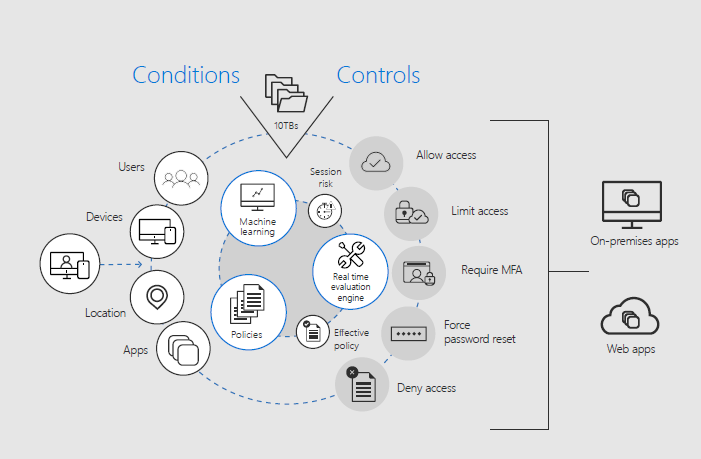
Figure 1. Set user policies using Azure AD conditional access.
Finally, encourage your employees to use Windows Hello for Business. It’s a security feature that allows users unlock their device using their PC’s camera, PIN, or their fingerprint.
How do I ensure that my employees’ credentials are not compromised?
What’s needed is a multi-layered approach to identity protection that goes beyond passwords and starts to identify risk even before a password is entered.
Early and active monitoring of potential threats is essential. With Azure AD Identity Protection, you get an overview of risk and vulnerabilities that may be affecting your organization’s identities. You can then set up risk-based conditional access policies to automatically mitigate threats. Risk-based conditional access uses machine learning to identify high-risk users. For example, a user may be flagged based on unfamiliar locations or failed sign-ins from the same IP address. Once flagged, a user can be required to use MFA in Azure AD or be blocked altogether (Figure 1).
Another useful monitoring tool is Azure AD Privileged Identity Management (PIM). With Azure AD PIM, you can monitor admin access to resources and minimize the number of people who have access to them. By continuously monitoring these high access points, you limit vulnerabilities. You can configure Azure AD PIM in the Azure portal to generate alerts when there’s suspicious or unsafe activity in your environment and then recommend mitigation strategies.
Along with monitoring, Microsoft 365 security solutions offer tools to better protect a user’s credentials. Windows Defender Credential Guard uses virtualization-based security to isolate secrets so that only privileged system software can access them, thus helping prevent unauthorized access to these secrets which can lead to credential theft attacks.
Deployment tips from the experts
Start by managing user identities as your control plane. Provision your user identities through Azure AD and use Azure AD Connect to integrate identities across Azure AD and your on-premises AD. Enable MFA for all administrators, set conditional access policies, and initiate SSO.
Manage your devices from the cloud. Managing employee devices remotely engenders productivity and bolsters security. Deploy Microsoft Intune as your mobile device manager for company- and employee-owned devices.
Plan for success with Microsoft FastTrack. FastTrack comes with your subscription at no additional charge. Whether you’re planning your initial rollout, needing to onboard your product, or driving end-user adoption, FastTrack is your benefit service that is ready to assist you. Get started at FastTrack for Microsoft 365.
Want to learn more?
For more information and guidance on this topic, check out the “Protect your users and their identity” white paper. You can find additional security resources on Microsoft.com.
More blog posts from this series:
- Tips for getting started on your security deployment
- Accelerate your security deployment with FastTrack for Microsoft 365
- First things first: Envisioning your security deployment
- Now that you have a plan, it’s time to start deploying
- New FastTrack benefit: Deployment support for co-management on Windows 10 devices
- Assessing Microsoft 365 security solutions using the NIST Cybersecurity Framework
- Enable your users to work securely from anywhere, anytime, across all of their devices
- Protect your data in files, apps, and devices
- Cybersecurity threats: How to discover, remediate, and mitigate