

The Microsoft Defender Research Team observed a multi‑stage intrusion where threat actors exploited internet‑exposed SolarWinds Web Help Desk (WHD) instances to get an initial foothold and then laterally moved towards other high-value assets within the organization. However, we have not yet confirmed whether the attacks are related to the most recent set of WHD vulnerabilities disclosed on January 28, 2026, such as CVE-2025-40551 and CVE-2025-40536 or stem from previously disclosed vulnerabilities like CVE-2025-26399. Since the attacks occurred in December 2025 and on machines vulnerable to both the old and new set of CVEs at the same time, we cannot reliably confirm the exact CVE used to gain an initial foothold.
This activity reflects a common but high-impact pattern: a single exposed application can provide a path to full domain compromise when vulnerabilities are unpatched or insufficiently monitored. In this intrusion, attackers relied heavily on living-off-the-land techniques, legitimate administrative tools, and low-noise persistence mechanisms. These tradecraft choices reinforce the importance of Defense in Depth, timely patching of internet-facing services, and behavior-based detection across identity, endpoint, and network layers.
In this post, the Microsoft Defender Research Team shares initial observations from the investigation, along with detection and hunting guidance and security posture hardening recommendations to help organizations reduce exposure to this threat. Analysis is ongoing, and this post will be updated as additional details become available.
Technical details
The Microsoft Defender Research Team identified active, in-the-wild exploitation of exposed SolarWinds Web Help Desk (WHD). Further investigations are in-progress to confirm the actual vulnerabilities exploited, such as CVE-2025-40551 (critical untrusted data deserialization) and CVE-2025-40536 (security control bypass) and CVE-2025-26399. Successful exploitation allowed the attackers to achieve unauthenticated remote code execution on internet-facing deployments, allowing an external attacker to execute arbitrary commands within the WHD application context.
Upon successful exploitation, the compromised service of a WHD instance spawned PowerShell to leverage BITS for payload download and execution:
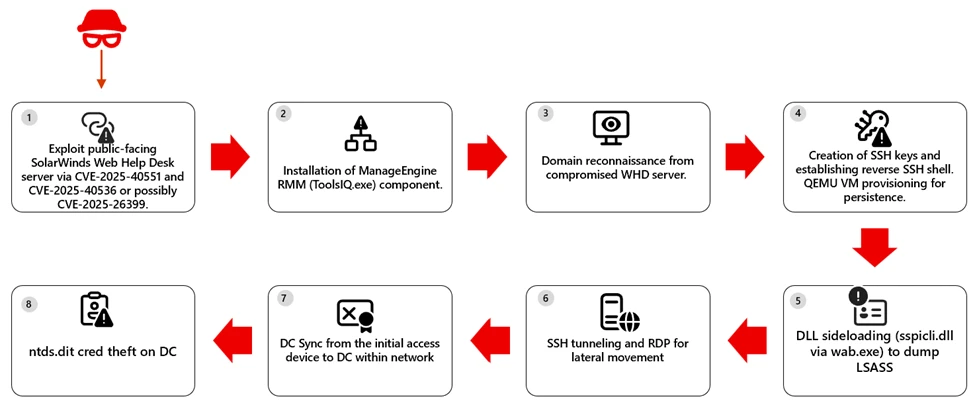
On several hosts, the downloaded binary installed components of the Zoho ManageEngine, a legitimate remote monitoring and management (RMM) solution, providing the attacker with interactive control over the compromised system. The attackers then enumerated sensitive domain users and groups, including Domain Admins. For persistence, the attackers established reverse SSH and RDP access. In some environments, Microsoft Defender also observed and raised alerts flagging attacker behavior on creating a scheduled task to launch a QEMU virtual machine under the SYSTEM account at startup, effectively hiding malicious activity within a virtualized environment while exposing SSH access via port forwarding.
SCHTASKS /CREATE /V1 /RU SYSTEM /SC ONSTART /F /TN "TPMProfiler" /TR "C:\Users\\tmp\qemu-system-x86_64.exe -m 1G -smp 1 -hda vault.db - device e1000,netdev=net0 -netdev user,id=net0,hostfwd=tcp::22022-:22"
On some hosts, threat actors used DLL sideloading by abusing wab.exe to load a malicious sspicli.dll. The approach enables access to LSASS memory and credential theft, which can reduce detections that focus on well‑known dumping tools or direct‑handle patterns. In at least one case, activity escalated to DCSync from the original access host, indicating use of high‑privilege credentials to request password data from a domain controller. In ne next figure we highlight the attack path.
Mitigation and protection guidance
- Patch and restrict exposure now. Update WHD CVE-2025-40551, CVE-2025-40536 and CVE-2025-26399, remove public access to admin paths, and increase logging on Ajax Proxy.
- Evict unauthorized RMM. Find and remove ManageEngine RMM artifacts (for example, ToolsIQ.exe) added after exploitation.
- Reset and isolate. Rotate credentials (start with service and admin accounts reachable from WHD), and isolate compromised hosts.
Microsoft Defender XDR detections
Microsoft Defender provides pre-breach and post-breach coverage for this campaign. Customers can rapidly identify vulnerable but unpatched WHD instances at risk using MDVM capabilities for the CVE referenced above and review the generic and specific alerts suggested below providing coverage of attacks across devices and identity.
| Tactic | Observed activity | Microsoft Defender coverage |
| Initial Access | Exploitation of public-facing SolarWinds WHD via CVE‑2025‑40551, CVE‑2025‑40536 and CVE-2025-26399. | Microsoft Defender for Endpoint – Possible attempt to exploit SolarWinds Web Help Desk RCE Microsoft Defender Antivirus – Trojan:Win32/HijackWebHelpDesk.A Microsoft Defender Vulnerability Management – devices possibly impacted by CVE‑2025‑40551 and CVE‑2025‑40536 can be surfaced by MDVM |
| Execution | Compromised devices spawned PowerShell to leverage BITS for payload download and execution | Microsoft Defender for Endpoint – Suspicious service launched – Hidden dual-use tool launch attempt – Suspicious Download and Execute PowerShell Commandline |
| Lateral Movement | Reverse SSH shell and SSH tunneling was observed | Microsoft Defender for Endpoint – Suspicious SSH tunneling activity – Remote Desktop session Microsoft Defender for Identity – Suspected identity theft (pass-the-hash) – Suspected over-pass-the-hash attack (forced encryption type) |
| Persistence / Privilege Escalation | Attackers performed DLL sideloading by abusing wab.exe to load a malicious sspicli.dll file. | Microsoft Defender for Endpoint – DLL search order hijack |
| Credential Access | Activity progressed to domain replication abuse (DCSync) | Microsoft Defender for Endpoint – Anomalous account lookups – Suspicious access to LSASS service – Process memory dump -Suspicious access to sensitive data Microsoft Defender for Identity -Suspected DCSync attack (replication of directory services) |
Microsoft Defender XDR Hunting queries
Security teams can use the advanced hunting capabilities in Microsoft Defender XDR to proactively look for indicators of exploitation.
The following Kusto Query Language (KQL) query can be used to identify devices that are using the vulnerable software:
1) Find potential post-exploitation execution of suspicious commands
DeviceProcessEvents
| where InitiatingProcessParentFileName endswith "wrapper.exe"
| where InitiatingProcessFolderPath has \\WebHelpDesk\\bin\\
| where InitiatingProcessFileName  in~ ("java.exe", "javaw.exe") or InitiatingProcessFileName contains "tomcat"
| where FileName  !in ("java.exe", "pg_dump.exe", "reg.exe", "conhost.exe", "WerFault.exe")


let command_list = pack_array("whoami", "net user", "net group", "nslookup", "certutil", "echo", "curl", "quser", "hostname", "iwr", "irm", "iex", "Invoke-Expression", "Invoke-RestMethod", "Invoke-WebRequest", "tasklist", "systeminfo", "nltest", "base64", "-Enc", "bitsadmin", "expand", "sc.exe", "netsh", "arp ", "adexplorer", "wmic", "netstat", "-EncodedCommand", "Start-Process", "wget");
let ImpactedDevices =
DeviceProcessEvents
| where isnotempty(DeviceId)
| where InitiatingProcessFolderPath has "\\WebHelpDesk\\bin\\"
| where ProcessCommandLine has_any (command_list)
| distinct DeviceId;
DeviceProcessEvents
| where DeviceId in (ImpactedDevices | distinct DeviceId)
| where InitiatingProcessParentFileName has "ToolsIQ.exe"
| where FileName != "conhost.exe"
2) Find potential ntds.dit theft
DeviceProcessEvents
| where FileName =~ "print.exe"
| where ProcessCommandLine has_all ("print", "/D:", @"\windows\ntds\ntds.dit")
3) Identify vulnerable SolarWinds WHD Servers
 DeviceTvmSoftwareVulnerabilities
| where CveId has_any ('CVE-2025-40551', 'CVE-2025-40536', 'CVE-2025-26399')
References
- CVE-2025-40551: SolarWinds Web Help Desk RCE | Horizon3.ai
- NVD – CVE-2025-40551
- SolarWinds Trust Center Security Advisories | CVE-2025-40551
- NVD – CVE-2025-40536
- SolarWinds Trust Center Security Advisories | CVE-2025-40536
- NVD – CVE-2025-26399SolarWinds Trust Center Security Advisories | CVE-2025-26399
- WHD 2026.1 release notes
- Known Exploited Vulnerabilities Catalog | CISA
This research is provided by Microsoft Defender Security Research with contributions from Sagar Patil, Hardik Suri, Eric Hopper, and Kajhon Soyini.
Learn more
Review our documentation to learn more about our real-time protection capabilities and see how to enable them within your organization.
Learn more about securing Copilot Studio agents with Microsoft Defender
Learn more about Protect your agents in real-time during runtime (Preview) – Microsoft Defender for Cloud Apps | Microsoft Learn
Explore how to build and customize agents with Copilot Studio Agent Builder