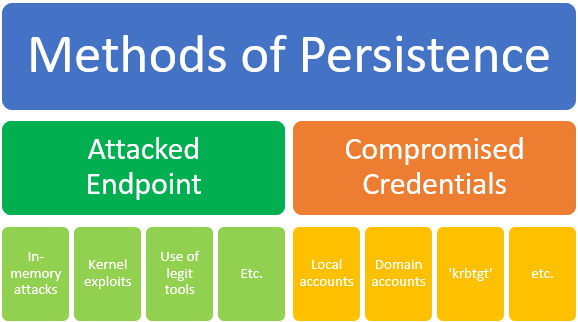
Advanced Persistent Threats use two primary methods of persistence: compromised endpoints and compromised credentials. It is critical that you use tools to detect both simultaneously. With only one or the other in place, you give adversaries more opportunities to remain on your network.
There are many attack vectors within these two main categories, including the use of zero-day attacks, exploiting vulnerabilities or weak defenses, using social engineering, creating hand-crafted malware via malicious implants, and harvesting legitimate credentials. Many cybersecurity tools have incomplete detection controls for these attacks and very little capability to detect harvested credential use. Microsoft has invested heavily in creating tools that empower organizations to address both problems.
Many initial attacks still arrive via e-mail attachment, so e-mail based protection tools are an important first line of defense. Office 365 Advanced Threat Protection helps you protect your mailboxes against new, sophisticated attacks in real time. By protecting against unsafe attachments and malicious links, it can keep e-mail borne attacks at bay.
But not all attacks are carried by e-mail. Windows Defender Advanced Threat Protection (Windows Defender ATP) enables enterprise customers to detect, investigate, and respond to advanced and zero day attacks on their endpoints. It uses built-in behavioral sensors, and machine learning and analytics to detect attacks that have made it past other defenses. Unparalleled threat optics, deep OS security, and big data expertise provide Security Operations (SecOps) correlated, actionable alerts. SecOps can investigate up to six months of historical data in a single timeline and use one-click response actions to effectively contain an incident and remediate infected endpoints. Windows Defender ATP has sensors to trace file, registry, network, processes, memory and kernel activities to help defenders understand what’s happening on the endpoint.
To complement these endpoint detection capabilities, Microsoft Advanced Threat Analytics offers critical insights into suspicious and anomalous user behavior, detecting lateral movement, credential theft activities and indicators of known techniques used by attackers. This is typically the blind spot for network defenders and digital forensics and incident response teams. By collecting network traffic and events in an environment, and by using machine learning capabilities together with detection of known techniques, Advanced Threat Analytics transforms the noise into relevant Suspicious Activities, simplifying the task for incident response teams. The earlier response teams can detect the adversary, the better they can prevent the attacker from gaining persistent access on your network.
It is equally important for incident response teams to detect abnormal activities on endpoints directly as well as compromised credentials.
Let’s walk through a practical example.
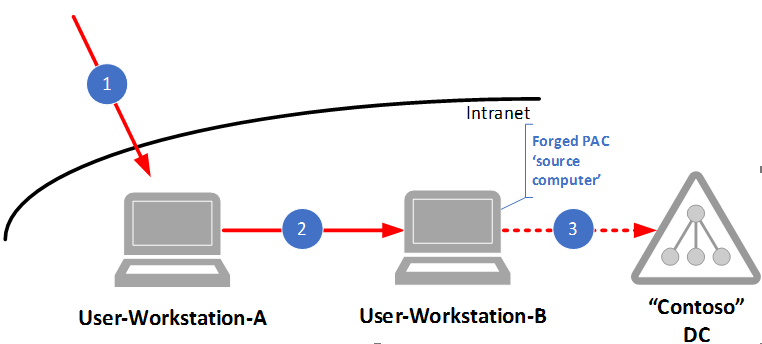
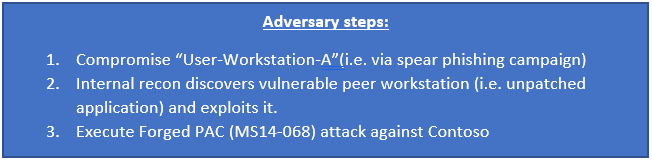
With the above diagram, an incident response team sees that Windows Defender ATP detected a user level exploit (assuming the application ran in user mode) and raised the first alert for this attack. When the attacker attempts to access the domain controller using a forged Privilege Attribute Certificate (PAC), the attack fails because you have patched your domain controllers for MS14-068. Advanced Threat Analytics detects the failed forged PAC attempt, which is a sign the adversary is active in your environment and attempting to escalate privileges.
Many responders would only inspect User-Workstation-B as Advanced Threat Analytics would identify that asset as the “source computer” of the attack. However, to fully understand the scope of this breach they will have to investigate all machines used by this user to find “patient zero” as well as other impacted endpoints. By adhering to the “pivot wide” rules of digital forensics and incident response, and with the right tools in place, network defenders would quickly be able to identify the connection from User-Workstation-A to User-Workstation-B and follow that back to the initial compromise.
Without detecting both advanced attacks on the endpoint and compromised credentials, a response and recovery effort would be inadequate. If you only clean up targeted endpoints but do not reset the affected credentials, the adversary could still have access to the environment. If you only reset affected credentials, the adversary could still have access to the environment (and would simply re-harvest the new credentials on the systems they have access to)! In both cases, the eviction would fail, and even worse, the security team would report to the corporate board they had addressed the threat and the environment was now secure.
Combining the data and insights from Windows Defender ATP and Advanced Threat Analytics might indeed change your recovery strategy and drive a full investigation.
Using these two capabilities in concert can be game-changing for digital forensics and incident response teams: they can instantaneously search and explore 6 months of historical data across endpoints, visually investigate forensic evidence and deep analysis, quickly respond to contain the attack and prevent reoccurrence.
The power of Microsoft’s unique capabilities is amplified through the Microsoft Intelligent Security Graph. This is the nexus of information on Indicators of Compromise, authentications, emails, etc. Threats detected, blocked, and remediated from Windows Defender ATP, Advanced Threat Analytics, and other Microsoft products are added to the Intelligent Security Graph. As a result, when persistent threats are captured and remediated by one solution, others can immediately start protecting against these threats.
As you evaluate your methods and tools for protecting against Advanced Persistent Threats, consider how you can move away from traditional detection tools that look at a single alert, axis, input or variable. Look for integrated tools, which can help the defender with increased speed and accuracy along with meta-event analysis.
Ask your questions and join the discussion with our team on the Microsoft Advanced Threat Analytics Tech Community site or the Windows Defender ATP team in the TechNet Forum. To learn more about Microsoft’s approach and vision for cybersecurity, visit the Microsoft Secure web site.