Microsoft Threat Protection can help you reduce the cost of phishing
The true cost of a successful phishing campaign may be higher than you think. Although phishing defenses and user education have become common in many organizations, employees still fall prey to these attacks. This is a problem because phishing is often leveraged as the first step in other cyberattack methods. As a result, its economic impact remains hidden. Understanding how these attacks work is key to mitigating your risk.
One reason phishing is so insidious is that attackers continuously evolve their methods. In this blog, I’ve described why you need to take phishing seriously and how different phishing methods work. You’ll also find links to Microsoft Threat Protection solutions that can help you reduce your risk.
Nearly 1 in 3 attacks involve phishing
According to Accenture’s Ninth Annual Cost of Cybercrime Study, phishing attacks cost the average organization USD1.4 million in 2018, an eight percent rise over 2017. This likely underestimates the cost because the report only considers four major consequences when determining the cost of an attack: business disruption, information loss, revenue loss, and equipment damage. However, phishing is used as the delivery method for several other attacks, including business email compromise, malware, ransomware, and botnet attacks. The 2019 Verizon Data Breach Report finds that almost one in three attacks involved phishing. And according to the 2019 Internet Crime Complaint Center, phishing/vishing/smishing/pharming are the most common methods for scamming individuals online.
Since the costs of other attacks can often be attributed to phishing, a comprehensive cyber risk mitigation strategy should place a high value on phishing defenses and user education.
Phishing campaigns can be well-targeted and sophisticated
As attackers have developed new methods to evade detection by defenders and victims, phishing has transformed. Phishing now uses mediums other than email, including voicemail, instant messaging, and collaboration platforms, as people have enhanced email-based defenses, but may have not considered these other attack vectors. The success of phishing as the delivery of other cyberattacks makes it critically important for defenders to be able to identify the many types of phishing and how to defend against them, including:
- Mass market phishing: When you think of phishing this is likely what comes to mind. These emails go out to a large group of people and use a generic message to trick users into clicking a link or downloading a file. Attacks often use email spoofing, so that the message appears to come from a legitimate source.
- Spear phishing: Spear phishing is a more targeted social engineering method. Attackers pick an individual, such as a global administrator or an HR professional, conduct research, and then craft an email that makes use of that research to dupe the victim.
- Whaling: These emails target someone on the executive team. Like spear phishing, these attacks start with research, which the attacker uses to write an email that appears legitimate.
- Business-email compromise: In these attacks, adversaries compromise an executive’s account, such as the CEO, and then use that account to ask a direct report to wire money.
- Clone phishing: Attackers clone a legitimate email and then change the link or attachment.
- Vishing: Vishing is a phishing attempt using the phone. Victims are asked to call back and enter a PIN number or account number.
Fahmida Y. Rashid provides more details about these type of phishing attacks on CSO.
An emerging phishing method exploits the increase in remote work
Recently, another phishing type was identified called consent phishing. In response to COVID-19, people have increased their usage of cloud apps and mobile devices to facilitate work from home. Bad actors have taken advantage of this shift by leveraging application-based attacks to gain unwarranted access to valuable data in cloud services. By using application prompts similar to that on mobile devices, they trick victims into allowing the malicious applications permission to access services and data (see Figure 2).

Figure 1: Familiar application prompts trick users into giving malicious apps access to services and data.
The following best practices can help you defend against this new threat:
- Educate your organization on how to identify a consent phishing message. Poor spelling and grammar are two indicators that the request isn’t legitimate. Users may also notice that the URL doesn’t quite look right.
- Promote and allow access to apps you trust. Use publisher verified to identify apps that have been validated by the Microsoft platform. Configure application consent policies, so employees are guided to applications you trust.
- Educate your organization on how permissions and consent framework works in the Microsoft platform.
Office 365 Advanced Threat Protection helps prevent and remediate phishing attacks
Office 365 Advanced Threat Protection (Office 365 ATP), natively protects all of Office 365 against advanced attacks. The service leverages industry-leading intelligence fueled by trillions of signals to continuously evolve to prevent emerging threats, like phishing and impersonation attacks. As part of Microsoft Threat Protection, Office 365 ATP provides security teams with the tools to investigate and remediate these threats, and integrates with other Microsoft Threat Protection products like Microsoft Defender Advanced Threat Protection and Azure Advanced Threat Protection to help stop cross-domain attacks spanning email, collaboration tools, endpoints, identities, and cloud apps.
Microsoft Threat Protection increases analyst efficiency
Microsoft Threat Protection stops attacks across Microsoft 365 services and auto-heals affected assets. It leverages the Microsoft 365 security portfolio to automatically analyze threat data across identities, endpoints, cloud applications, and email and docs. By fusing related alerts into incidents, defenders can respond to threats and attacks immediately and in their entirety, saving precious time. (see Figure 3).
The following actions will help you gain greater visibility into attacks to protect your organization.
- Configure Anti-phishing policies in Microsoft 365:
- Learn how Microsoft Office 365 ATP can defend your employees from more than email-based phishing attacks.
- Use the Attack Simulator in Office 365 ATP to run attack scenarios and educate users about phishing attacks.
- Investigate risky OAuth apps that may have been granted access to your Office 365 account.
- Understand your organization’s threat posture by viewing reports in Office 365 ATP.
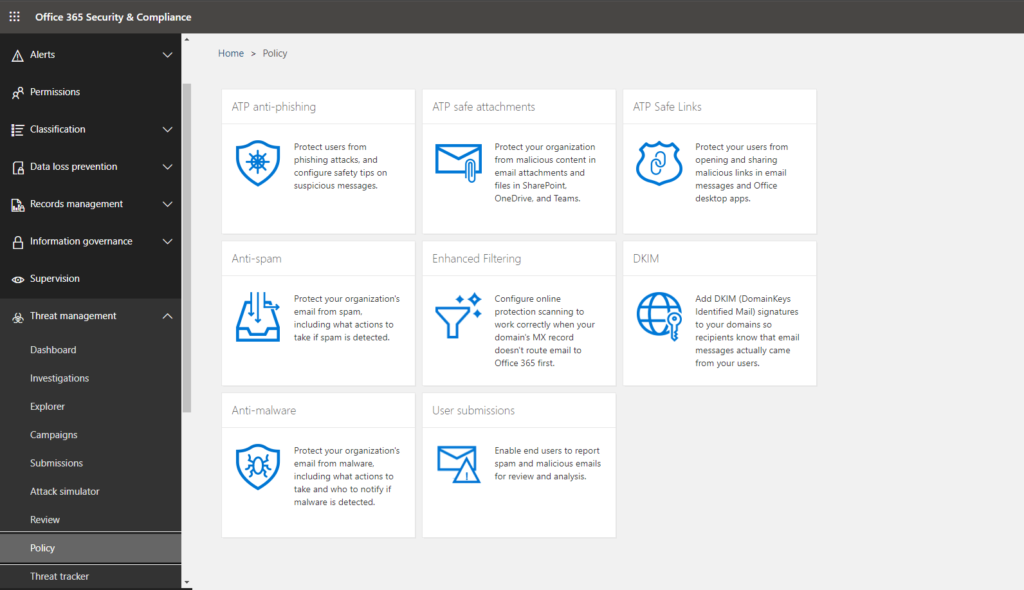
Figure 2: Microsoft Threat Protection and Office 365 ATP provide several capabilities to help you protect your organization from phishing attacks.
To learn more about Microsoft Security solutions visit our website. Bookmark the Security blog to keep up with our expert coverage on security matters. Also, follow us at @MSFTSecurity for the latest news and updates on cybersecurity.