Today’s sophisticated cyber threats require a modern approach to security. And this doesn’t apply only to enterprises or government entities—in recent years we’ve seen attacks increase exponentially against individuals. There are 921 password attacks every second.1 We’ve seen ransomware threats extending beyond their usual targets to go after small businesses and families. And we know, as bad actors become more and more sophisticated, we need to increase our personal defenses as well.
That is why it is so important for us to protect your entire digital life, whether you are at home or work—threats don’t end when you walk out of the office or close your work laptop for the day. We need solutions that help keep you and your family secure in how you work, play, and live.
That’s why I’m excited to share the availability of Microsoft Defender for individuals, a new online security application for Microsoft 365 Personal and Family subscribers. We believe every person and family should feel safe online. This is an exciting step in our journey to bring security to all and I’m thrilled to share with you more about this new app, available with features for you to try today.
Introducing Microsoft Defender
As our digital footprints grow, and with more devices and family members online, protecting your personal data and devices becomes more important than ever. On top of that, you and your family’s device preferences may result in Windows, iOS, Android, and macOS devices all represented in a single household—I know from personal experience in my own family. As threats grow more sophisticated, and time spent online has increased during the pandemic, we are more vulnerable than ever.
To help keep your data private and devices secure, people often turn to multiple security products, with scattered security monitoring and device management. This fragmentation makes keeping up with increasing online threats even harder.
We must evolve our security solutions to meet unique customer needs at home and work by bringing together existing technologies in a new way. That is why we are introducing Microsoft Defender for individuals. It was built on our Microsoft Defender for Endpoint technology, leveraging the same trusted security that enterprises rely on. It joins our comprehensive set of security products and services as the newest member of our family of Microsoft Defender solutions and extends the protection already built into Windows Security.
What does Microsoft Defender do?
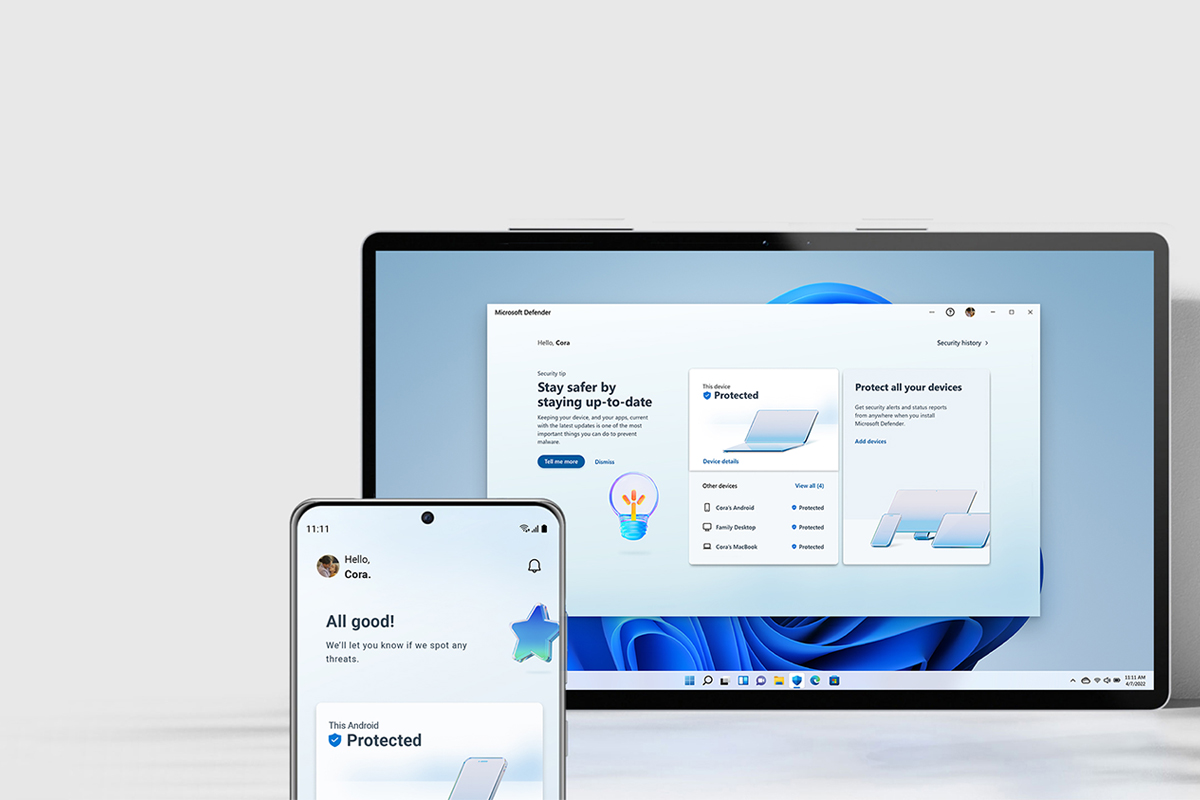
Microsoft Defender is simplified online security that meets you and your family where you are by bringing multiple protections together into a single dashboard. It provides online protection across the devices you and your family use. It offers tips and recommendations to strengthen your protection further. And, as you grow your digital footprint by adding family members and devices, Defender grows with you and keeps your defenses up-to-date using trusted technology.
This seamless solution, which includes continuous antivirus and anti-phishing protection for your data and devices, will enable you to:
- Manage your security protections and view security protections for everyone in your family, from a single easy-to-use, centralized dashboard.2
- View your existing antivirus protection (such as Norton or McAfee). Defender recognizes these protections within the dashboard.
- Extend Windows device protections to iOS, Android, and macOS devices for cross-platform malware protection on the devices you and your family use the most.3, 4
- Receive instant security alerts, resolution strategies, and expert tips to help keep your data and devices secure.5
This is just the start. As we look forward, we will continue to bring more protections together under a single dashboard, including features like identity theft protection and secure online connection. Microsoft Defender is simplified online security that grows with you and your family to help keep you safe.
Try it today!
The expansion of our security portfolio with Microsoft Defender for individuals is the natural and exciting progression in our journey as a security company. The Microsoft Defender app is available to Microsoft 365 subscribers beginning today, across Windows, macOS, iOS, and Android. It was shaped based on the thoughts and feedback from so many families and people who use our products, and we are so excited to have this available today. Read more about the value to Microsoft 365 subscribers and the journey to get here from the Microsoft 365 team, or try Microsoft Defender today. There is so much more to come, and we look forward to sharing more on this journey to make the world a safer place for all!
To learn more about Microsoft Security solutions, visit our website. Bookmark the Security blog to keep up with our expert coverage on security matters. Also, follow us at @MSFTSecurity for the latest news and updates on cybersecurity.
1According to Microsoft Azure Active Directory (Azure AD) authentication log data. 2022.
2App requires a Microsoft 365 Family or Personal subscription and is available as a separate download.
3App is available on Windows, macOS, Android, and iOS in select Microsoft 365 Family or Personal billing regions.
4New malware protection is not available where these protections exist on iOS and Windows.
5Security tips are available on Windows and macOS only.