
Just a month ago, I communicated the details about Azure Sentinel reaching general availability. Since then, many customers have shared how Azure Sentinel has empowered their teams to be nimble and more efficient. ASOS, one of the largest online fashion retailers, is an excellent example of this. Using Azure Sentinel, ASOS has created a bird’s-eye view of everything it needs to spot threats early, allowing it to safeguard its business and its customers proactively. As a result, it has cut issue resolution times in half.
“Sentinel has helped improve the efficiency of our security operations by allowing us to quickly consolidate a large number of disparate security and contextual data sources.”
—George Mudie, Chief Information Security Officer, ASOS
Learn more about how ASOS has benefitted from Azure Sentinel.
I am thrilled to come back and share new features available in preview starting this week. These new features highlight continued innovation and progress towards our goal of empowering defenders to do more.
Azure Sentinel
Intelligent security analytics for your entire enterprise.
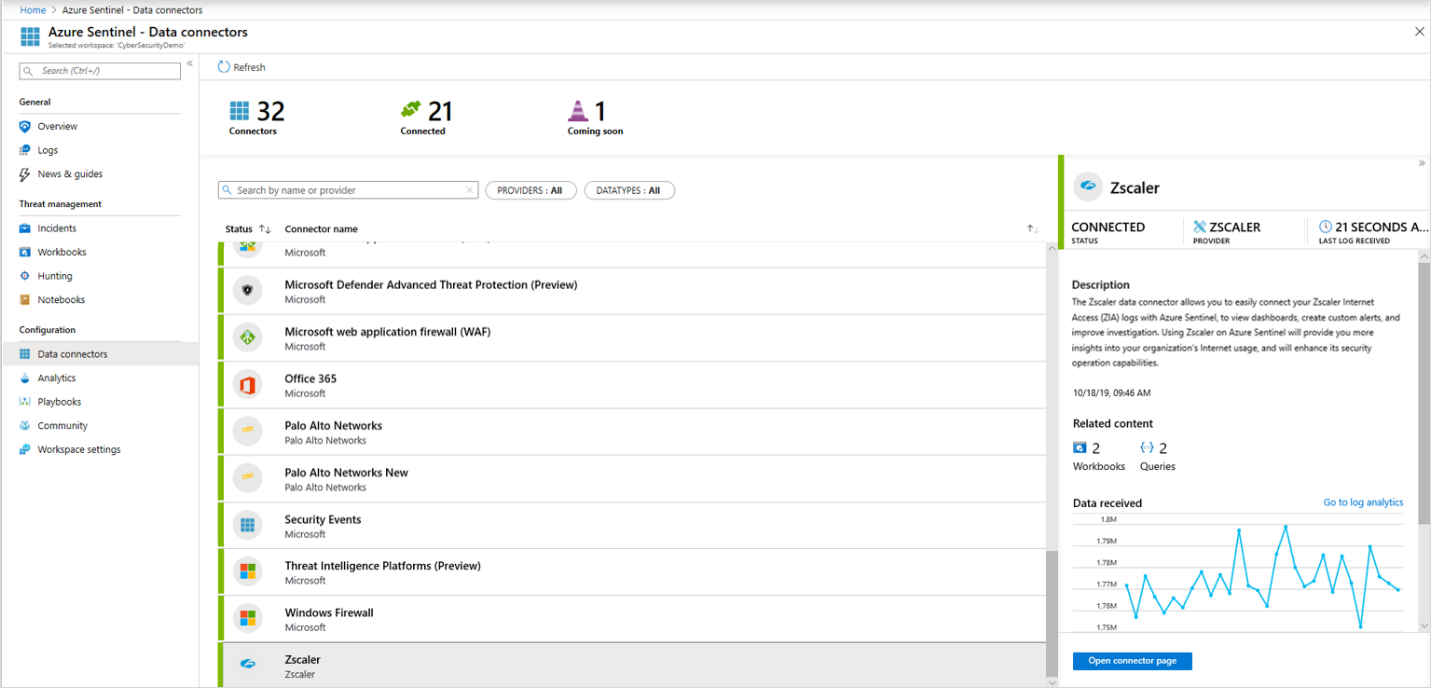
Collect data from more sources with built-in connectors
Azure Sentinel enables you to collect security data across different sources, including Azure, on-premises solutions, and across clouds. Many built-in connectors are available to simplify integration, and new ones are being added continually. Connectors recently introduced by Zscaler, F5, Barracuda, Citrix, ExtraHop, One Identity, and Trend Micro make it easy to collect relevant data and use built-in workbooks and queries to gain insight into data from these solutions. Read more information on the Connect data sources page.
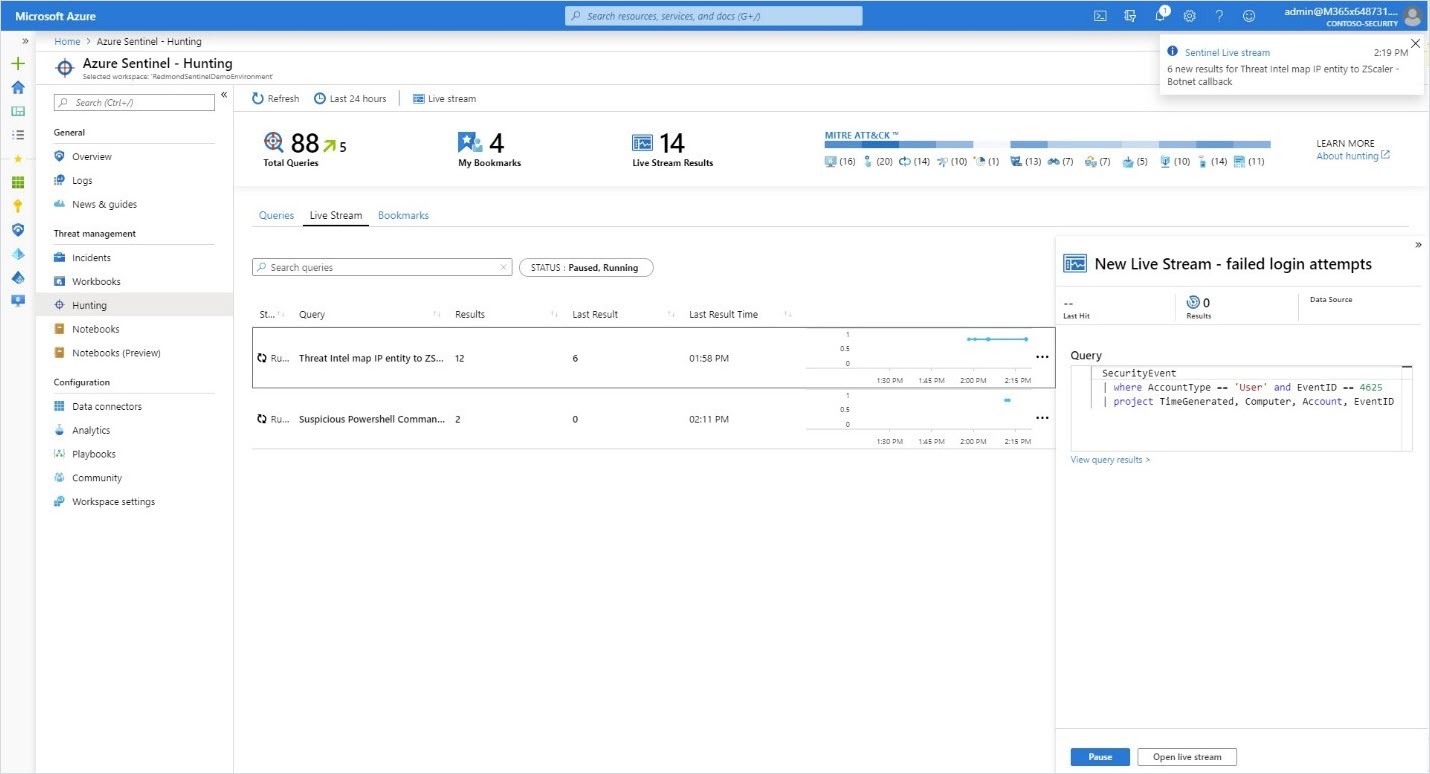
Accelerate threat hunting with new capabilities
The work of threat hunters gets much easier with the addition of built-in hunting queries for Linux and network events. These queries, developed by Microsoft security researchers and community experts, provide a starting point to look for suspicious activity. You can customize hunting queries with the help of IntelliSense and bookmark interesting results for further investigation or sharing with fellow analysts. View the bookmarks alongside alerts in the Investigation graph and make them part of an incident.
You can now receive an Azure notification when there are new results on a query using the hunting livestream. Promote the livestream query to an Analytic rule if you want to make it part of your incident response workflow.
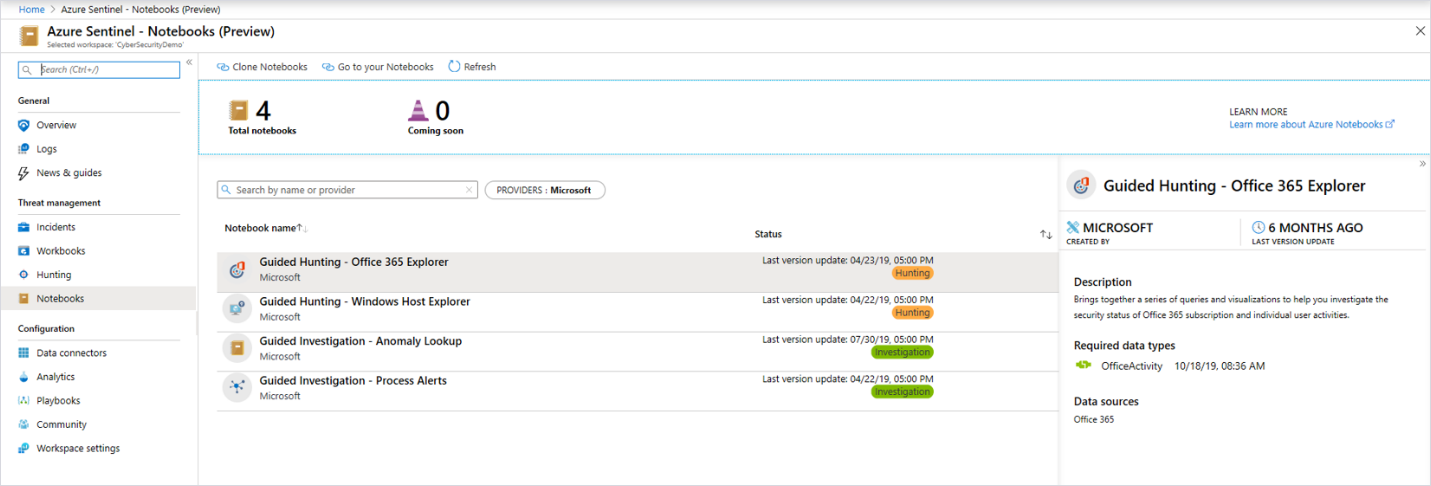
In addition, you can now launch Azure Notebooks directly from Azure Sentinel, making it easy to create and execute Jupyter notebooks to analyze your data. Notebooks combine live code, graphics, visualizations, and text, making them a valuable tool for threat hunters. Choose from a built-in gallery of notebooks developed by Microsoft security researchers or import others from GitHub to get started. These notebooks are the same professional-strength hunting solutions Microsoft’s threat hunters use every day.
Connect threat intelligence sources using STIX/TAXII
The existing Threat Intelligence Platforms data connector allows you to integrate threat indicators from a variety of sources for use with Azure Sentinel analytics, hunting, and workbooks. A new Threat Intelligence TAXII connector will add support for threat indicator feeds from open source threat intelligence (OSINT) and threat intelligence platforms supporting this standard protocol and STIX data format. Once your threat intelligence sources are connected, you can:
- Use built-in analytics or create your own rules to generate alerts and incidents when events match your threat indicators.
- Track the health of your threat intelligence pipeline and gain insights into alerts generated with threat intelligence using built-in threat intelligence workbooks.
- Correlate threat intelligence with event data via hunting queries to add contextual insights to your investigations.
- Investigate anomalies and hunt for malicious behaviors in Azure Notebooks.
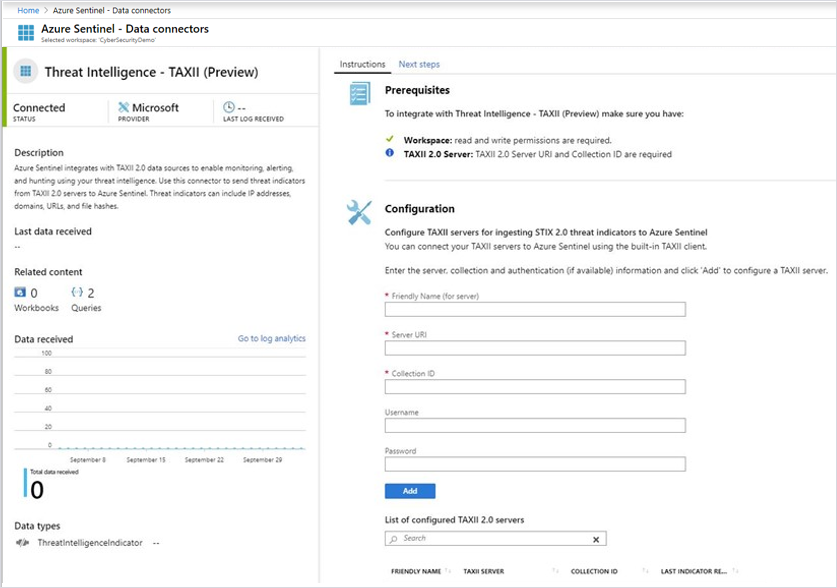
Tap into Microsoft threat intelligence
Microsoft has an unparalleled view of the evolving threat landscape informed by analyzing trillions of signals from its cloud customers, services, and infrastructure. And now, Azure Sentinel customers can begin to leverage this intelligence to detect threats in their data. The first of these built-in detections matches Microsoft URL threat intelligence with new CEF logs (for example, from Palo Alto Networks or Zscaler). Retrospective lookbacks that match URL threat intelligence with historical event data will also be coming soon.
When a match is found, an alert is generated and an incident is created to enable further investigation. The matched indicator is also added to the Threat Intelligence Indicator table, which can be used just like any other indicator. Sign up for the Microsoft Cloud + AI Security Preview Program to enable these detections today, and keep an eye out for new matches coming soon.

Automatically detonate URLs to speed investigation
Azure Sentinel customers can now use the power of URL detonation to enrich alerts and discover threats related to malicious URLs. When creating scheduled alerts, any URL data in the query results can map to a new URL entity type. Whenever an alert containing a URL entity is generated, the mapped URL is automatically detonated, and the investigation graph is immediately enriched with the detonation results. A verdict, final URL, and screenshot (especially useful for identifying phishing) can be used to quickly assess a potential threat. As a quick tip, when ingesting data from an IDS or IPS, enable threat logging to log URL data. You can try this feature during the preview at no cost.
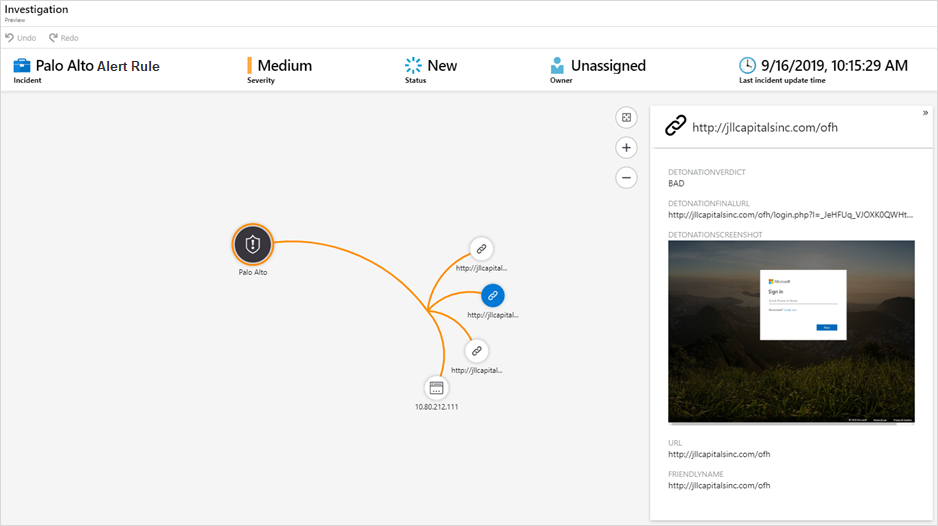
Integrate with ticketing and security management solutions
New Microsoft Graph Security API integrations enable you to sync alerts from Azure Sentinel, as well as other Microsoft solutions, with ticketing and security management solutions such as ServiceNow. You can learn more by reading the Microsoft Graph Security API overview page.
Get started with Azure Sentinel and the new features
It’s easy to get started. You can access the latest public preview features in the Azure Sentinel dashboard today. If you’re not using Azure Sentinel, we welcome you to start a trial.
We collaborated with strategic partners to help you quickly design, implement, and operationalize your security operations using Azure Sentinel.
Partners including Accenture, Avanade, Ascent, DXC Technology, EY Global, KPMG, Infosys, Insight, Optiv, PwC, Trustwave, and Wipro are now offering a variety of services from architecture, deployment, and consultancy to a fully managed security service.
We have a lot of information available to help you, from great documentation to connecting with us via Yammer and email.
- Keep up to date by following the Tech Community blog.
- Join our Tech Community.
- Send us an email with feedback and suggestions.
- Become an Azure Sentinel threat hunter.
Visit us at Microsoft Ignite 2019
I will be joining many of our team members at Microsoft Ignite. Please stop by the Azure Sentinel booth. We would love to meet you.
You can also get more information on SIEM strategies and Azure Sentinel in many of the sessions at Ignite:
- TK03—Microsoft’s roadmap for security, compliance, and identity
- BRK011—Microsoft security for your entire environment
- SEC150—Modernize your SIEM in the cloud with Azure Sentinel
- BRK3236—Get instant value from your SIEM: Best practices for Azure Sentinel
- THR2174—Using Azure Sentinel to supercharge your threat hunting
- THR2159—Threat Hunting in the Cloud with Azure Sentinel and Jupyter Notebooks
- Hands-on workshop WRK3033R2—Investigate and respond to events with Azure Sentinel
Looking forward to meeting you all at Ignite!
Microsoft Ignite
Join us online November 4–8, 2019 to livestream keynotes, watch selected sessions on-demand, and more.