
This blog post is part of the Microsoft Intelligence Security Association (MISA) guest blog series. To learn more about MISA, visit the MISA webpage.
The cloud is changing the way we build and deploy applications. Most enterprises will benefit from the cloud’s many advantages through hybrid, multi, or standalone cloud architectures. A recent report showed that 42 percent of companies have a multi-cloud deployment strategy.
The advantages of the cloud include flexibility, converting large upfront infrastructure investments to smaller monthly bills (for example, the CAPEX to OPEX shift), agility, scalability, the capability to run applications and workloads at high speed, as well as high levels of reliability and availability.
However, cloud security is often an afterthought in this process. Some worry that it may slow the momentum of organizations that are migrating workloads into the cloud. Traditional IT security teams may be hesitant to implement new cloud security processes, because to them the cloud may be daunting or confusing, or just new and unknown.
Although the concepts may seem similar, cloud security is different than traditional enterprise security. Additionally, there may also be industry-specific compliance and security standards to be met.
Public cloud vendors have defined the Shared Responsibility Model where the vendor is responsible for the security “of” their cloud, while their customers are responsible for the security “in” the cloud.
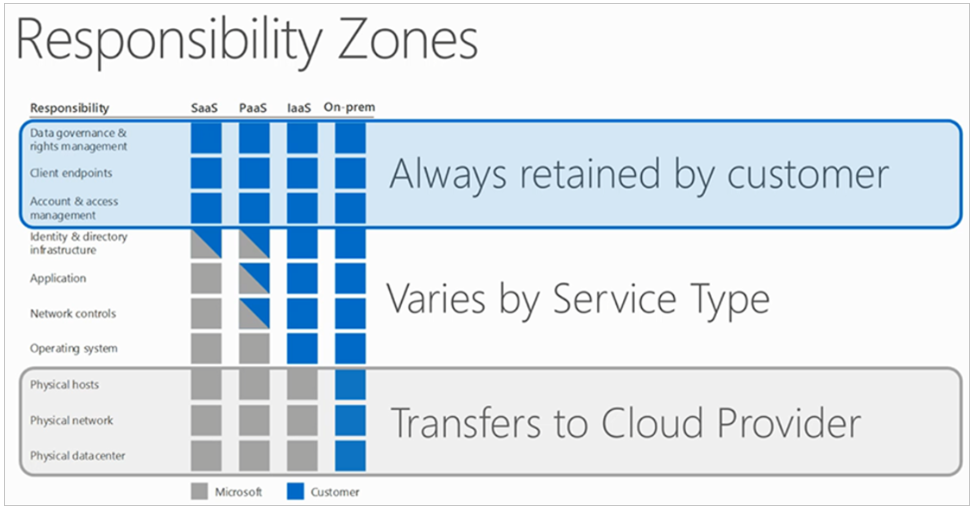
The Shared Responsibility Model (Source: Microsoft Azure).
Cloud deployments include multi-layered components, and the security requirements are often different per layer and per component. Often, the ownership of security is blurred when it comes to the application, infrastructure, and sometimes even the cloud platform—especially in multi-cloud deployments.
Cloud vendors, including Microsoft, offer fundamental network-layer, data-layer, and other security tools for use by their customers. Security analysts, managed security service providers, and advanced cloud customers recommend layering on advanced threat prevention and network-layer security solutions to protect against modern-day attacks. These specialized tools evolve at the pace of industry threats to secure the organization’s cloud perimeters and connection points.
Check Point is a leader in cloud security and the trusted security advisor to customers migrating workloads into the cloud.
Check Point’s CloudGuard IaaS helps protect assets in the cloud with dynamic scalability, intelligent provisioning, and consistent control across public, private, and hybrid cloud deployments. CloudGuard IaaS supports Azure and Azure Stack. Customers using CloudGuard IaaS can securely migrate sensitive workloads, applications, and data into Azure and thereby improve their security.
But how well does CloudGuard IaaS conform to Microsoft’s best practices?
Principal Program Manager of Azure Networking, Dr. Reshmi Yandapalli (DAOM), published a blog post titled Best practices to consider before deploying a network virtual appliance earlier this year, which outlined considerations when building or choosing Azure security and networking services. Dr. Yandapalli defined four best practices for networking and security ISVs—like Check Point—to improve the cloud experience for Azure customers.
I discussed Dr. Yandapalli’s four best practices with Amir Kaushansky, Check Point’s Head of Cloud Network Security Product Management. Amir’s responsibilities include the CloudGuard IaaS roadmap and coordination with the R&D/development team.
1. Azure accelerated networking support
Dr. Yandapalli’s first best practice in her blog is that the ISV’s Azure security solution is available on one or more Azure virtual machine (VM) type with Azure’s accelerated networking capability to improve networking performance. Dr. Yandapalli recommends that you “consider a virtual appliance that is available on one of the supported VM types with Azure’s accelerated networking capability.”
The diagram below shows communication between VMs, with and without Azure’s accelerated networking:
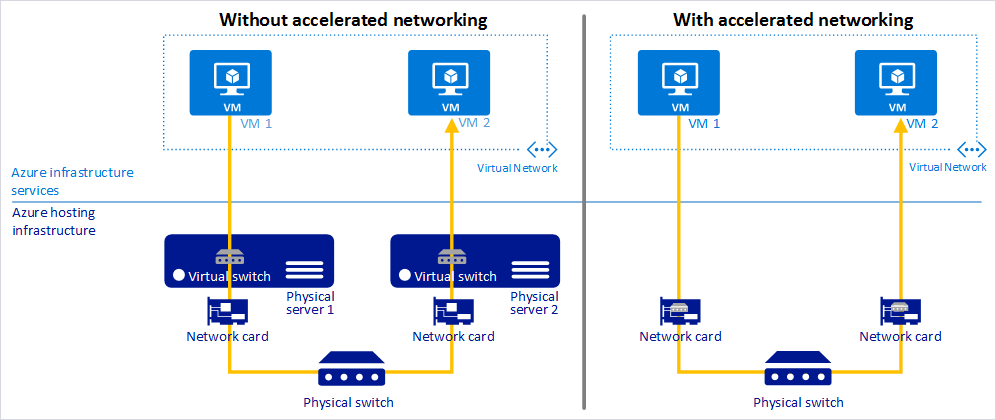
Accelerated networking to improve performance of Azure security (Source: Microsoft Azure).
Kaushansky says, “Check Point was the first certified compliant vendor with Azure accelerated networking. Accelerated networking can improve performance and reduce jitter, latency, and CPU utilization.”
According to Kaushansky—and depending on workload and VM size—Check Point and customers have observed at least a 2-3 times increase in throughput due to Azure accelerated networking.
2. Multi-Network Interface Controller (NIC) support
Dr. Yandapalli’s blog’s next best practice is to use VMs with multiple NICs to improve network traffic management via traffic isolation. For example, you can use one NIC for data plane traffic and one NIC for management plane traffic. Dr. Yandapalli states, “With multiple NICs you can better manage your network traffic by isolating various types of traffic across the different NICs.”
The diagram below shows the Azure Dv2-series with maximum NICs per VM size:
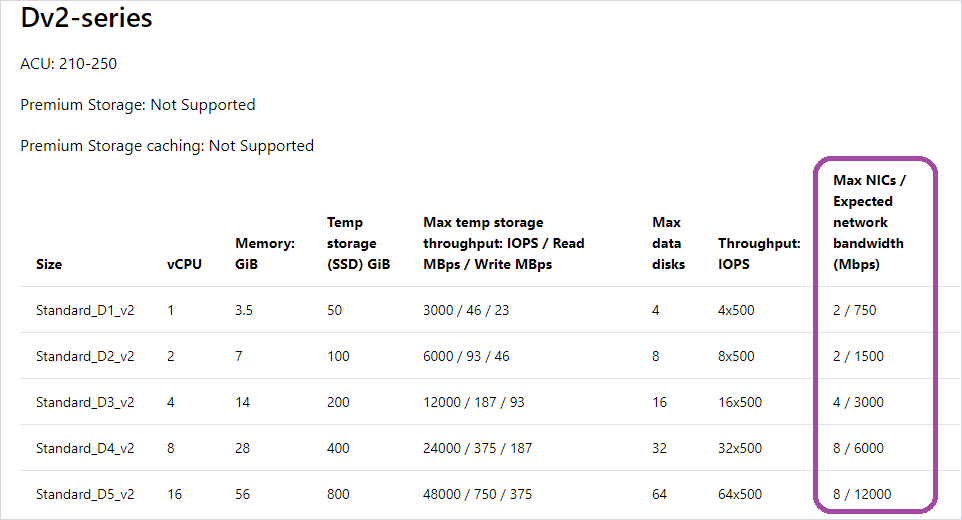
Azure Dv2-series VMs with # NICs per size.
CloudGuard IaaS supports multi-NIC VMs, without any maximum of the number of NICs. Check Point recommends the use of VMs with at least two NICs—VMs with one NIC are supported but not recommended.
Depending on the customer’s deployment architecture, the customer may use one NIC for internal East-West traffic and the second for outbound/inbound North-South traffic.
3. High Availability (HA) port with Azure load balancer
The Dr. Yandapalli’s third best practice is that Azure security and networking services should be reliable and highly available.
Dr. Yandapalli suggests the use of a High Availability (HA) port load balancing rule. “You would want your NVA to be reliable and highly available, to achieve these goals simply by adding network virtual appliance instances to the backend pool of your internal load balancer and configuring a HA ports load-balancer rule,” says Dr. Yandapalli.
The diagram below shows an example usage of a HA port:
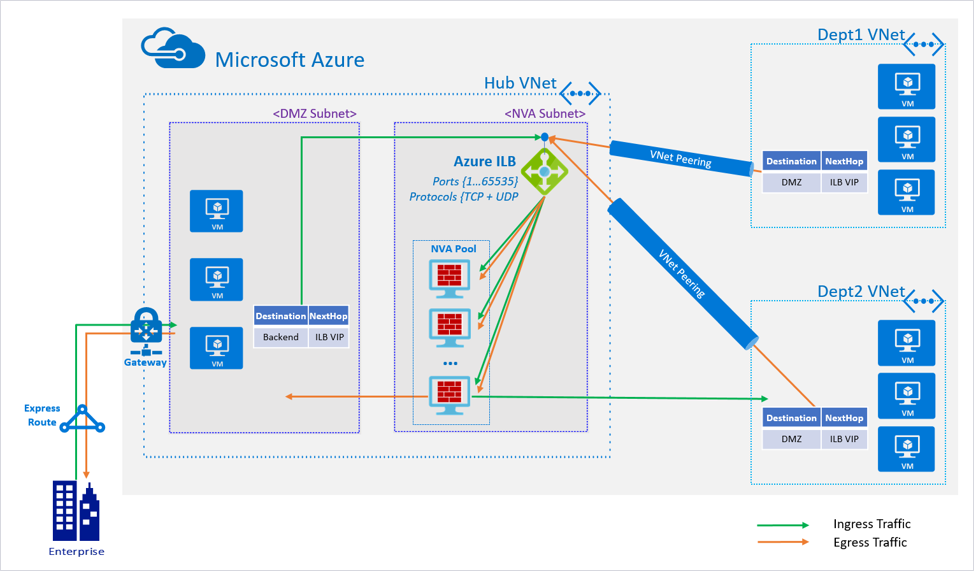
Flowchart example of a HA port with Azure load balancer.
Kaushansky says, “CloudGuard IaaS supports this functionality with a standard load balancer via Azure Resource Manager deployment templates, which customers can use to deploy CloudGuard IaaS easily in HA mode.”
4. Support for Virtual Machine Scale Sets (VMSS)
The Dr. Yandapalli’s last best practice is to use Azure VMSS to provide HA. These also provide the management and automation layers for Azure security, networking, and other applications. This cloud-native functionality provides the right amount of IaaS resources at any given time, depending on application needs. Dr. Yandapalli points out that “scale sets provide high availability to your applications, and allow you to centrally manage, configure, and update a large number of VMs.”
In a similar way to the previous best practice, customers can use an Azure Resource Manager deployment template to deploy CloudGuard in VMSS mode. Check Point recommends the use of VMSS for traffic inspection of North-South (inbound/outbound) and East-West (lateral movement) traffic.
Learn more and get a free trial
As you can see from the above, CloudGuard IaaS is compliant with all four of Microsoft’s common best practices for how to build and deploy Azure network security solutions.
Visit Check Point to understand how CloudGuard IaaS can help protect your data and infrastructure in Microsoft Azure and hybrid clouds and improve Azure network security. If you’re evaluating Azure security solutions, you can get a free 30-day evaluation license of CloudGuard IaaS on Azure Marketplace!
(Based on a blog published on June 4, 2019 in the Check Point Cloud Security blog.)