
A global threat requires a global response. While the world faces the common threat of COVID-19, defenders are working overtime to protect users all over the globe from cybercriminals using COVID-19 as a lure to mount attacks. As a security intelligence community, we are stronger when we share information that offers a more complete view of attackers’ shifting techniques. This more complete view enables us all to be more proactive in protecting, detecting, and defending against attacks.
At Microsoft, our security products provide built-in protections against these and other threats, and we’ve published detailed guidance to help organizations combat current threats (Responding to COVID-19 together). Our threat experts are sharing examples of malicious lures and we have enabled guided hunting of COVID-themed threats using Azure Sentinel Notebooks. Microsoft processes trillions of signals each day across identities, endpoint, cloud, applications, and email, which provides visibility into a broad range of COVID-19-themed attacks, allowing us to detect, protect, and respond to them across our entire security stack. Today, we take our COVID-19 threat intelligence sharing a step further by making some of our own indicators available publicly for those that are not already protected by our solutions. Microsoft Threat Protection (MTP) customers are already protected against the threats identified by these indicators across endpoints with Microsoft Defender Advanced Threat Protection (ATP) and email with Office 365 ATP.
In addition, we are publishing these indicators for those not protected by Microsoft Threat Protection to raise awareness of attackers’ shift in techniques, how to spot them, and how to enable your own custom hunting. These indicators are now available in two ways. They are available in the Azure Sentinel GitHub and through the Microsoft Graph Security API. For enterprise customers who use MISP for storing and sharing threat intelligence, these indicators can easily be consumed via a MISP feed.
This threat intelligence is provided for use by the wider security community, as well as customers who would like to perform additional hunting, as we all defend against malicious actors seeking to exploit the COVID crisis.
This COVID-specific threat intelligence feed represents a start at sharing some of Microsoft’s COVID-related IOCs. We will continue to explore ways to improve the data over the duration of the crisis. While some threats and actors are still best defended more discreetly, we are committed to greater transparency and taking community feedback on what types of information is most useful to defenders in protecting against COVID-related threats. This is a time-limited feed. We are maintaining this feed through the peak of the outbreak to help organizations focus on recovery.
Protection in Azure Sentinel and Microsoft Threat Protection
Today’s release includes file hash indicators related to email-based attachments identified as malicious and attempting to trick users with COVID-19 or Coronavirus-themed lures. The guidance below provides instructions on how to access and integrate this feed in your own environment.
For Azure Sentinel customers, these indicators can be either be imported directly into Azure Sentinel using a Playbook or accessed directly from queries.
The Azure Sentinel Playbook that Microsoft has authored will continuously monitor and import these indicators directly into your Azure Sentinel ThreatIntelligenceIndicator table. This Playbook will match with your event data and generate security incidents when the built-in threat intelligence analytic templates detect activity associated to these indicators.
These indicators can also be accessed directly from Azure Sentinel queries as follows:
let covidIndicators = (externaldata(TimeGenerated:datetime, FileHashValue:string, FileHashType: string )
[@"https://raw.githubusercontent.com/Azure/Azure-Sentinel/master/Sample%20Data/Feeds/Microsoft.Covid19.Indicators.csv"]
with (format="csv"));
covidIndicators
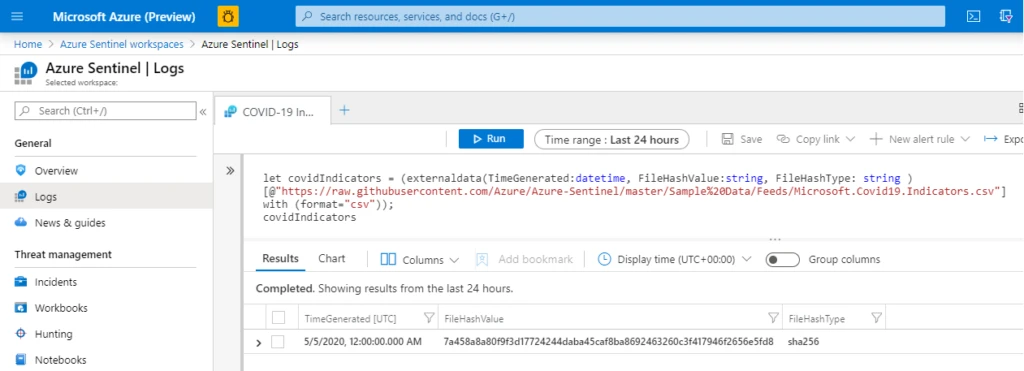
A sample detection query is also provided in the Azure Sentinel GitHub. With the table definition above, it is as simple as:
- Join the indicators against the logs ingested into Azure Sentinel as follows:
covidIndicators
| join ( CommonSecurityLog | where TimeGenerated >= ago(7d)
| where isnotempty(FileHashValue)
) on $left.FileHashValue == $right.FileHash
- Then, select “New alert rule” to configure Azure Sentinel to raise incidents based on this query returning results.

You should begin to see Alerts in Azure Sentinel for any detections related to these COVID threat indicators.
Microsoft Threat Protection provides protection for the threats associated with these indicators. Attacks with these Covid-19-themed indicators are blocked by Office 365 ATP and Microsoft Defender ATP.
While MTP customers are already protected, they can also make use of these indicators for additional hunting scenarios using the MTP Advanced Hunting capabilities.
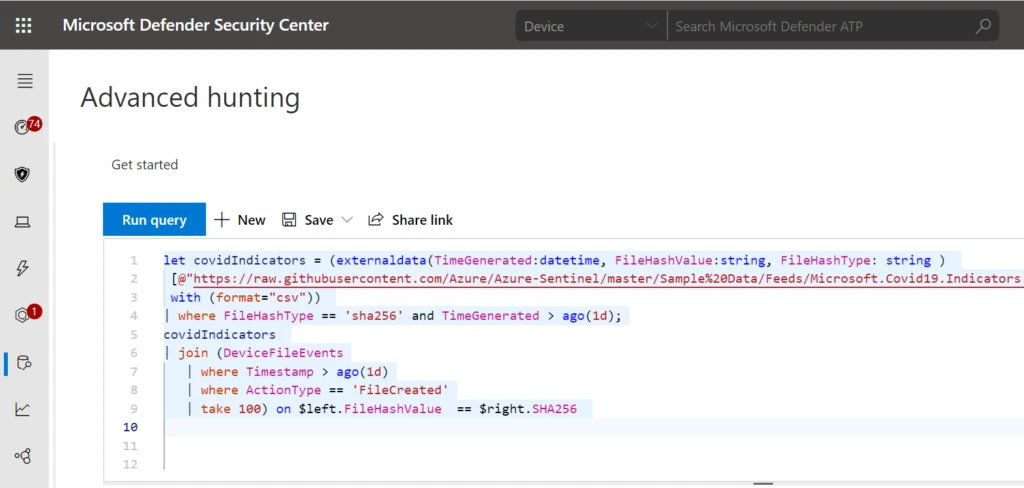
Here is a hunting query to see if any process created a file matching a hash on the list.
let covidIndicators = (externaldata(TimeGenerated:datetime, FileHashValue:string, FileHashType: string )
[@"https://raw.githubusercontent.com/Azure/Azure-Sentinel/master/Sample%20Data/Feeds/Microsoft.Covid19.Indicators.csv"]
with (format="csv"))
| where FileHashType == 'sha256' and TimeGenerated > ago(1d);
covidIndicators
| join (DeviceFileEvents
| where Timestamp > ago(1d)
| where ActionType == 'FileCreated'
| take 100) on $left.FileHashValue  == $right.SHA256
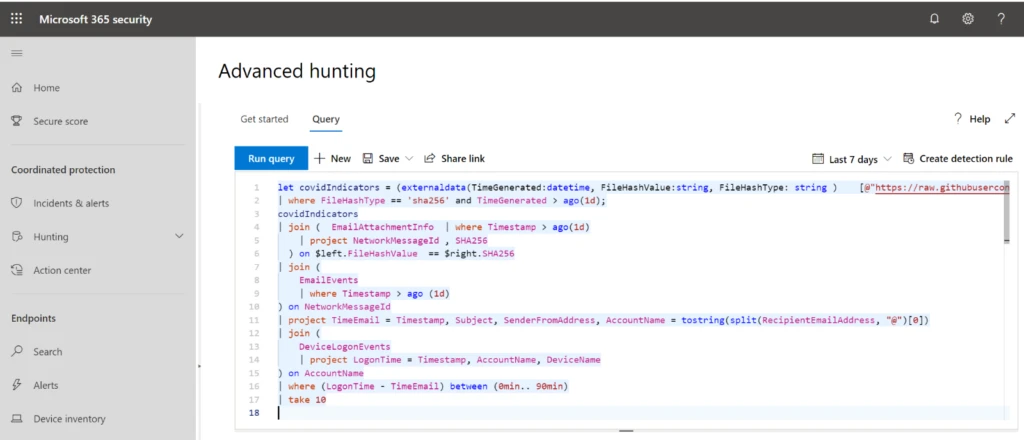
This is an Advanced Hunting query in MTP that searches for any recipient of an attachment on the indicator list and sees if any recent anomalous log-ons happened on their machine. While COVID threats are blocked by MTP, users targeted by these threats may be at risk for non-COVID related attacks and MTP is able to join data across device and email to investigate them.
let covidIndicators = (externaldata(TimeGenerated:datetime, FileHashValue:string, FileHashType: string )    [@"https://raw.githubusercontent.com/Azure/Azure-Sentinel/master/Sample%20Data/Feeds/Microsoft.Covid19.Indicators.csv"] with (format="csv"))
| where FileHashType == 'sha256' and TimeGenerated > ago(1d);
covidIndicators
| join (  EmailAttachmentInfo  | where Timestamp > ago(1d)
| project NetworkMessageId , SHA256
) on $left.FileHashValue  == $right.SHA256
| join (
EmailEvents
| where Timestamp > ago (1d)
) on NetworkMessageId
| project TimeEmail = Timestamp, Subject, SenderFromAddress, AccountName = tostring(split(RecipientEmailAddress, "@")[0])
| join (
DeviceLogonEvents
| project LogonTime = Timestamp, AccountName, DeviceName
) on AccountName
| where (LogonTime - TimeEmail) between (0min.. 90min)
| take 10
Connecting an MISP instance to Azure Sentinel
The indicators published on the Azure Sentinel GitHub page can be consumed directly via MISP’s feed functionality. We have published details on doing this at this URL: https://aka.ms/msft-covid19-misp. Please refer to the Azure Sentinel documentation on connecting data from threat intelligence providers.
Using the indicators if you are not an Azure Sentinel or MTP customer
Yes, the Azure Sentinel GitHub is public: https://aka.ms/msft-covid19-Indicators
Examples of phishing campaigns in this threat intelligence
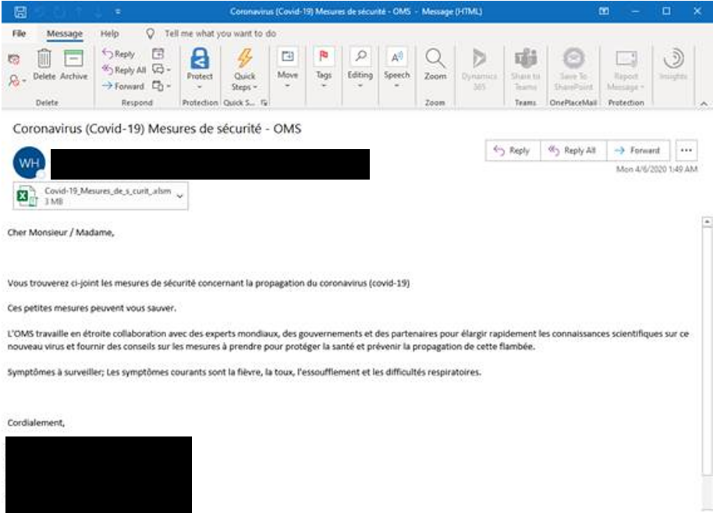
The following is a small sample set of the types of COVID-themed phishing lures using email attachments that will be represented in this feed. Beneath each screenshot are the relevant hashes and metadata.
Figure 1: Spoofing WHO branding with “cure” and “vaccine” messaging with a malicious .gz file.
Name: CURE FOR CORONAVIRUS_pdf.gz
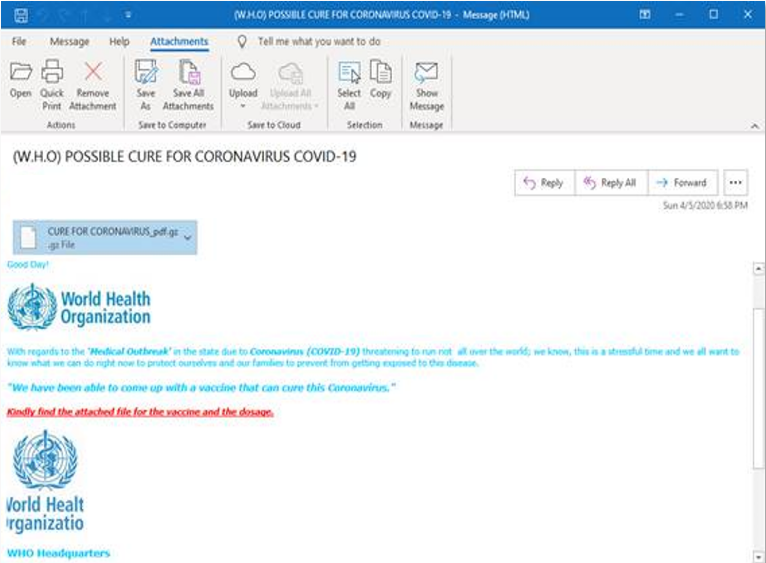
Figure 2: Spoofing Red Cross Safety Tips with malicious .docm file.
Name: COVID-19 SAFETY TIPS.docm
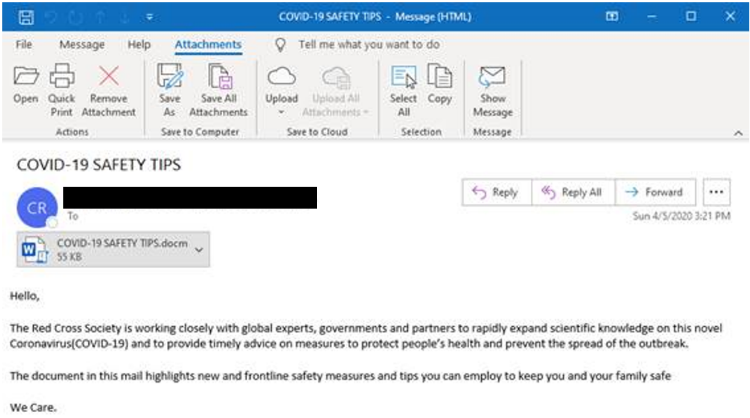
Figure 3: South African banking lure promoting COVID-19 financial relief with malicious .html files.
Name: SBSA-COVID-19-Financial Relief.html
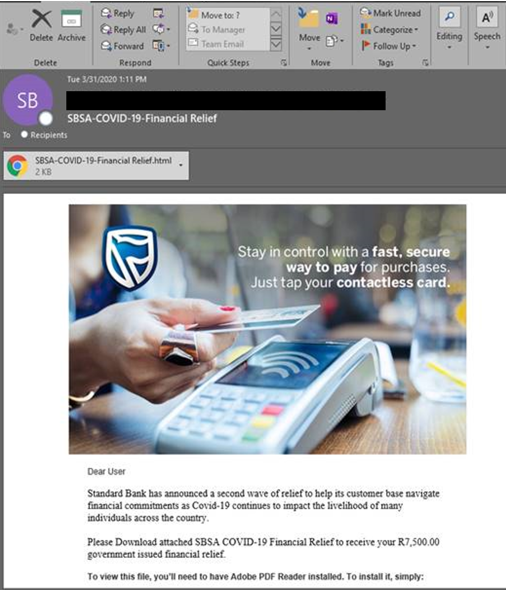
Figure 4: French language spoofed correspondence from the WHO with malicious XLS Macro file.
Name: -✉-Covid-19 Relief Plan5558-23636sd.htm
If you have questions or feedback on this COVID-19 feed, please email msft-covid19-ti@microsoft.com.