The shift to remote and hybrid work since the pandemic expanded global hiring and accelerated digital onboarding, increasing reliance on online identity verification and remote access. Threat actors such as Jasper Sleet, a North Korea-aligned threat actor, exploit this model by posing as legitimate hires using stolen or fabricated identities and AI-assisted deception to gain trusted access, generate revenue, and in some cases enable data theft, extortion, or follow-on compromise.
In the initial job-discovery phase, these fraudulent applicants posing as remote IT workers systematically survey organization career sites and external hiring portals to identify active technical roles and recruitment workflows. A previously published Microsoft Threat Intelligence blog highlights how these actors use generative AI at scale to analyze job postings and extract role‑specific language, required skills, certifications, and tooling expectations. They then use those insights to construct tailored fake digital personas and submit highly convincing job applications, increasing their likelihood of passing screening and entering legitimate hiring pipelines, and even onboarding once hired into the targeted roles successfully.
Organizations using common and widely adopted human resources (HR) software as a service (SaaS) platforms like Workday often expose their job postings through external career sites for applicants to submit job applications. These job listing sites are often targeted by this threat actor to find open job roles. While this activity might be hard to detect from usual job hunting behavior, knowing the threat actor’s interests and objectives to infiltrate into the target organization might present an opportunity for defenders to look for anomalous patterns in a hiring candidate’s behaviors by leveraging the access to the right telemetry and available threat actor intelligence being published.
While these activities could happen on any HR SaaS platform, this blog focuses on Workday as an example due to its widespread adoption and rich event logs, which are useful for hunting and detection, that are available to customers. The discussion highlights how customers using Microsoft Defender for Cloud Apps can monitor and detect fraudulent remote IT worker activity in pre-recruitment and post-recruitment phases, offering guidance on threat hunting and relevant threat detection strategies to help security and HR teams surface suspicious candidates early and detect risky onboarding activity after hire.
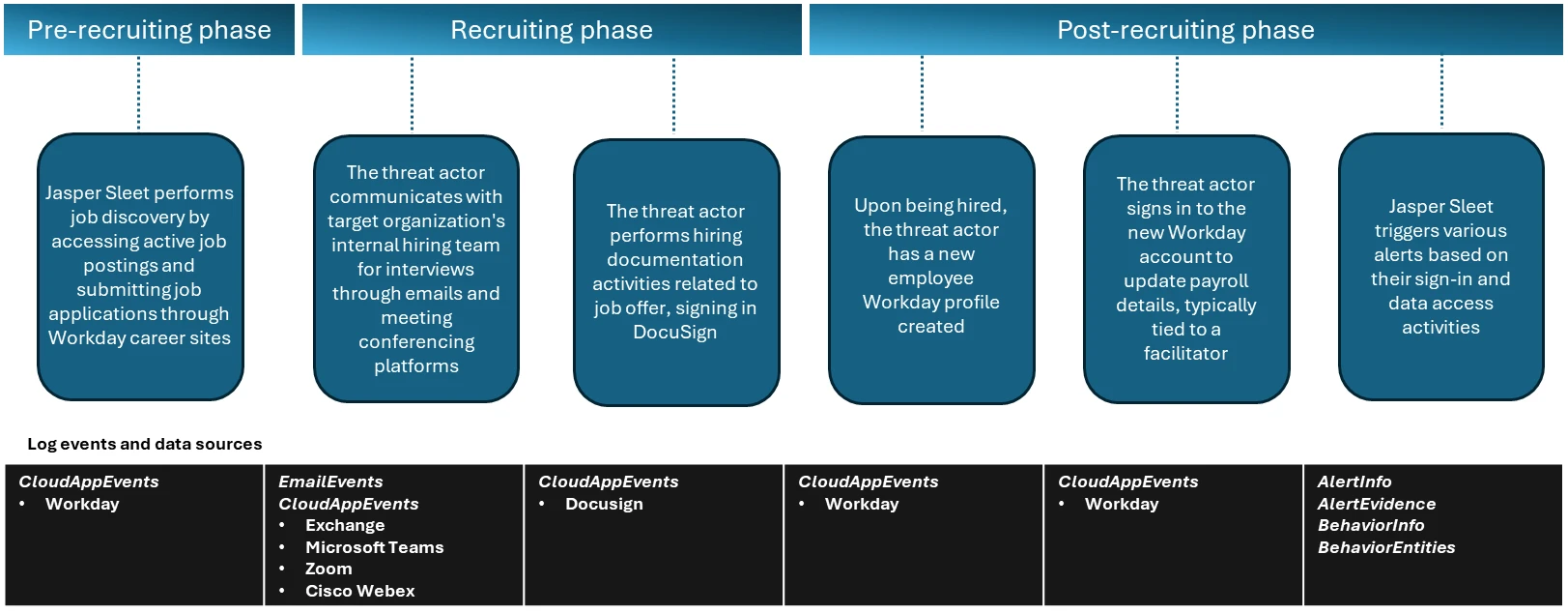
Attack chain overview
In the observed campaigns, the threat actors leverage routine HR workflows like external-facing career sites with open job postings to help with their job search and application process. Once they’re successfully contacted, interviewed, and hired, they complete typical new-hire onboarding formalities like setting up payroll accounts, which are also through the HR SaaS platform like Workday.
Activities in pre-recruitment phase
In the pre-recruitment phase, Microsoft has observed Jasper Sleet accessing Workday Recruiting Web Service endpoints exposed through external career sites from known actor infrastructure and email accounts, indicating a discovery phase of open roles and recruitment workflows.
Workday lets organizations use internal, non-public APIs such as Recruiting Web Service to allow programmatic access to apply for jobs in these organizations. These APIs are used to connect to external career sites involved in talent management and applicant tracking systems and allow applicants to browse and apply for open job roles. To access these APIs, an organization has to allow setting up of OAuth clients and associated OAuth tokens, and expose the APIs so that the organization’s external career sites can use them.
Microsoft has observed API call events coming from known Jasper Sleet infrastructure in Workday telemetry to hrrecruiting/* API endpoints. These events access information about job postings, applications, and related questionnaires, and to submit job applications and questionnaires.
Some common API calls being made by the threat actor’s activity when using the Workday portal include the following:
- hrrecruiting/accounts/*
- hrrecruiting/jobApplicationPackages/*
- hrrecruiting/validateJobApplication/*
- hrrecruiting/resumes/*
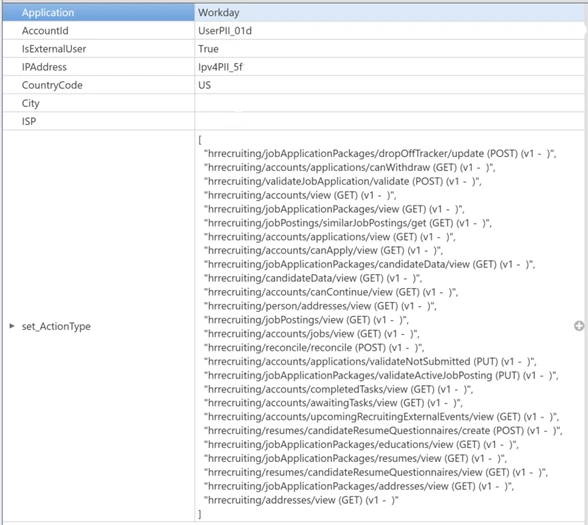
It’s important to note here that these API calls could also be made by legitimate job applicants. However, Microsoft has observed the Jasper Sleet threat actor using multiple external accounts suspiciously to access the same set of API calls in a consistent, repeating pattern, as shown in Figure 2, indicating a possible job discovery phase activity on open job roles and following up on job applications submitted. This anomaly sets the threat actor behavior apart from legitimate job applicants.
Defender for Cloud Apps’ Workday connector enables organizations to view and track API activity to their /hrrecruiting endpoints. The connector also lets them identify external accounts and their corresponding infrastructure metadata. Organizations can match this information against any available threat intelligence feeds on Jasper Sleet so they can identify fraudulent applications early in the recruiting process.
Activities in recruiting phase
In the recruiting phase, signals outside of Workday could help with investigation of threat actor behavior. The threat actor communicates with the target organization’s hiring team using emails and meeting conferencing platforms like Microsoft Teams, Zoom, or Cisco Webex for scheduling interviews. Using advanced hunting tables in Microsoft Defender, organizations can track suspicious communications (for example, email and Teams messages with external accounts originating from suspicious IP addresses or email addresses that could possibly be associated with the threat actor) and raise a red flag early in the hiring process. Additionally, organizations that use Zoom or Cisco Webex must leverage Defender for Cloud Apps’ Zoom or Cisco Webex connectors to detect malicious external accounts in the interviewing process.
Organizations can also leverage Defender for Cloud Apps’ DocuSign connector, which enables them to monitor activity related to hiring documentation, like offer letter signing from suspicious external sources.
Activities in post-recruitment phase
When Jasper Sleet is hired for a role in the organization, a legitimate account is created and assigned to them as part of the onboarding process. In organizations that use HR workflows in Workday for onboarding new hires, we’ve observed sign-ins to the newly created Workday profile and setting up of payroll details originating from known Jasper Sleet infrastructure.
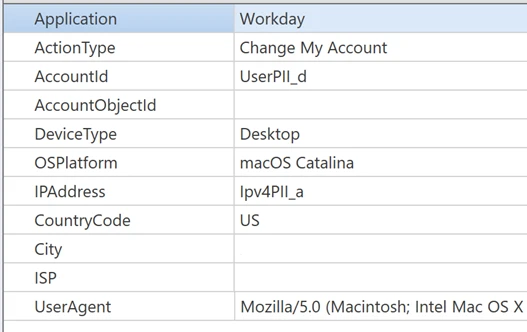
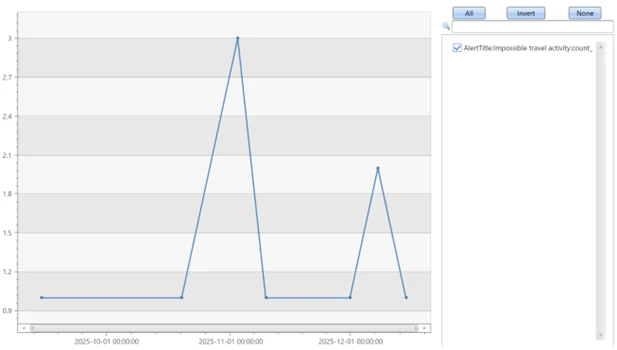
The threat actor now has legitimate access to organization data, and they can access internal SaaS applications like Teams, SharePoint, OneDrive, and Exchange Online. Hence, it’s important to investigate any alerts associated with new hire accounts, especially alerts that are related to access to organization data from different locations and anonymous proxies performing search and downloads on Microsoft 365 suite or other third-party SaaS applications. Microsoft has observed a spike in impossible travel alerts for such new hires, indicating suspicious remote IT worker behavior in the initial months of onboarding.
Mitigation and protection guidance
Microsoft recommends leveraging access to telemetry coming from multiple data sources and monitoring behavioral anomalies in hiring candidates as part of background verification in HR recruitment processes. Organizations can also leverage threat intelligence as an aid, when available, to strengthen confidence in these anomalies.
These recommendations draw from established Defender blog guidance patterns and align with protections offered across Microsoft Defender XDR.
Organizations can follow these recommendations to mitigate threats associated with this threat actor:
Enable connectors in Microsoft Defender for Cloud Apps to gain visibility and track activity from external user accounts associated with fraudulent candidates. Investigate events of both external users and newly hired internal users originating from malicious infrastructure. For more information, see the following articles in Microsoft Learn:
- How Defender for Cloud Apps helps protect your Workday environment
- How Defender for Cloud Apps helps protect your DocuSign environment
- How Defender for Cloud Apps helps protect your Cisco Webex environment
- Connect Zoom to Microsoft Defender for Cloud Apps (Preview)
Educate users on social engineering. Train employees to recognize suspicious behaviors during hiring process and in new hires. For more information on the threat actor behavior, read this blog: Jasper Sleet: North Korean remote IT workers’ evolving tactics to infiltrate organizations
Microsoft Defender XDR detections
Microsoft Defender XDR customers can refer to the list of applicable detections below. Microsoft Defender XDR coordinates detection, prevention, investigation, and response across endpoints, identities, email, and apps to provide integrated protection against attacks like the threat discussed in this blog.
Customers with provisioned access can also use Microsoft Security Copilot in Microsoft Defender to investigate and respond to incidents, hunt for threats, and protect their organization with relevant threat intelligence.
| Tactic | Observed activity | Microsoft Defender coverage |
| Resource Development | Threat actors accessing external facing Workday sites to research job postings and submit job applications. | Microsoft Defender for Cloud Apps Possible Jasper Sleet threat actor activity in Workday Recruiting Web Service |
| Resource Development | Once hired and onboarded, the threat actor signs in to the newly created Workday account to update payroll details from known Jasper Sleet infrastructure | Microsoft Defender for Cloud Apps Suspicious Payroll and Finance related activity in Workday |
| Initial Access | Anomalous sign-ins and access to internal resources by newly hired threat actor | Microsoft Defender XDR Impossible travel – Sign-in activity by suspected North Korean entity Jasper Sleet |
Threat intelligence reports
Microsoft Defender XDR customers can use the following threat analytics reports in the Defender portal (requires license for at least one Defender XDR product) to get the most up-to-date information about the threat actor, malicious activity, and techniques discussed in this blog. These reports provide the intelligence, protection information, and recommended actions to prevent, mitigate, or respond to associated threats found in customer environments.
Microsoft Security Copilot customers can also use the Microsoft Security Copilot integration in Microsoft Defender Threat Intelligence, either in the Security Copilot standalone portal or in the embedded experience in the Microsoft Defender portal to get more information about this threat actor.
Hunting queries
Microsoft Defender XDR customers can run the following queries to find related activity to any suspicious indicators in their networks:
Access to Workday Recruiting Web Service API by external users
let api_endpoint_regex = 'hrrecruiting/*';
CloudAppEvents
| where Application == 'Workday'
| where IsExternalUser
| where ActionType matches regex api_endpoint_regex
| where IPAddress in (<suspiciousips>) or AccountId in (<suspicious_emailids>);
| summarize make_set(ActionType) by AccountId, IPAddress, bin(Timestamp, 1d)
Emails and Teams communications related to interviews
//Email communications
EmailEvents
| where SenderMailFromAddress == "<suspicious_emailids>" or RecipientEmailAddress == "<suspicious_emailids>"
| where Subject has "Interview"
| project Timestamp, SenderMailFromAddress, SenderDisplayName, SenderIPv4, SenderIPv6, RecipientEmailAddress, Subject, DeliveryAction, DeliveryLocation
EmailEvents
| where SenderIPv4 == "<suspiciousIPs>" or SenderIPv6 == "< suspiciousIPs>"
| where Subject has "Interview"
| project Timestamp, SenderMailFromAddress, SenderDisplayName, SenderIPv4, SenderIPv6, RecipientEmailAddress, Subject, DeliveryAction, DeliveryLocation
//Microsoft Teams communications
CloudAppEvents
| where Application == "Microsoft Teams"
| where IsExternalUser
| where AccountId == "<suspicious_emailids>" or AccountDisplayName == "<suspicious_emailids>"
| summarize make_set(ActionType) by IPAddress, AccountId, bin(Timestamp, 1d)
CloudAppEvents
| where Application == "Microsoft Teams"
| where IsExternalUser
| where IPAddress == "<suspiciousIPs>"
| summarize make_set(ActionType) by IPAddress, AccountId, bin(Timestamp, 1d)
//Zoom or Cisco Webex communication events after enabling the Microsoft Defender for Cloud apps connectors
CloudAppEvents
| where Application == "Zoom"
| where IsExternalUser
| where IPAddress == "<suspiciousIPs>"
| summarize make_set(ActionType) by IPAddress, AccountId, bin(Timestamp, 1d)
CloudAppEvents
| where Application == "Cisco Webex"
| where IsExternalUser
| where IPAddress == "<suspiciousIPs>"
| summarize make_set(ActionType) by IPAddress, AccountId, bin(Timestamp, 1d)
Hiring phase involving accessing and signing of agreements through DocuSign
CloudAppEvents
| where Application == "DocuSign"
| where IsExternalUser
| where ActionType == "ENVELOPE SIGNED"
| where IPAddress in ("<suspiciousIPs>") or AccountId == "<suspicious_emailids>"
New hire onboarding and payroll activities originating from known Jasper Sleet infrastructure
CloudAppEvents
| where Application == "Workday"
| where AccountId == "<NewHireWorkdayId>"
| where ActionType has_any ("Add", "Change", "Assign", "Create", "Modify") and ActionType has_any ("Account", "Bank", "Payment", "Tax")
| where IPAddress in ("<suspiciousIPs>")
| summarize make_set(ActionType) by IPAddress, bin(Timestamp, 1d)
References
- Jasper Sleet: North Korean remote IT workers’ evolving tactics to infiltrate organizations | Microsoft Security Blog
- AI as tradecraft: How threat actors operationalize AI | Microsoft Security Blog
This research is provided by Microsoft Defender Security Research with contributions from members of Microsoft Threat Intelligence.
Learn more
For the latest security research from the Microsoft Threat Intelligence community, check out the Microsoft Threat Intelligence Blog.
To get notified about new publications and to join discussions on social media, follow us on LinkedIn, X (formerly Twitter), and Bluesky.
To hear stories and insights from the Microsoft Threat Intelligence community about the ever-evolving threat landscape, listen to the Microsoft Threat Intelligence podcast.
Review our documentation to learn more about our real-time protection capabilities and see how to enable them within your organization.
- Learn more about securing Copilot Studio agents with Microsoft Defender
- Evaluate your AI readiness with our latest Zero Trust for AI workshop.
- Learn more about Protect your agents in real-time during runtime (Preview)
- Explore how to build and customize agents with Copilot Studio Agent Builder
- Microsoft 365 Copilot AI security documentation
- How Microsoft discovers and mitigates evolving attacks against AI guardrails