

Organizations are rapidly adopting agents, but attackers are equally fast at exploiting misconfigured AI workflows. Mis-sharing, unsafe orchestration, and weak authentication create new identity and data‑access paths that traditional controls don’t monitor. As agents become integrated into operational systems, exposure becomes both easier and more dangerous. Detecting and preventing misconfigurations early is now a core part of AI security posture.
Agents are becoming a core part of business workflows: automating tasks, accessing data, and interacting with systems at scale. That power cuts both ways. In real environments, where organizations turn to low-code solutions to scale agent production, we repeatedly see small, well‑intentioned configuration choices turn into security gaps: agents shared too broadly, exposed without authentication, running risky actions, or operating with excessive privileges. These issues rarely look dangerous- until they are abused.
If you want to find and stop these risks before they turn into incidents, this post is for you. We break down ten common agent misconfigurations we observe in the wild, showing how to detect them using Microsoft Defender Advanced Hunting via the relevant Community Hunting Queries, and mitigate them using safe configurations with Copilot Studio.
Short on time? Start with the table below. It gives you a one‑page view of the risks, their impact, and the exact detections that surface them. If something looks familiar, jump straight to the relevant scenario and mitigation.
Each section then dives deeper into a specific risk and recommended mitigations- so you can move from awareness to action, fast.
| # | Misconfiguration & Risk | Security Impact | Copilot Studio Mitigating Control(s) | Advanced Hunting Community Queries (go to: Security portal>Advanced hunting>Queries> Community Queries>AI Agent folder) |
| 1 | Agent shared with entire organization or broad groups | Unintended access, misuse, expanded attack surface | Enable authentication (on by default) Agent sharing limits Automatic security scan warnings at design-time and publish | • AI Agents – Organization or Multitenant Shared |
| 2 | Agents that do not require authentication | Public exposure, unauthorized access, data leakage | Enforce agent authentication at the environment level Automatic security scan warnings at design-time and publish | • AI Agents – No Authentication Required |
| 3 | Agents with HTTP Request actions using risky configurations | Governance bypass, insecure communications, unintended API access | Apply data policies/advanced connector policies per environment Communicate best practices in Maker welcome content | • AI Agents – HTTP Requests to connector endpoints • AI Agents – HTTP Requests to nonHTTPS endpoints • AI Agents – HTTP Requests to nonstandard ports |
| 4 | Agents capable of emailbased data exfiltration | Data exfiltration via prompt injection or misconfiguration | Implement Microsoft Defender Real-time Protection Disable specific actions with connector action control | • AI Agents – Sending email to AIcontrolled input values • AI Agents – Sending email to external mailboxes |
| 5 | Dormant connections, actions, or agents | Hidden attack surface, stale privileged access | Review agents in Inventory | • AI Agents – Published Dormant (30d) • AI Agents – Unpublished Unmodified (30d) • AI Agents – Unused Actions • AI Agents – Dormant Author Authentication Connection |
| 6 | Agents using author (maker) authentication | Privilege escalation, separation of duties bypassofduties bypass | Restrict maker-provided credentials Automatic security scan warnings at design-time and publish | • AI Agents – Published Agents with Author Authentication • AI Agents – MCP Tool with Maker Credentials |
| 7 | Agents containing hardcoded credentials | Credential leakage, unauthorized system access | Communicate best practices in Maker welcome content Store secrets in Azure Key Vault, referencing as environment variables Managed environments: Sharing Limits, Deployment Pipelines with gated extensions | AI Agents – Hardcoded Credentials in Topics or Actions |
| 8 | Agents with Model Context Protocol (MCP) tools configured | Undocumented access paths, unintended system interactions | Manage available MCP tooling with Data Policies and Advanced Connector Policies | AI Agents – MCP Tool Configured |
| 9 | Agents with generative orchestration lacking instructions | Prompt abuse, behavior drift, unintended actions | Communicate Best Practices for agent instructions Azure Prompt Shield & RAI guardrails (on by default) Implement Microsoft Defender Real-time Protection | AI Agents – Published Generative Orchestration without Instructions |
| 10 | Orphaned agents (no active owner) | Lack of governance, outdated logic, unmanaged access | Check inventory for stale agents Quarantine agents to be decommissioned | AI Agents – Orphaned Agents with Disabled Owners |
Top 10 risks you can detect and prevent
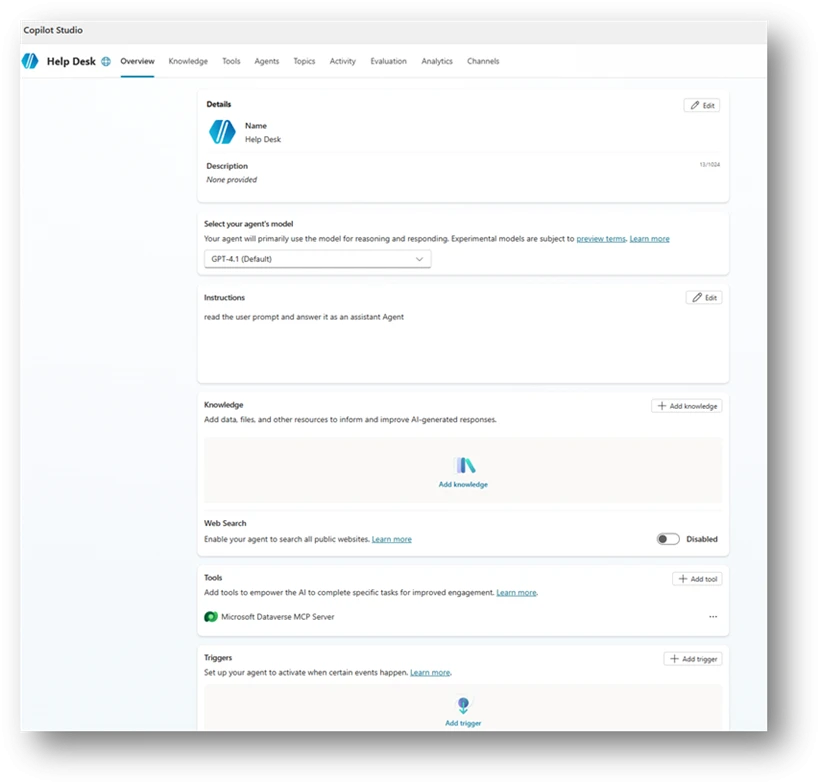
Imagine this scenario: A help desk agent is created in your organization with simple instructions.
The maker, someone from the support team, connects it to an organizational database using an MCP tool, so it can pull relevant customer information from internal tables and provide better answers. So far, so good.
Then the maker decides, on their own, that the agent doesn’t need authentication. After all, it’s “only” shared internally, and the data belongs to employees anyway (See example in Figure 1)). That might already sound suspicious to you. But it doesn’t to everyone.
You might be surprised how often agents like this exist in real environments—and how rarely security teams get an active signal when they’re created. No alert. No review. Just another “helpful” agent quietly going live.
Now here’s the question:
Out of the 10 risks described in this article, how many do you think are already present in this simple agent?
The answer comes at the end of the blog.
Scenario 1: Agent shared with the entire organization or broad groups
Sharing an agent with your entire organization or broad security groups exposes its capabilities without proper access boundaries. While convenient, this practice expands the attack surface. Users unfamiliar with the agent’s purpose might unintentionally trigger sensitive actions, and threat actors with minimal access could use the agent as an entry point.
In many organizations, this risk occurs because broad sharing is fast and easy, often lacking controls to ensure only the right users have access. This results in agents being visible to everyone, including users with unrelated roles or inappropriate permissions. This visibility increases the risk of data exposure, misuse, and unintended activation of sensitive connectors or actions.
Mitigation
Copilot Studio agents are restricted to a Power Platform environment, which enforces data, security, and governance policies. Properly managing environments helps prevent risks like oversharing and controls who can create or deploy agents, making it important to consider an environment strategy for safe agent deployment.
With Managed Environments, administrators can limit sharing by setting how broadly Copilot Studio agents can be shared within an environment or environment group, including specifying numerical limits on recipients.
Scenario 2: Agents That Do Not Require Authentication
Agents that you can access without authentication, or that only prompt for authentication on demand, create a significant exposure point. When an agent is publicly reachable or unauthenticated, anyone with the link can use its capabilities. Even if the agent appears harmless, its topics, actions, or knowledge sources might unintentionally reveal internal information or allow interactions that were never for public access.
This gap appears because authentication was deactivated for testing, left in its default state, or misunderstood as optional. The results in an agent that behaves like a public entry point into organizational data or logic. Without proper controls, this creates a risk of data leakage, unintended actions, and misuse by external or anonymous users.
Mitigation
In Copilot Studio, recommended default settings direct makers to utilize Microsoft Entra ID for authentication purposes. If a maker chooses the ‘No authentication’ option, they will be presented with a warning both during design and at publishing, ensuring that such a configuration is intentional.
To further reduce the risk of misconfigurations, administrators have the ability to prevent unauthenticated access by implementing data policies at scale, ranging from individual environments to tenant-wide enforcement.
Scenario 3: Agents with HTTP Request action with risky configurations
Agents that perform direct HTTP requests introduce a unique risk, especially when those requests target non-standard ports, insecure schemes, or sensitive services that already have pre-built connectors. These patterns often bypass the governance, validation, throttling, and identity controls that connectors provide. As a result, they can expose the organization to misconfigurations, information disclosure, or unintended privilege escalation.
These configurations appear unintentionally. A maker might copy a sample request, test an internal endpoint, or use HTTP actions for flexibility during testing and convenience. Without proper review, this can lead to agents issuing unsecured calls over HTTP or invoking critical Microsoft APIs directly through URLs instead of secured connectors. Each of these behaviors represents an opportunity for misuse or accidental exposure of organizational data.
Mitigation
Providing agents with tools increases risk, so makers should be educated on safe setup. In Copilot Studio, Maker welcome content easily informs makers of best practices and policies.
Whenever possible, use Microsoft-published secured connectors instead of HTTP Request actions to access APIs and services. Admins can enforce this by applying a data policy that limits risky connectors at the environment level.
Combining data policies with environments helps contain high-risk tools like HTTP Request to development stages, while restricting them in production where agents are published and shared.
Scenario 4: Agents Capable of Email-Based Data Exfiltration
Agents that send emails using dynamic or externally controlled inputs present a significant risk. When an agent uses generative orchestration to send email, the orchestrator determines the recipient and message content at runtime. In a successful indirect prompt injection attack, a threat actor could instruct the agent to send internal data to external recipients.
A similar risk exists when an agent is explicitly configured to send emails to external domains. Even for legitimate business scenarios, unaudited outbound email can allow sensitive information to leave the organization. Because email is an immediate outbound channel, any misconfiguration can lead to unmonitored data exposure.
Many organizations create this gap unintentionally. Makers often use email actions for testing, notifications, or workflow automation without restricting recipient fields. Without safeguards, these agents can become exfiltration channels for any user who triggers them or for a threat actor exploiting generative orchestration paths.
Mitigation
To safeguard sensitive data within the organization, Copilot Studio may be configured for policy enforcement, runtime protection, and human oversight.
Addressing the risk of prompt injection attacks, Copilot Studio can leverage both native and externally integrated (Defender) runtime protections. These mechanisms actively monitor for prompt injection threats and deviations from intended objectives, thereby establishing a comprehensive, layered defense at runtime.
Given that outbound channels such as email allow for rapid data exfiltration, administrators are advised to implement data policies to regulate the use of email connectors by agents. They may also restrict permitted actions through connector action control. Ultimately, human‑in‑the‑loop approvals ensure user oversight of high-risk operations, enabling agents to provide assistance while maintaining user control over critical decisions.
Scenario 5: Dormant Connections, Actions, or Agents Within the Organization
Dormant agents and unused components might seem harmless, but they can create significant organizational risk. Unmonitored entry points often lack active ownership. These include agents that haven’t been invoked for weeks, unpublished drafts, or actions using Maker authentication. When these elements stay in your environment without oversight, they might contain outdated logic or sensitive connections That don’t meet current security standards.
Dormant assets are especially risky because they often fall outside normal operational visibility. While teams focus on active agents, older configurations are easily forgotten. Threat actors, frequently target exactly these blind spots. For example:
- A published but unused agent can still be called.
- A dormant maker-authenticated action might trigger elevated operations.
- Unused actions in classic orchestration can expose sensitive connectors if they are activated.
Without proper governance, these artifacts can expose sensitive connectors if they are activated.
Mitigation
To address the risks posed by unused agents, administrators should regularly monitor the Power Platform Inventory for agents with minimal activity. This inventory provides visibility of agents across all environments, identifying those that haven’t been actively used.
These agents can then be transitioned into a deprecation phase, where their availability is limited and their impact is assessed. Maintaining a dedicated list of agents flagged for deprecation helps prevent unnecessary proliferation and signals organizational intent to retire them, ensuring unused agents don’t become unmanaged risks. Learn how agents can be quarantined during review.
Scenario 6: Agents Using Author Authentication
When agents use the maker’s personal authentication, they act on behalf of the creator rather than the end user. In this configuration, every user of the agent inherits the maker’s permissions. If those permissions include access to sensitive data, privileged operations, or high impact connectors, the agent becomes a path for privilege escalation.
This exposure often happens unintentionally. Makers might allow author authentication for convenience during development or testing because it is the default setting of certain tools. However, once published, the agent continues to run with elevated permissions even when invoked by regular users. In more severe cases, Model Context Protocol (MCP) tools configured with maker credentials allow threat actors to trigger operations that rely directly on the creator’s identity.
Author authentication weakens separation of duties and bypasses the principle of least privilege. It also increases the risk of credential misuse, unauthorized data access, and unintended lateral movement
Mitigation
In Copilot Studio, tool authentication is configured by default to use end user credentials, prioritizing security and limiting privilege escalation risks. When a maker attempts to change the authentication method to ‘Maker-provided credentials’, the automatic security scan triggers a warning to ensure that this change is made deliberately and with awareness of the associated risks. This safeguard helps makers avoid unintentionally enabling elevated permissions for agents.
Scenario 7: Agents Containing Hard-Coded Credentials
Beyond the immediate leakage risk, hard-coded credentials bypass the standard enterprise controls normally applied to secure secret storage. They are not rotated, not governed by Key Vault policies, and not protected by environment variable isolation. As a result, even basic visibility into agent definitions may expose valuable secrets.
Agents that contain hard-coded credentials inside topics or actions introduce a severe security risk. Clear-text secrets embedded directly in agent logic can be read, copied, or extracted by unintended users or automated systems. This often occurs when makers paste API keys, authentication tokens, or connection strings during development or debugging, and the values remain embedded in the production configuration. Such credentials can expose access to external services, internal systems, or sensitive APIs, enabling unauthorized access or lateral movement.
Mitigation
Copilot Studio agents should never store secrets directly. Instead, credentials should be externalized through managed connections, agent flows, and environment variables backed by Azure Key Vault, so that secrets are securely resolved at runtime and never exposed in agent definitions.
Agents should enforce Microsoft Entra ID authentication, avoid author‑run contexts in production, and operate with least‑privilege access. Mechanisms such as Power Platform pipelines, gated promotions, and audit logging, help prevent secrets from being introduced during development and ensure secure practices are consistently applied from development through production.
Scenario 8: Agents With Model Context Protocol (MCP) Tools Configured
AI agents that include Model Context Protocol (MCP) tools provide a powerful way to integrate with external systems or run custom logic. However, if these MCP tools aren’t actively maintained or reviewed, they can introduce undocumented access patterns into the environment.
This risk when MCP configurations are:
- Activated by default
- Copied between agents
- Left active after the original integration is no longer needed
Unmonitored MCP tools might expose capabilities that exceed the agent’s intended purpose. This is especially true if they allow access to privileged operations or sensitive data sources. Without regular oversight, these tools can become hidden entry points that user or threat actors might trigger unintended system interactions.
Mitigation
Copilot Studio enforces secure integration of Model Context Protocol (MCP) tools by onboarding MCP servers as connectors, ensuring all connections are only accessible if approved by IT. Administrators should restrict MCP access to managed environments, implement data policies, advanced connector policies, and regularly review the Power Platform Inventory to identify agents with dormant or risky integrations to minimize the risk of undocumented access paths and privilege escalation.
By following these practices, organizations ensure that MCP tools are consistently managed and aligned with least-privilege principles, preventing unintended system interaction or access.
Scenario 9: Agents With Generative Orchestration Lacking Instructions
AI agents that use generative orchestration without defined instructions face a high risk of unintended behavior. Instructions are the primary way to align a generative model with its intended purpose. If instructions are missing, incomplete, or misconfigured, the orchestrator lacks the context needed to limit its output. This makes the agent more vulnerable to user influence from user inputs or hostile prompts.
A lack of guidance can cause an agent to;
- Drift from its expected behaviors. The agent might not follow its intended logic.
- Use unexpected reasoning. The model might follow logic paths that don’t align with business needs.
- Interact with connected systems in unintended ways. The agent might trigger actions that were never planned.
For organizations that need predictable and safe behavior, behavior, missing instructions area significant configuration gap.
Mitigation
Copilot Studio provides built-in protections to reduce risks like prompt injection and goal manipulation when using generative orchestration. At the platform layer, it scans user input and context for common injection attempts and goal deviations.
External runtime defenses, including Microsoft Defender integration, add a second layer by inspecting agent actions during execution, blocking misuse before actions are completed.
Despite these controls, clear maker guidance remains vital. Generative orchestration relies on intentional instructions, and training makers on best practices is essential to ensure safe, predictable results.
10: Orphaned agents
Orphaned agents are agents whose owners are no longer with organization or their accounts deactivated. Without a valid owner, no one is responsible for oversight, maintenance, updates, or lifecycle management. These agents might continue to run, interact with users, or access data without an accountable individual ensuring the configuration remains secure.
Because ownerless agents bypass standard review cycles, they often contain outdated logic, deprecated connections, or sensitive access patterns that don’t align with current organizational requirements.
Mitigation
With Copilot Studio, Administrators can leverage the Power Platform Inventory to gain usage visibility and continuously identify agents that lack an accountable owner or are no longer actively used. The Inventory provides a near‑real‑time view of all agents across environments, including ownership metadata and usage signals, enabling administrators to surface agents with missing owners or consistently low or no activity.
By reviewing this information alongside usage and adoption reporting, administrators can distinguish between actively governed solutions and orphaned or abandoned agents that no longer serve a business purpose.
Once identified, orphaned or unused agents can be placed into a deprecation state as part of governance operations. Learn how agents can be quarantined for review.
Maintaining a deprecation list informed by inventory and usage insights allows organizations to signal intent, remove broad availability, and prevent further sprawl while assessing risk and impact before reassignment to a new owner or deletion.
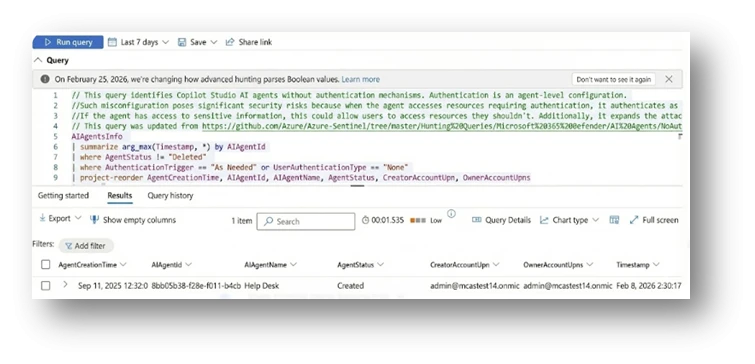
Remember the help desk agent we started with? That simple agent setup quietly checked off more than half of the risks in this list.
Keep reading and running the Advanced Hunting queries in the AI Agents folder, to find agents carrying these risks in your own environment before it’s too late.
From Findings to Fixes: A Practical Mitigation Playbook for Agents (Beyond Copilot Studio)
The ten risks described above manifest in different ways, but they consistently stem from a small set of underlying security gaps: overexposure, weak authentication boundaries, unsafe orchestration, and missing lifecycle governance.
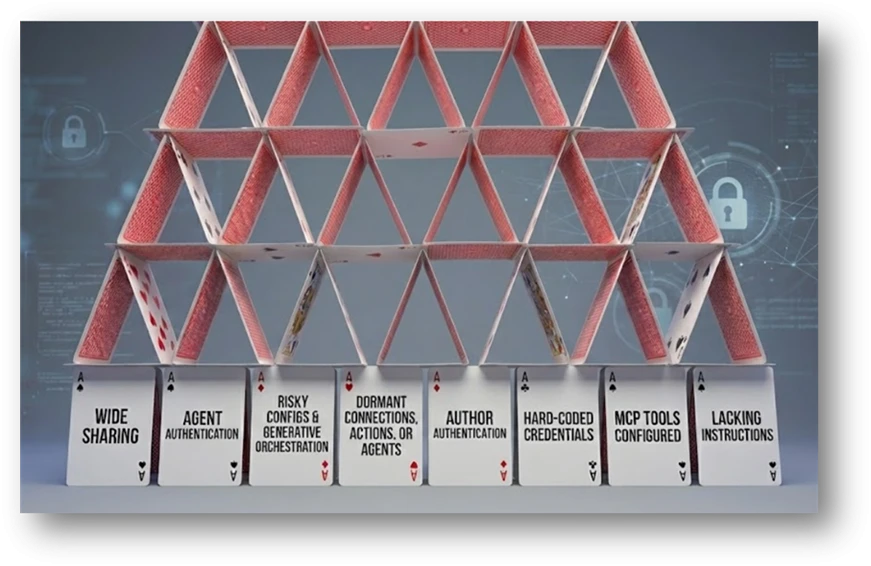
Damage doesn’t begin with the attack. It starts when risks are left untreated. The section below is a practical checklist of validations and actions that help close common agent security gaps before they’re exploited. Read it once, apply it consistently, and save yourself the cost of cleaning up later. Fixing security debt is always more expensive than preventing it.
1. Verify Intent and Ownership
Before changing configurations, confirm whether the agent’s behavior is intentional and still aligned with business needs.
- Validate the business justification for broad sharing, public access, external communication, or elevated permissions with the agent owner.
- Confirm whether agents without authentication are explicitly designed for public use and whether this aligns with organizational policy.
- Review agent topics, actions, and knowledge sources to ensure no internal, sensitive, or proprietary information is exposed unintentionally.
- Ensure that every agent has an active, accountable owner. Reassign ownership for orphaned agents or retire agents that no longer have a clear purpose.
- Validate whether dormant agents, connections, or actions are still required, and decommission those that are not.
- Perform periodic reviews for agents and establish a clear organizational policy for agents’ creation.
2. Reduce Exposure and Tighten Access Boundaries
Most agent risks are amplified by unnecessary exposure. Reducing who can reach the agent, and what it can reach, significantly lowers risk.
- Restrict agent sharing to well-scoped, role-based security groups instead of entire organizations or broad groups.
- Establish and enforce organizational policies defining when broad sharing or public access is allowed and what approvals are required.
- Enforce full authentication by default. Only allow unauthenticated access to agents when explicitly required and approved.
- Limit outbound communication paths:
- Restrict email actions to approved domains or hardcoded recipients.
- Avoid AI-controlled dynamic inputs for sensitive outbound actions such as email or HTTP requests.
- Perform periodic reviews of shared agents to ensure visibility and access remain appropriate over time.
3. Enforce Strong Authentication and Least Privilege
Agents must not inherit more privilege than necessary, especially through development shortcuts.
- Replace author authentication with user-based or system-based authentication wherever possible.
- Review all tools and abilities that run using delegated access and reconfigure those that expose sensitive or high-impact services.
- Audit MCP tools that rely on creator credentials and remove or update them if they are no longer required.
- Apply the principle of least privilege to all connectors, actions, and data access paths, even when broad sharing is justified.
4. Harden Orchestration and Dynamic Behavior
Generative agents require explicit guardrails to prevent unintended or unsafe behavior.
- Ensure clear, well-structured instructions are configured for generative orchestration to define the agent’s purpose, constraints, and expected behavior.
- Avoid allowing the model to dynamically decide:
- Email recipients
- External endpoints
- Execution logic for sensitive actions
- Review HTTP Request actions carefully:
- Confirm endpoint, scheme, and port are required for the intended use case.
- Prefer official integrations over raw HTTP requests to benefit from authentication, governance, logging, and policy enforcement.
- Enforce HTTPS and avoid nonstandard ports unless explicitly approved.
5. Eliminate Dead Weight and Protect Secrets
Unused capabilities and embedded secrets quietly expand the attack surface.
- Remove or deactivate:
- Dormant agents
- Unpublished or unmodified agents
- Unused actions
- Stale connections
- Outdated or unnecessary MCP tool configurations
- Clean up actions that use author authentication and classic orchestration actions that are no longer referenced.
- Externalize all secrets to secure storage and reference them via environment variables instead of embedding them in agent logic.
Treat agents as production assets, not experiments, and include them in regular lifecycle and governance reviews.

Effective posture management is essential for maintaining a secure and predictable agent production environment. As agents grow in capability and integrate with increasingly sensitive systems, organizations must adopt structured governance practices that identify risks early and enforce consistent configuration standards.
The scenarios and detection rules presented in this blog provide a foundation to help you;
- Discovering common security gaps
- Strengthening oversight
- Reduce the overall attack surface
By combining automated detection with clear operational policies, you can ensure that agents remain secure, aligned, and resilient.
This research is provided by Microsoft Defender Security Research with contributions from Dor Edry, Uri Oren, and the Copilot Studio team.
Learn more
- Read about the AI agents inventory at: AI agents inventory in Microsoft Defender
- Learn how to secure AI agents using Microsoft Defender: How to secure AI agents using Microsoft Defender
- Read our blog on Real-Time Protection for AI agents: From runtime risk to real‑time defense: Securing AI agents | Microsoft Security Blog