Artificial intelligence (AI) and connected devices have fueled digital transformation in the utilities industry. These technological advances promise to reduce costs and increase the efficiency of energy generation, transmission, and distribution. They’ve also created new vulnerabilities. Cybercriminals, nation state actors, and hackers have demonstrated that they are capable of attacking a nation’s power grid through internet-connected devices. As utilities and their suppliers race to modernize our infrastructure, it’s critical that cybersecurity measures are prioritized.
In the first blog in the “Defending the power grid against cyberattacks” series, I walked through how the accelerated adoption of the Internet of Things (IoT) puts utilities and citizens at risk of attack from nation state actors. In this post, I’ll provide guidance for how utilities manufacturers can better protect the connected devices that are deployed in the energy industry.
Protect identities
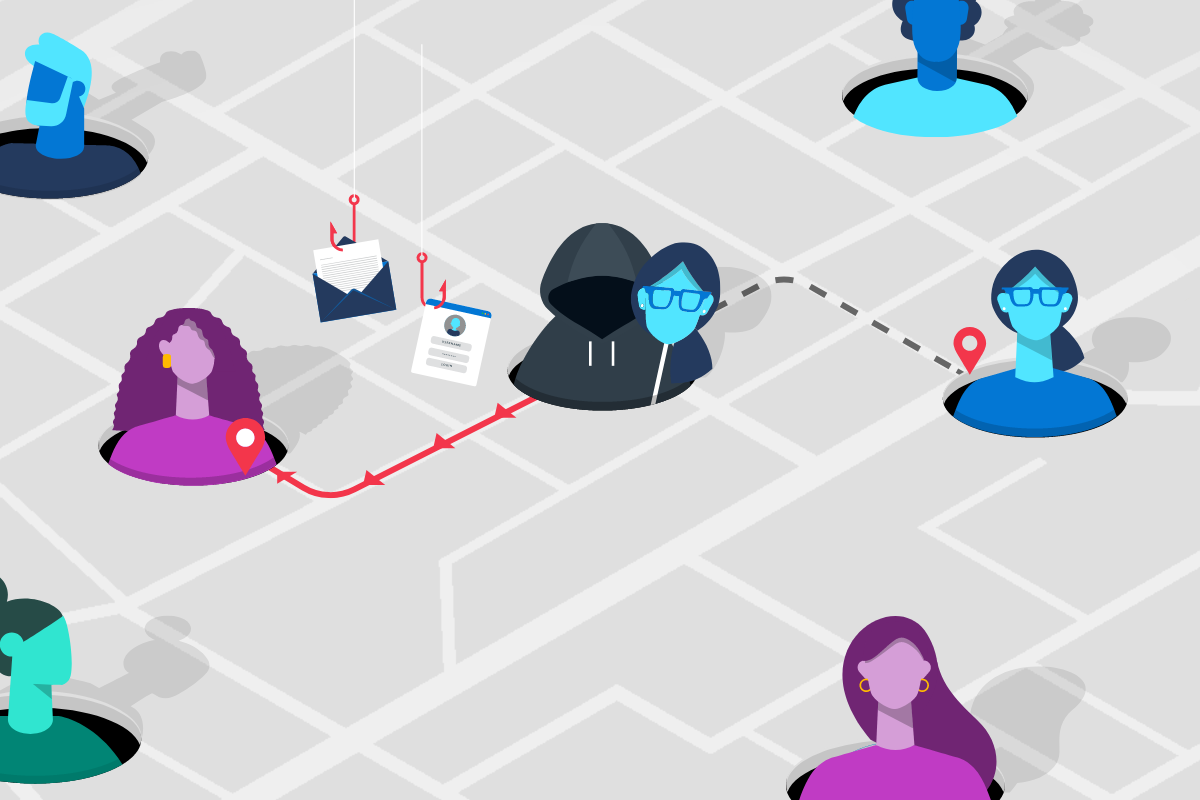
If your organization supplies the energy industry, you may be targeted by adversaries who want to disrupt the power supply. One way they will try to access your company resources is by stealing or guessing user credentials with tactics like password spray or phishing. According to Verizon’s 2019 Data Breach Investigations Report, 80 percent of breaches are the result of weak or compromised passwords. Attackers target multiple people at a time, but they only need to succeed once to gain access.
Securing your company starts with safeguarding your identities. At the bare minimum, you should apply multi-factor authentication (MFA) to your administrative accounts. A better option is to require all users to authenticate using MFA. MFA requires that users sign in with more than just a password. The second form of authentication can be a one-time code from a mobile device, biometrics, or a secure FIDO2 key, among other options. MFA reduces your risk significantly because it’s much harder for an attacker to compromise two or more authentication factors.
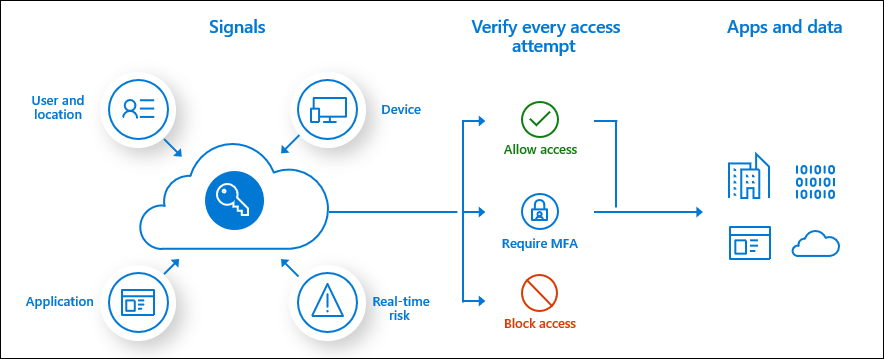
Figure 1: You can use Conditional Access policies to define when someone is promoted to sign in with MFA.
Secure privileged access
In a supply chain attack, adversaries attack your organization to gain access to data and applications that will allow them to tamper with your product or service before it reaches its intended destination. Bad actors want to infiltrate your build environment or the servers that you use to push software updates. To accomplish this, they often target administrator accounts. Securing your administrative accounts is critical to protect your company resources. Here are a few steps you can take to safeguard these accounts:
- Separate administrative accounts from the accounts that IT professionals use to conduct routine business. While administrators are answering emails or conducting other productivity tasks, they may be targeted by a phishing campaign. You don’t want them signed into a privileged account when this happens.
- Apply just-in-time privileges to you administrator accounts. Just-in-time privileges require that administrators only sign into a privileged account when they need to perform a specific administrative task. These sign-ins go through an approval process and have a time limit. This will reduce the possibility that someone is unnecessarily signed into an administrative account.
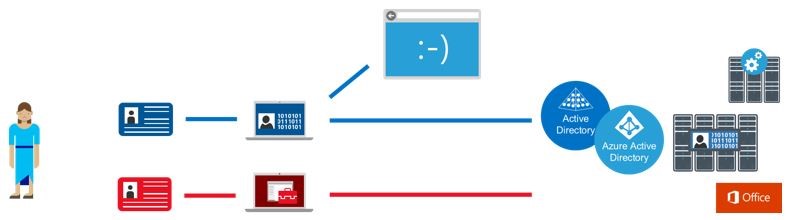
Figure 2: A “blue” path depicts how a standard user account is used for non-privileged access to resources like email and web browsing and day-to-day work. A “red” path shows how privileged access occurs on a hardened device to reduce the risk of phishing and other web and email attacks.
- Set up privileged access workstations for administrative work. A privileged access workstation provides a dedicated operating system with the strongest security controls for sensitive tasks. This protects these activities and accounts from the internet. To encourage administrators to follow security practices, make sure they have easy access to a standard workstation for other more routine tasks.
Safeguard your build and update environment
Bad actors don’t just target user accounts. They also exploit vulnerabilities in software. Many attacks take advantage of known vulnerabilities for which there are available patches. Keep software and operating systems up-to-date and patched to reduce your risk. Retire any technology that is no longer supported by the publisher and implement mandatory integrity controls to ensure only trusted tools run.
You also need to protect the software that your team writes. A proven and robust Secure Development Lifecycle (SDL) will guide your developers to build software that includes fewer vulnerabilities. Microsoft’s SDL includes 12 practices. For example, Microsoft SDL recommends that security and privacy requirements be defined at the beginning of every project. The guidelines also provide tips for managing the security risk of third-party software, performing threat modeling, and penetration testing, among other recommendations. By building security into the entire software process, the software you release will be more secure and less vulnerable to attack.
Assume breach
My recommendations will reduce your risk, but they won’t eliminate it entirely. To protect your company and customers, you’ll need to adopt an assume breach mindset. It’s not a matter of if you’ll be breached but when. Once you’ve accepted that you can’t prevent all attacks, put processes and tools in place that enable you to detect and respond to an incident as quickly as possible.
Endpoint detection and response solutions, like Microsoft Threat Protection, leverage AI to automate detection and response and correlate threats across domains. When incidents are detected, you will need an appropriate response. The National Institute of Standards and Technology (NIST) provides an incident response guide. You can also learn from Microsoft’s Security Response Center (MSRC), which shared how it developed an incident response plan.
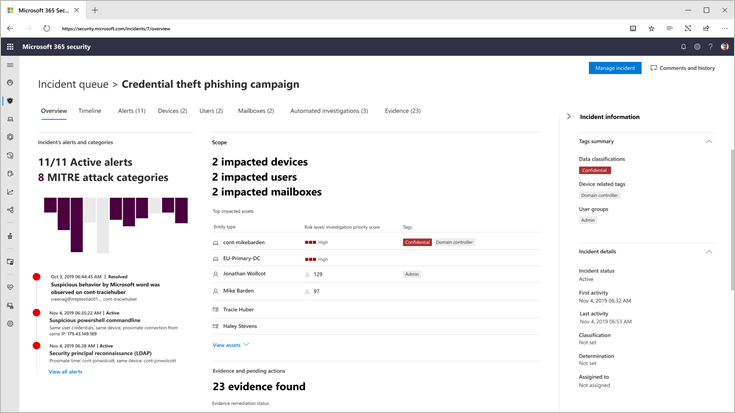
Figure 3: An overview of an incident in Microsoft Threat Protection.
A good communication plan is an important component of a response plan. You will need to let customers know there was an incident and how you plan to address it. As the MSRC notes, “Clear, accurate communication builds confidence in the incident response process, maintains trust with customers, protects your brand, and is essential for fast effective response.”
Centralized IoT device management
In addition to operating a number of generation plants, utilities operate a network of thousands of substations and hundreds of thousands of miles of transmission and distribution lines. This requires them to deploy a large number of IoT devices to safely and efficiently deliver electricity to their customers. To effectively manage this network of IoT devices, suppliers should provide their customers with centralized IoT device management to update firmware, install security updates, and manage accounts and passwords.
Build trust
Protecting critical infrastructure from a destabilizing attack will require collaboration among utilities and suppliers in the industry. Device manufacturers and software publishers have a vital role to play in protecting critical infrastructure. By instituting and maintaining the security practices that I’ve recommended, you can dramatically reduce the risk to your organization and to the power grid.
Stay tuned for the final post in this series, “Part 3: Risk management strategies for the utilities industry,” where I’ll provide recommendations specifically for utilities.
- Learn more about securing your administrator accounts.
- Read how Microsoft Threat Protection can help you better secure your endpoints.
- Read the first blog in this series.
Bookmark the Security blog to keep up with our expert coverage on security matters. Also, follow us at @MSFTSecurity for the latest news and updates on cybersecurity.