(Note: Our Tech support scams FAQ page has the latest info on this type of threat, including scammer tactics, fake error messages, and the latest scammer hotlines. You can also read our latest blog, Teaming up in the war on tech support scams.)
The cornerstone of tech support scams is the deception that there is something wrong with your PC. To advance this sham, tech support scams have long abused browsers’ full screen function. Coupled with dialogue loops, the pop-up messages that just won’t go away, and the spoofing of brands like Microsoft, tech support scam websites can be convincing.
The end-goal, of course, is to get you to call a technical support hotline, which then charges you for services you don’t need.
Recently we came across a new tech support scam website that stands out in the way it creatively uses the full screen function and dialogue boxes.
The scam is one of many websites we have discovered and blocked over the years. To achieve its end, the website uses a malicious script belonging to the Techbrolo family of support scam malware. Techbrolo is known for introducing the dialogue loops and audio message, which have now become staple in tech support scam sites.
Anatomy of a support scam website
The scam starts like any other. You are redirected to the website by nefarious ads. When the page loads, you get a pop-up message that says your computer has been locked because of virus infection. It asks you to immediately call a technical support number.
The website also starts playing an audio message, a tactic to further cause panic, something that we’re seeing more and more in these scams. It says:
Important security alert! Virus intrusions detected on your computer. Your personal data and system files may be at serious risk. All system resources are halted to prevent any damage. Please call customer service immediately to report these threats now.
In usual scam sites, if you click OK or close the pop-up message, a dialogue loop kicks in. The website continues to serve the pop-up messages whatever you do, effectively locking your browser.
In this new site, however, if you click OK, things start to get very interesting.
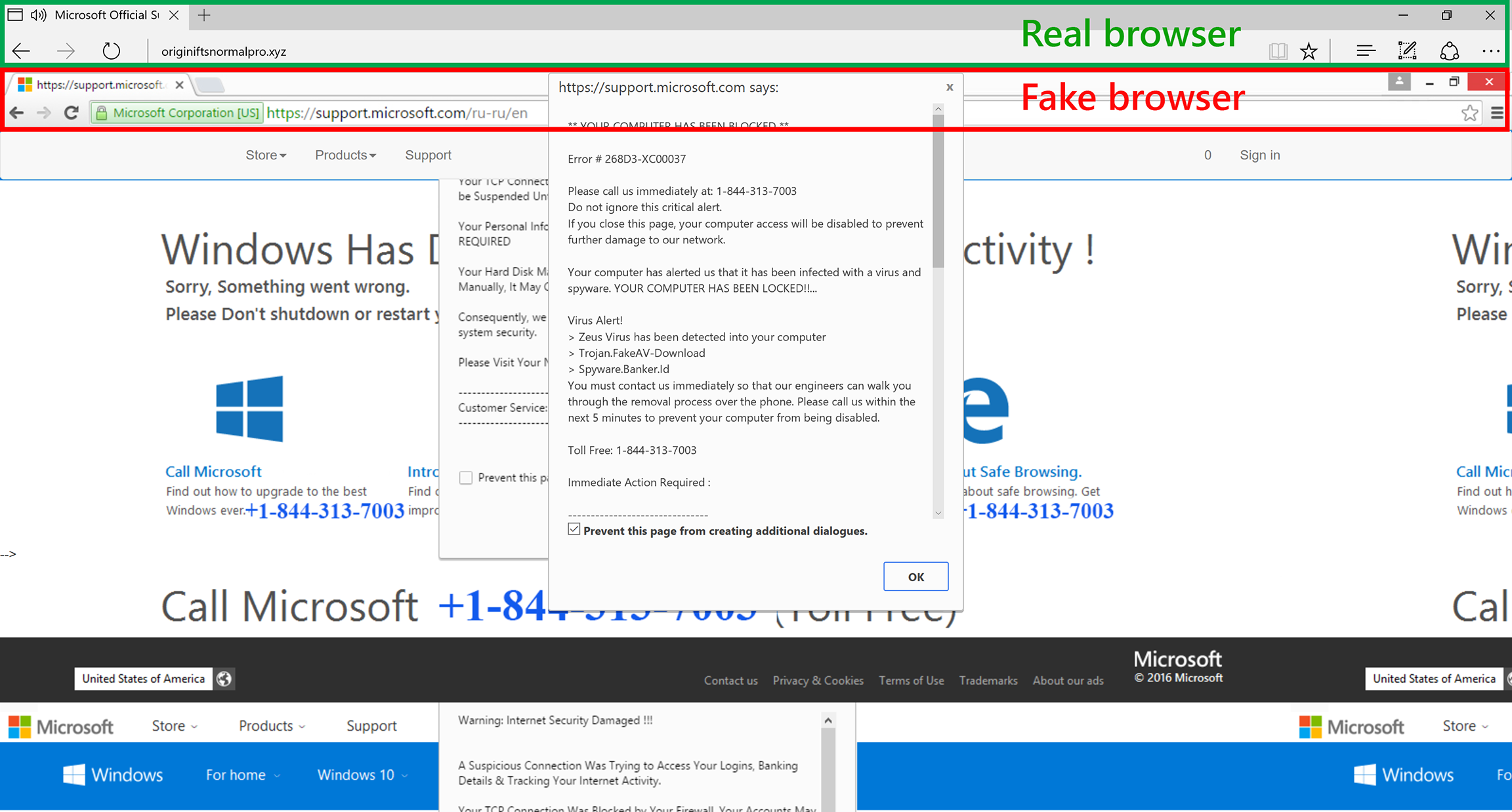
It loads a page with what appears to be a pop-up message containing the same details, including the technical support hotline. You may think at this point you’re just getting the usual dialogue loop. But, upon closer inspection, it’s not really a pop-up message, but a website element of the scam page.
If you click OK on the fake dialogue box (or basically anywhere on the page), it goes into full screen and brings in another surprise.
At full screen, you get what looks like a browser opened to support.microsoft.com/ru-ru/en. But, alas, just like the pop-up message, the browser is just a website element.
This is how the scam site is able to spoof support.microsoft.com in the fake address bar. It even has the green HTTPS indicator to further feign authenticity. If you didn’t detect the scam at this point, you may think you were redirected to a Microsoft website and it’s serving you some messages about your PC.
Don’t fall for this. Exiting full screen puts things in perspective.
Busting the scam
Just like all tech support scams, this new iteration is doing its best to make you think there’s something wrong with your PC. The new techniques are meant to improve its chances of you taking the social engineering bait.
The key to stopping the attack is to immediately recognize and break it. If you’re a Microsoft Edge user, there are a couple of ways to do this.
The first clue that something’s amiss is a message from Microsoft Edge. As the offending site goes into full screen, you get a notification from Microsoft Edge. You can exit the full screen at this point by clicking Exit now, and you stop the attack.
The second clue is the change in the interface. Since the page is designed to look like Google Chrome, if you’re a Microsoft Edge user, you may catch the difference. Detecting the change in the interface may be easier said than done, but the opportunity to break the attack is there.
Conclusion: Avoiding tech support scams
As this newly discovered support scam website shows, scammers are always on the lookout for opportunities to improve their tools. They can get really creative, motivated by the possibility of avoiding security solutions and ultimately increasing the chances of you falling for their trap.
Avoid tech support scam websites by being more careful when browsing the Internet. As much as you can, visit trusted websites only. Like most tech support scams, you are redirected to offending sites via malvertising (malicious ads). These ads are usually found in dubious websites, such as those hosting illegal copies of media and software, crack applications, and malware.
Get the latest protection from Microsoft by keeping your Windows operating system and antivirus up-to-date. If you haven’t, upgrade to Windows 10.
Use Microsoft Edge when browsing the Internet. It blocks known support scam sites using Microsoft SmartScreen. Microsoft Edge can also stop pop-up dialogue loops used by these sites. It also calls out when a website goes into full screen.
Jonathan San Jose
Talk to us
Questions, concerns, or insights on this story? Join discussions at the Microsoft Defender ATP community.
Follow us on Twitter @MsftSecIntel.