
Deploying Microsoft 365 Copilot: Our guide for leaders
Generative AI has captured the world’s attention, and businesses are taking notice.
According to our annual Microsoft Work Trends report, 70% of people would delegate as much work as possible to AI to lessen their workloads.
Capitalizing on this trend will mean the difference between surging ahead or getting left behind, including here at Microsoft, where we were the first enterprise to fully deploy Microsoft 365 Copilot.
“I’m inspired by the transformative power of AI,” says Andrew Osten, general manager of Business Operations and Programs in Microsoft Digital, the company’s IT organization. “I’ve been impressed with how quickly our employees have put it to work for them.”
He would know. His team is responsible for driving usage and adoption of Copilot and any new features to more than 300,000 employees and vendors across the world.

“Customers are looking to us to share what we’ve learned as the first enterprise to deploy Copilot. Our team has a unique opportunity to help them deploy and get to value as quickly as possible.”
Andrew Osten, general manager, Microsoft Digital
Our mission in Microsoft Digital is to empower, enable, and transform the company’s digital employee experience across devices, applications, and infrastructure. We provide a blueprint for our customers to follow as Customer Zero for the company, and as such, we’ve created this guide for deploying and adopting Microsoft 365 Copilot that’s based on our experience here at Microsoft.
“Customers are looking to us to share what we’ve learned as the first enterprise to deploy Copilot,” Osten says. “Our team has a unique opportunity to help them deploy and get to value as quickly as possible.”

Are you an IT pro?
View the full version of this deployment and adoption guide here.
Chapter 1: Getting your governance right
Before you even begin your Microsoft 365 Copilot implementation, you’ll want to consider how this tool impacts your data. Copilot uses Large Language Models (LLMs) that interact with data and content across your organization and uses information your employees can access to transform user prompts into personalized, relevant, and actionable responses.
Giving your employees this level of access means proper data hygiene is a priority. At Microsoft Digital, we use sensitivity labeling to empower our employees with access while also protecting our data. Microsoft 365 Copilot was designed to respect labels, permissions, and rights management service (RMS) protections that block content extraction on relevant file labels. That ensures private or confidential information stays that way.
This chapter outlines the highly robust, best-case scenario we created for Microsoft, but we know not every organization has a fully deployed data governance strategy. If you’re in that position, don’t worry! You can use Restricted SharePoint Search to provide instant value and protection without exposing Copilot to all of your internal SharePoint sites.
Laying the groundwork with proper labeling
We’ve developed four data labeling practices that make up our foundation for appropriate policies and settings.

Responsible self-service
Enable your employees to create new workspaces like SharePoint sites, ensuring your company data is on your Microsoft 365 tenant. That enables your people to take full advantage of Copilot in ways that align with your organizational data hygiene while you keep your company’s information safe.

Top-down defaults
Label containers for data segmentation by default to ensure your information isn’t overexposed. At Microsoft, we default our container labels to “Confidential\Internal Only.” We use Microsoft Purview to manage this process.

Consistency within containers
Derive file labels from their parent containers. Consistency boosts security and reduces the administrative burden on your employees for labeling every file they create. Copilot will reflect file labels in chat responses so employees know the level of confidentiality of each portion of AI-created responses.

Employee awareness
We train our employees to understand how to handle and label sensitive data. By making your employees active participants in your data hygiene strategy, you increase accuracy and improve your security posture.
Self-service with guardrails
The data hygiene practices above form a foundation for compliance and security, but backstopping those efforts through Microsoft 365 features adds an extra layer of protection. Here’s how:
Trust, but verify
Empower self-service with sensitivity labels, but verify by checking against data loss prevention standards, then use auto-labeling and quarantining when necessary. We’ve configured Microsoft Purview Data Loss Prevention to detect and control sensitive content automatically.
Expiry and attestation
Put strong lifecycle management protocols in place that require your employees to attest containers to keep them from expiring. We don’t keep items that don’t have an accountable employee or that might not be necessary for our work.
Controlling the flow
Limit oversharing at the source by enabling company-shareable links instead of forcing employees to grant access to large groups. To enforce these behaviors, you can set default link types based on labels through Purview.
Oversharing detection
Even under the best circumstances, accidents happen. When one of our employees does overshare sensitive data, we use Microsoft Graph Data Connect extraction in conjunction with Microsoft Purview to catch and report oversharing.
International compliance: No size fits all
Europe has extra requirements in the form of EU Data Boundary regulations and works councils, organizations that provide employee co-determination on workers’ rights or regulatory issues. Our Microsoft 365 Copilot deployment meant we needed to partner closely with our Microsoft works councils to address complex data and privacy implications.
Your experience will vary depending on your industry and where you operate, but we’ve learned that it’s best to work closely with local subsidiaries to ensure you have a complete picture of a region’s regulatory situation. Local insiders are poised to liaise with works councils or other bodies through direct relationships. Start the process early so you can manage feedback cycles effectively and resolve any concerns through configurations that work for your employees.
Learning from our governance, security, and compliance practices

Bring the right people into the conversation
Don’t keep this conversation in the IT sphere alone. Bring in all the relevant security, legal, and compliance professionals.

Build a foundation for automation
Microsoft Purview Data Loss Prevention has powerful intelligent detection, but it relies on establishing good defaults.

Think about how your employees will use Copilot
Determine the primary use cases. The kinds of collaboration and access employees need will affect your labeling architecture.

Take this opportunity to train employees
If you’ve been looking for an excuse to refresh employee knowledge around data privacy, let this moment be your milestone.

Don’t overwhelm your users
Make labeling easy and intuitive and ensure it isn’t overwhelming.
Employees should have a limited set of choices to keep things simple.

Key takeaways
Use these tips to tackle governance, security, and compliance at your company. It’s based on what we learned deploying Copilot internally here at Microsoft.
- Establish a clear labeling framework that defines classification levels, maps labels to the right policies (such as access control, encryption, DLP, and storage rules), sets container defaults, and ensures employees understand how to apply labels correctly.
- Implement comprehensive data loss prevention controls by configuring Microsoft Purview DLP standards and quarantines, defining lifecycle and attestation processes, and using Microsoft Graph Data Connect to identify and remediate oversharing.
- Engage globally to meet international compliance needs by partnering with local subsidiaries and works councils, addressing regional requirements and concerns, and determining where segmented or region‑specific deployments are necessary.

Key actions
How we did it at Microsoft
- Read our guide to governing Microsoft 365 Copilot. This step-by-step resource, based on our internal experience at Microsoft, will help you adapt your existing governance standards to reflect the new realities of AI.
Further guidance for you
- Conduct the Microsoft 365 Copilot Optimization Assessment to understand your level of AI adoption and chart your course.
Chapter 2: Implementation with intention
At the time of our deployment, we were the first company to roll out Microsoft 365 Copilot and agents at scale, and our implementation team had to choose from different licensing strategies. We’ve learned from experience that it makes sense to start with pilot groups who can validate the experience and enable the rest of your organization. For us, that looked like:

Phase zero
We provided early access to our Copilot engineering team to test-drive the tool from an insider’s perspective.
- Product engineers

Phase one
We issued a limited number of on-demand licenses in core scenarios to get validation and feedback for key use cases.
- Sales
- Marketing

Phase two
We extended licenses to teams who needed to understand and support Copilot or provide approval for use.
- Support
- HR
- Legal
- Security
- Works councils

Phase three
We deployed Copilot and started working on adoption across the entire company.
- Advancing in phases, we deployed Copilot to more than 300,000 Microsoft employees and external staff.
Scaling out your licenses
After you decide on the general shape of your rollout, you can begin building your licensing strategy. In Microsoft Digital, we started with individual licenses at the single-user level. As our implementation scaled, we tied licensing automation to Microsoft 365 groups to implement targeted licensing changes at scale. Those groups could include subsets of employees or entire organizations within Microsoft, and we keyed our automation logic to their expanding and contracting eligibility.
We highly recommend defining a phased rollout strategy and structuring your groups accordingly. That creates accountability and gives your IT admins a crucial point of contact for understanding the licensing needs of different groups within your organization.
There are three primary benefits to using groups:

Optimize licensing costs: Create groups that reflect your business needs and goals that align with your respective business sponsors. Sync your licensing status changes with your group membership changes. That way, you can assign the right licenses to the right users and adjust easily if you require frequent changes (e.g., in your early initial validation phase) and avoid paying for licenses you don’t need or use.

Refine admin costs: Group-based licensing enables your admins to assign one or more product licenses to a group. This depends on your rollout strategy and progress—your admins will be able to streamline your group setup at scale, reducing your admin overhead, which is helpful considering all the licenses you likely need to manage.

Enhance compliance and security: This ensures that only authorized users are licensed and have access to resources, enhancing your security and compliance. Your admins can use audit logs and other Microsoft Entra services to monitor and manage your group-based licensing activities.
Pre-adoption communications
Given the excitement around AI, one of the biggest challenges during our phased implementation was support requests from employees not within our initial pilot groups. Most of our support requests at this stage were essentially asking, “When do I get access?”
You can easily avoid the issue through clear and honest communication. For example, when you alert your initial implementation groups about their Copilot access, you could simultaneously deploy “Coming soon” emails to the rest of your organization. That will help you avoid any confusion while simultaneously generating excitement.
Your IT implementation team can’t work in isolation. Communication, especially with organizational leadership, is a key part of your licensing and implementation strategy.
Learning from our implementation

Design for the “who”
When you determine your initial cohorts, base your decisions on which roles have the largest coverage and will provide the most relevant feedback.

Get your groups in place
Be thoughtful about your Microsoft 365 groups and make sure everyone knows who owns them and who’s responsible.

Engage your support team from the start
This is a new technology, so your support teams will receive requests. Ensure they’re ready by giving them early access.

Manage expectations to minimize blowback
Proactively help users understand why they have licenses or don’t. Note that your rollout strategy might be subject to change.

Bring leadership on board early
Executive sponsorship isn’t just useful for adoption. Leaders will also help you identify the key use cases within their organizations.

Product feedback at every level
Encourage feedback for employees in your early implementation phases because that will guide your wider adoption efforts.
Key takeaways
Use these tips to help you with your internal implementation and admin process. They are based on our experience here at Microsoft.
- Prepare your organization for Copilot by performing the Microsoft 365 Copilot optimization assessment, defining implementation phases and audience groups, securing leadership sponsorship, and mapping your rollout plan to a clear licensing strategy.
- Onboard users and activate your environment by assembling the right security groups, building an automated licensing workflow, enabling roles for Copilot reports and dashboards, assigning and configuring licenses, and gathering early signals from pilot usage and feedback.
- Drive engagement through targeted communication by analyzing in‑app and qualitative pilot feedback, reviewing usage data, and delivering clear, ongoing communications aligned with your adoption strategy.
Key actions
How we did it at Microsoft
- Learn about the councils steering our AI projects here at Microsoft.
- Find out how we’re unlocking the value of Microsoft 365 Copilot at Microsoft.
Further guidance for you
- Use the Copilot Success Kit to accelerate your implementation with templates, onboarding guides, and technical readiness resources.
Chapter 3: Driving adoption to accelerate value
The fact that your employees are excited about trying out Copilot isn’t enough. We found that you need strategic, coordinated change management to drive usage and adoption.
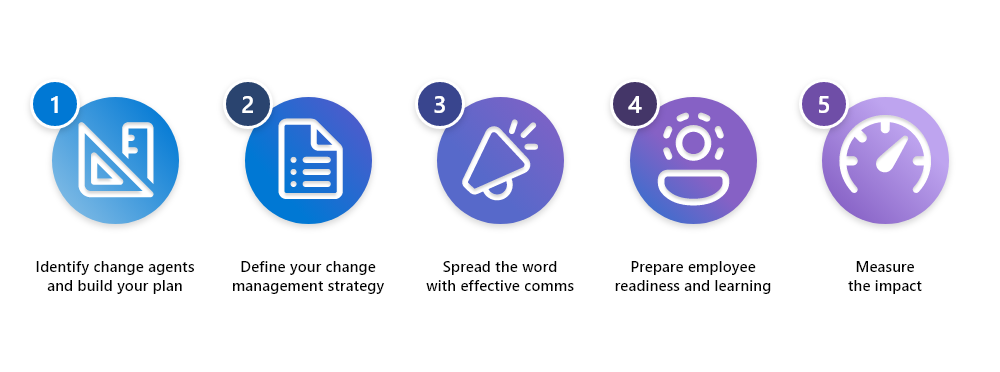
To do this effectively, you will need to empower change agents in your organization. These are not part-time roles; they are dedicated resources across your company who are responsible for the change management function, including creation of a deployment and adoption plan, facilitating principled change management practices, communicating and engaging with employees, preparing employee readiness and learning opportunities, and then measuring the success of your deployment across the enterprise. At a high level, your strategy should consist of the following five steps.
Microsoft 365 Copilot change management
How we drove adoption in Microsoft Digital
At Microsoft, we broke our company-wide adoption efforts into cohorts, for example, subsidiaries or business groups. Depending on the size of your enterprise, you may benefit from this approach as well. We divided our adoption along two vectors: internal organizations like legal or sales and marketing, and regions like North America or Europe. Different cohorts have different focuses, but the strategy is similar. At Microsoft, we did this in four phases:

Get ready
Effective change management requires careful planning. Begin by identifying and then working with company-wide change management leads. Next, identify members of your target cohorts who will support the adoption, including change managers, leadership sponsors, and employee champions.
Champions will be crucial to your adoption by filling several powerful roles:
- Pinpointing key usage scenarios for Copilot based on their cohort’s culture or processes.
- Providing insights that help adoption leaders build out their rollout plans.
- Most importantly, demonstrating the value of Copilot and showing their peers how powerful this tool can be in their day-to-day work.
When champions socialize their tips and tricks, our experience at Microsoft Digital has revealed that it’s best to share specific prompts and the value they provided as a concrete entry point for users. For example, a champion could say, “I saved three hours drafting this sales script in Microsoft Word using this prompt,” then share their Copilot prompt as a place for peers to start.
Works councils also play a key role at this stage. They offer the benefit of local cultural expertise and can help you identify the challenges employees face in their jurisdiction. Even something as simple as understanding proper modes of address helps smooth the road to adoption through effective communication.
Each of these sets of stakeholders has a role to play in leading your own rollout. We recommend using Microsoft 365 Copilot adoption resources to build out your own adoption plan.

Onboard and engage
At Microsoft, we implemented this phase across each adoption cohort. Because every group will have its own champions and leadership sponsors, it’s important to treat each of them as its own organization, with its own unique adoption needs.
In advance of our general rollout, we created “jump-start” communications with links to learning opportunities:
Localized training took the form of Power Hours in different languages and time zones. These training sessions demonstrated key Copilot scenarios across Microsoft 365 apps.
Self-learn assets included user quick-start guides, demo videos, and Microsoft Viva Learning modules to accommodate different learning styles and preferences.
Pre-rollout communications fulfill two needs. First, this messaging is a great opportunity to launch your champion communities. Second, these communications build your employee population’s desire and excitement for their incoming Copilot licenses, then prepare them to hit the ground running when they get access.
After your Copilot licenses are live, your launch-day welcome comms are straightforward. Invite employees to access Copilot and to start experimenting with how it can fit into their work. There are many possible vectors for deploying these communications, but a multi-pronged effort that includes Microsoft Viva Amplify will deliver the maximum impact.
For support in building out your own communication plan, our adoption team has created a user onboarding kit for Copilot. These ready-to-send emails and community posts can help you onboard and engage your users.

Deliver impact
After everyone has access, it’s time to promote Copilot usage and ensure all employees are having the best possible experience and gaining the most value. For our cohorts, employee champions and leadership sponsors were essential levers.
It’s important to remember that Copilot isn’t just another tool. It introduces a whole new way of working within employees’ trusted apps. At Microsoft, we took great care to encourage employees to adapt a mindset to see it as part of their daily work—not just something they play with when there’s time.
Microsoft Viva Engage, or a similar employee communication platform, is a helpful forum for peer community support. In our case, it provided an organic space for champions to share their expertise and change managers to provide further recommendations and adoption content. For employees who explore best on their own, Copilot Lab provides in-the-flow learning opportunities to build their prompt skills.
Meanwhile, leadership sponsors diversified our communications strategy by deploying and amplifying messaging through executive channels like org-wide emails or Viva Engage Leadership Corner posts.

Extend and optimize
Understanding overall usage patterns and impact is crucial to optimizing usage. Our Microsoft Digital team used a combination of controlled feature rollout (CFR) technology while tracking usage through Microsoft 365 admin center and the Copilot Dashboard in Viva Insights. Together, these tools gave us the visibility and tracking we needed to establish and communicate adoption patterns.
Meanwhile, IT admins and user experience success managers can access simple in-app feedback through Microsoft 365 admin center. And to really maximize value, our Microsoft Digital employee experience teams conducted listening sessions and satisfaction surveys.
All these insights are helping us establish a virtuous cycle to drive further value and better adoption for future rollouts, extend usage to new and high-value scenarios, incorporate Copilot into business process transformation, and understand custom line-of-business opportunities.
Driving user enablement with Microsoft Viva
Our team in Microsoft Digital used Microsoft Viva to help enable our 300,000-plus global users. Microsoft Viva is an Employee Experience Platform that brings together communication and feedback, analytics, goals, and learning in one unified solution. Our team used Viva across a range of change management scenarios, including building awareness, communicating with our employees, providing access to readiness and learning resources, and measuring the impact of our deployment.
You can see a few of the specific ways we used Viva to accelerate employee adoption below.

Accelerating Microsoft 365 Copilot with Viva

Viva Connections
Sharing key news related to deployment and enablement, generating “buzz,” and tying Copilot to Microsoft culture.

Viva Amplify
Producing and efficiently distributing employee communications to build awareness and excitement.

Viva Learning
Courses and training for our employees on how to maximize value from Copilot, inclusive of building effective prompts.

Viva Engage
Actively engaging employees, providing leader updates, listening to feedback, and enabling Champs community.

Viva Insights
Using the Microsoft 365 Copilot Dashboard beta to identity actionable insights and usage trends.

Viva Pulse
Instant feedback from employees on their Copilot experience to fine-tune our landing and adoption approach.

Viva Glint
Understanding employee sentiment and gauging the overall effectiveness of our Copilot deployment effort.
Learning from our adoption of Copilot

Cascade adoption efforts through localization
Regional differences, priorities, even time zones—they can all block your centralization efforts. Your insider adoption leaders within each adoption cohort can help.

Empower your employee champions with trust
Monitor your user-led adoption communities at the start to provide support. As this community of power users becomes product experts, they’ll take over.

Empower employees as innovators
You’ll be surprised by what your employees dream up. Provide every opportunity for them to share their favorite tips and usage scenarios.

Create excitement, but set expectations
Encourage a healthy mindset around what Copilot can accomplish and where it fits. Don’t overpromise.

Gamify learning to build engagement and experience
Friendly competitions or cooperative challenges like prompt-a-thons generate excitement and invite creativity.

Understand that for many, AI is emotional
Overcome AI hesitancy by encouraging employees to tackle easy tasks with Copilot assistance. That will help minimize reluctance.
Use Microsoft Viva to accelerate time to value
Viva supports user enablement through learning, effective communication, usage tracking, and employee sentiment.
Key takeaways
Use these tips as your guide as you build out and implement your adoption plan. They are based on our own experience internally at Microsoft.
- Prepare your organization for adoption by identifying your adoption lead, building a cross-functional cohort-based team, defining personas and key usage scenarios, establishing communication preferences and success metrics, completing enablement training, and creating a localized communications and asset library.
- Engage your cohorts and activate readiness by deploying targeted onboarding communications, launching champion communities, running live and self-paced learning experiences, and elevating visibility with digital materials that help employees understand how Copilot improves their daily work.
- Drive measurable impact across cohorts by promoting usage through internal channels, reporting on KPIs at planned intervals, gathering employee sentiment through surveys and listening sessions, spotlighting success stories, applying learnings to refine adoption activities, and nurturing champions through deeper technical training.
- Extend and optimize your deployment by exploring new high‑value scenarios, identifying opportunities for business process transformation with agents, Copilot Studio, plugins, and connectors, and sourcing custom line‑of‑business use cases that advance your organization’s Copilot maturity.
Key actions
How we did it at Microsoft
- Learn how we boosted our Copilot adoption with a companywide expo.
- Explore how we created a Center of Excellence to guide our adoption and use of AI.
Further guidance for you
- Access the Copilot scenario library to understand different user needs and opportunities.
- Deepen Copilot engagement through the Microsoft Modern Collaboration Architecture (MOCA).
Chapter 4: Building a foundation for support
Empowering employees means making sure they have access to the right support channels. The fact that Copilot operates across a wide spectrum of Microsoft 365 apps adds complexity to support scenarios. As a result, it’s important to get your support teams early access along with your earliest pilot implementations.
For us in Microsoft Digital, four principles define high-quality support:

Available
Highly available and in-context support should deliver both self-help and assisted experiences wherever and however the user needs it.

Consistent
Coherent and seamless access to support across the entire journey eliminates frustration and keeps the experience consistent.

Contextual
Base your support experience on where the user is and what they’re trying to accomplish.

Personal
Anchor support in a user’s goals and preferences.
Strategizing for support
Building experience and knowledge is one thing, but coming up with your approach to support requires planning and a strong idea of your users’ ideal experience. At Microsoft Digital, we take a “shift-left” approach. That means we save our human support staff time by attempting to create excellent self-service options for our users.
Shift-left principles can apply to many different support contexts, but with Copilot, we’ve found that the most important upfront action is ensuring your employees have accessible self-service support channels and communicating their availability. Work with your adoption teams to ensure they include self-service support options in their rollout communications.
Seven things we learned prepping to support Microsoft 365 Copilot
Preliminary access
Select your initial support specialists. Include people with different Microsoft 365 app focuses, support tiers, and service audiences.
Communication hub
Establish a community space where your support team can connect and collaborate on issues. Invite non-support professionals as needed.
Knowledge base
Start a collaborative document and add learnings. This will eventually evolve into your knowledge base for internal support.
Widen access
Host information sessions with the wider support team and extend access so all relevant support professionals can ramp up.

Rehearse
Conduct role-playing and shadowing sessions so support teams can build practical knowledge and confidence.

Support go-live
Get your support resources and processes ready and push them live in advance of your Copilot deployment. Consider a dry run.

Track
Determine a tracking cadence and gather data on Copilot issues that arise so support teams can identify trending issues and tickets.
Common questions, issues, and resolutions
We’re getting questions about why particular employees don’t have licenses.
Use employee change management communication waves to solve for this issue by alerting employees when they’ll have access to licenses.
Users are coming to us with questions that would be better served by adoption and employee material, and that isn’t our role as support.
Work with your adoption team to preempt these issues with proactive communications. Update your self-help content and provide your support agents with ready access to different employee education resources.
Teams are looking for integration support. Where do I send them?
Share this list of pre-built connectors to help your users integrate various data sources to Microsoft Graph. This list shares the types of content supported.
Can employees put confidential information into Copilot?
If employees are signed into Copilot with their Entra ID, they can enter confidential information.
My organization has concerns about who owns the IP that Copilot generates. Does the Microsoft Customer Copyright Commitment apply to Copilot?
Microsoft does not own the IP generated by Copilot. Our universal terms state “Microsoft does not own customers’ output content.”
What’s the best way to verify the accuracy of the information Copilot provides?
Copilot is transparent about where it sources responses. It provides linked citations to these answers so the user can verify further.
Key takeaways
Use these tips to manage your Copilot support efforts. They are based on our experience here at Microsoft.
- Enable and align your support team by starting with a core group of support leaders, establishing shared communication spaces and a collaborative knowledge base, expanding access to the full Copilot support team, training them through information sessions and role‑playing exercises, defining escalation paths, and partnering with internal communications to finalize user‑facing support materials.
- Deliver meaningful user impact by signaling support availability across employee communities, publishing a clear and accessible user-facing knowledge base, and standing up self-service automations where appropriate to empower users and reduce friction.
- Optimize and mature your support services by reviewing ongoing support issues and product feedback, and continually refining support workflows to drive efficiency, accuracy, and a better user experience.
Key actions
How we did it at Microsoft
- Read how we’re using AI to transform our Support business at Microsoft. This article shares how our Support team in Microsoft Digital is using AI to overhaul the business from end to end.
- Learn how we deployed the Employee Self-Service Agent here at Microsoft. This blog post shares how we’re using this agent to help our employees with their support needs in the flow of where they work in Copilot.
Further guidance for you
- Follow the Microsoft IT admin guide for Copilot onboarding, enablement, and support resources to ensure a smooth rollout.
- Access the Copilot Success Kit for launch day assets, support templates, and troubleshooting guides.
Chapter 5: Extending Copilot through agents
As organizations and employees have matured with respect to AI, agentic extensibility is expanding the frontiers of this technology. By using and even creating agents that surface knowledge, take actions, and reinvent workflows, employees can personalize AI’s capabilities to fulfill more specific needs.
What is an agent?
Agents are specialized AI-powered assistants that automate and execute business processes, working alongside or on behalf of a person, team, or organization. They range from simple prompt-and-response agents to more advanced, fully autonomous agents. Through specific instructions, grounding, connectors, APIs, and custom orchestration, creators can tailor agents to more focused workflows than a comprehensive AI solution like Microsoft 365 Copilot.
At Microsoft, our goal has been to provide access and enable agents at appropriate levels for our employees and the company as a whole. To make that happen, we’ve adopted a maturity model for agentic AI deployment. Early phases focus on using Copilot, grounded in enterprise data, to enhance knowledge discovery and retrieval. Later phases will enable our employees to act on that knowledge and even fully automate business workflows.
Agentic AI at Microsoft
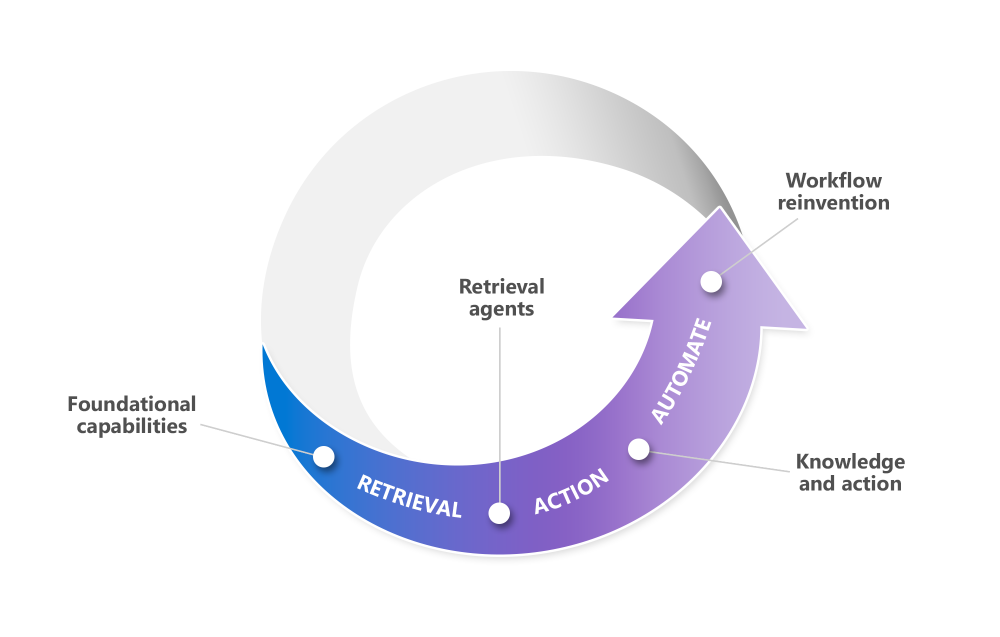
Each of these levels of agentic capability requires different tools to create and depends on different policies to govern. Because retrieval agents don’t require special tooling, we allow employees to create them at will through Copilot Chat and simplified agent builders in Copilot Studio and SharePoint.
For more complex agents intended to meet enterprise needs across lines of business or the company as a whole, our developers use more full-featured tools like Copilot Studio or Azure AI Foundry. For these kinds of agents, we apply the same rigor, reviews, and software development lifecycle (SDL) we use as part of our standard internal app development.
As you explore the different kinds of agents available to your users and decide how and where to enable them, adoption.microsoft.com provides an excellent place to start. It provides three different approaches to creating agents: Microsoft 365 Copilot Chat, Azure AI Foundry, and Copilot Studio.
All of this choice adds complexity, so maintaining visibility and control over the agents your employees create can be a challenge. As a result, we take a matrixed approach to creating and governing agents based on different parameters. They include the type of agent, how the user creates it, its knowledge sources, the need for custom tooling, sharing and publishing permissions, and more.
Keeping agents safe and effective through good governance
At Microsoft, we incorporated elements of our tenant’s minimum bar for governance into our policies for managing agents. These measures include Microsoft Information Protection, a functional inventory, activity logging, lifecycle management, and the ability to properly isolate agents against crossing data boundaries.
To govern agentic capabilities, we introduced further controls like sharing limits, breadth of knowledge sources, agent metadata, and information about an agent’s behaviors. The result is a proactive approach to governance backstopped by reactive structures that catch any issues.
As you think about governing your own agents, consider the four core principles we’ve established at Microsoft Digital.
We empower employees to create and share simple, low-risk agents
We provide a safe space and personal flexibility that allows individual employees to experiment without implicating company data or content users don’t own.
We capture and vet sensitive data flows at the enterprise level
More complex or far-reaching agents owned by teams or lines of business need enterprise documentation to account for external audits or security and privacy validation.
We protect data designated confidential or higher
We contain data flows to tenant mandates and only trust suitable storage destinations for content.
We honor the enterprise lifecycle
We treat agents that individual employees own like any other user-created app and delete them when that individual leaves the organization. Agents owned by teams have a lifecycle defined by the tenant and tied to attestation, the SDL, and accountability confirmations.
Once you have your governance policies and procedures in place, you can begin your rollout to users through many of the same strategies and processes we’ve discussed in this guide.
Learning from our experience with agents
Connect with relevant stakeholders
Establish early communication and collaboration with members of your security, legal, compliance, IT, and other teams who can help you define ways to configure Copilot Studio agent builder safely.
Trust and empower
Provide safe spaces with appropriate guardrails for individual employees to experiment with simple agents. Copilot Studio agent builder is a great place to start.
Expand enterprise capabilities
Empower a small number of trusted creators to experiment with more powerful agent-building tools under the close watch of IT, Governance, Security, Privacy, Data, and HR teams. This will reveal gaps in process and policy and inform future reviews.
Solidify labeling and data
Revisit your labeling structures and data flows. It will be important to have these structures in place to support this new agentic environment. Start by learning from our experience governing Copilot at Microsoft.
Extend your review process
Adapt any review processes you already have in place to agents, including security, privacy, and accessibility. Embed those reviews into your publishing workflow for agents operating above the individual level. Consider adding reviews for Responsible AI.
Prevent agent sprawl
Establish a reasonable enterprise lifecycle for agents that includes attestation. That will keep agents from sprawling or remaining in place after employees have left your organization or simply no longer need a particular agent.
Key takeaways
Use these tips to manage your Copilot support efforts. They are based on our experience here at Microsoft.
- Plan and refine your governance approach by aligning with Security, Legal, Compliance, HR, and IT; updating existing governance and labeling policies for agents; defining your review process; building a matrix that maps agent capabilities to governance controls; and determining how your SDL procedures apply to agents.
- Pilot with targeted teams to validate your controls by selecting groups such as Security, HR, and IT; establishing clear feedback and monitoring channels; and iterating on your review and remediation procedures based on insights from early adopters.
- Enable agents responsibly across the organization by ensuring foundational protections like Purview DLP and Microsoft Information Protection are in place, deploying adoption and change‑management communications, enabling simple agent‑builder capabilities for broad users, and unlocking advanced agent development scenarios for IT and line‑of‑business developers.
Key actions
How we did it at Microsoft
- Read about how embracing the agentic future is enabling us to become an AI-first Frontier Firm. This article shares our vision for using agents to transform the workplace.
- Find out more about our deployment of Microsoft Agent 365 at Microsoft. This post shows how we’re using this new platform to manage our agent ecosystem.
Further guidance for you
- Follow the Microsoft 365 Copilot Agents Deployment Blueprint to enable agents at scale with security, governance, and measurement strategies.
- Learn about the Responsible AI policies and practices that we use to guide our use of AI at Microsoft.
Applying our lessons to your own Copilot deployment
Embarking on your Microsoft 365 Copilot deployment and agentic extensibility journey might seem daunting, but by capitalizing on the lessons that Microsoft Digital has learned from our internal deployment, you can both speed up the process and avoid any pitfalls.

“Deploying Copilot internally has inspired us to dive deeper into the power of AI assistance, which is enabling us to enhance our employee experience.”
Stephan Kerametlian, business program management senior director, Microsoft Digital
By anchoring your work in careful planning and making use of the steps and resources provided in this guide, you can unleash a new era of productivity through Copilot.
We’ve learned a lot on our journey with Copilot, and we’re happy that we get to share our experiences with you—hopefully they help you on your journey.
“Deploying Copilot internally has inspired us to dive deeper into the power of AI assistance, which is enabling us to enhance our employee experience,” says Stephan Kerametlian, a business program management senior director in Microsoft Digital.
You’re not in this alone. If you’re looking for support or knowledge on any aspect of your deployment, reach out to our customer success team.
Key takeaways
This guide reflects our learnings and the processes we followed during our internal rollout of Microsoft 365 Copilot. This last set of tips summarizes the major actions you can take to get started with Copilot at your company.
- Start with strong governance: Build a clear labeling and data protection strategy before deploying Copilot to safeguard sensitive information and meet compliance needs.
- Pilot, then scale: Roll out Copilot in phases, beginning with pilot groups to gather feedback and refine your approach before expanding companywide.
- Communicate early and often: Proactive communication and leadership sponsorship are essential for managing expectations and driving successful adoption.
- Empower champions: Identify and enable employee champions to share best practices, tips, and real-world scenarios that help others get value from Copilot.
- Invest in training: Provide tailored learning resources and support to help users build confidence and skills with Copilot in their daily workflows.
- Measure and optimize: Track usage, collect feedback, and continuously refine your deployment to maximize impact and uncover new opportunities.
- Plan for support: Set up self-service and human support channels early so employees can get help quickly and keep momentum going.
- Extend with agents: As your organization matures, explore agentic AI to automate workflows and unlock even greater productivity gains.
Key actions
How we did it at Microsoft
- Read our IT playbook for becoming a Frontier Firm in the era of AI.
- Review our five-step AI maturity guide for IT leaders.
- Learn how our IT organization is powering our companywide digital transformation.
- View the full, detailed version of this guide.
Further guidance for you
- Read the Microsoft Work Trend Index Annual Report.
- Find the best overall Copilot deployment and adoption guidance at adoption.microsoft.com.

Try it out