

Developers who are blind or have low vision have historically been limited to back-end programming, but new research suggests AI programming assistants are changing that in remarkable ways. A Microsoft Research Asia study found that developers who use screen readers can now tackle previously challenging tasks like UI development through an AI-assisted software development technique where natural language replaces traditional syntax, also known as vibe coding.
The implications extend far beyond accommodation. Only 1.7% (roughly 1,100 of 70,000) of surveyed developers (opens in new tab) are blind or have low vision. Yet the Microsoft Research study shows that AI assistants can unlock new capabilities for this group, sometimes surpassing traditional methods.
“I used to do only non-UI development because my visual impairment made UI tasks difficult,” said one blind developer. “Now, I turn user feedback into prompts for GitHub Copilot to modify code, ask it to check the generated code, and send screenshots for review. I can even review the code myself. This has greatly simplified my workflow.”
The research
The Microsoft Research Asia team recruited 16 developers with varying experience levels and degrees of visual impairment for a comprehensive three-phase study examining real-world use of GitHub Copilot in Visual Studio Code.
In the first phase, participants completed onboarding and coding tasks. Then they used Copilot in their daily work for two weeks while documenting their experience. Final interviews captured long-term feedback on participants’ performance and sentiment.
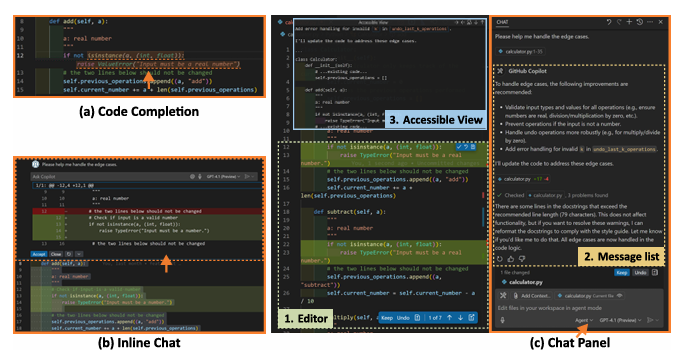
GitHub Copilot proved ideal for the study because it already incorporates accessibility features: sound cues in addition to visual prompts, text-based views for layout clarity, and multimodal capabilities that convert visual content like screenshots into textual descriptions. The tool’s features are illustrated in Figure 1.
Beyond basic accommodation
“Through real-world use, participants consistently reported that AI programming tools improved efficiency, enhanced coding skills, and lowered the barrier to learning new technologies,” said Luna Qiu, technical program manager at Microsoft Research Asia – Shanghai. “More importantly, these tools used the multimodal capabilities of large models to assist with visual elements, expanding users’ capabilities.”
The study revealed how participants were adapting the new vibe coding approach to overcome traditional limitations. One developer explained: “I like to discuss plans or ask for explanations in Ask mode before letting GitHub Copilot handle my files.” Another noted the power of natural language: “I used natural language to ask GitHub Copilot to undo an operation—and it worked.”
But the benefits went beyond simple task completion. “Accessibility isn’t just about adding labels or shortcuts,” said another developer who is blind. “More types of cues, like sound effects, help me better understand changes. Too many text prompts can actually interfere with my code comprehension.”
For newcomers to programming, the impact was particularly striking. “With a code assistant like GitHub Copilot, getting started with programming is much easier,” one participant noted. “In daily life, we have all kinds of needs, and better programming capabilities help us meet personalized requirements.”
Video 1 shows how screen readers enable users to review code four times faster than they normally would.
Video 2 shows the actual GitHub Copilot interface.
Eight critical improvements
The research team identified specific pain points and solutions across four key areas of AI programming tools.
Managing AI interactions
More consistent shortcuts and clearer feedback: Users often run into conflicting keyboard shortcuts that don’t behave consistently across sessions. Because of this, some resort to clumsy workarounds like copying content to the clipboard and pasting it elsewhere for editing. We recommend creating
a consistent and predictable shortcut system that minimizes conflicts, reduces extra navigation, and provides timely, accessible session settings.
Guidance on prompts and model choice: AI suggestions are sometimes too brief or based on incorrect assumptions, which requires users to repeatedly refine prompts. As users gain experience, tools should help by detecting vague prompts, asking for clarification, and offering straightforward guidance on selecting suitable AI models for the task.
Reviewing AI responses
Clearer responses: For developers using screen readers, audio cues can be unclear or distracting, and intermixed code changes are difficult to follow. We recommend a system that tracks changes through clear sound cues or text indicators, provides concise text summaries, and groups related information to reduce navigation effort and cognitive load.
Smarter message navigation: Lists of messages can help organize interactions, but navigation is often linear and inefficient. Long responses and input fields that are hard to exit add to the difficulty. We recommend a more navigable format that groups related messages, uses headings or indexes for orientation, minimizes misleading content, and provides reference information to build trust.
Accessible view, optimized: A plain-text accessibility view simplifies navigation but often loses important detail, especially in formatted content like tables. A simplified UI is valuable, but it should still preserve the completeness and integrity of information.
AI response playback: Automatic playback of AI responses can reduce manual effort, but long passages can interrupt thought flow and be hard to digest. We recommend making this “autoplay” optional so that users can choose their preferred interaction style.
Staying focused across views
Improving focus with integrated views: Switching between the editor, chat panel, and terminal can break concentration and increase the risk of errors. In Agent mode, developers must divide attention across multiple views, which makes this even harder. We recommend consolidating key information and actions into a single panel, along with self-verification tools and clear feedback to reduce the need for manual cross-checking.
System status and next steps
Clear status updates: After submitting a request, users need timely updates to understand system status. In Agent mode, vague notifications make it harder to decide on next steps. We recommend providing clear status updates that separate AI-driven actions from those requiring user input, and adding a “Do Not Disturb” setting to minimize unnecessary interruptions.
“AI programming tools are expanding in functionality, but for users of screen readers, more features don’t mean better usability,” said Nan Chen, research SDE at Microsoft Research Asia – Shanghai. “Complex interfaces, convoluted workflows, and unpredictable feedback reduce efficiency. What’s needed is to deliver more value through fewer actions. Striking the right balance between added features and streamlined usability will be a key challenge for future accessibility design.”
Looking ahead to personalized AI programming
As tools evolve from passive adaptation to active customization, personalization is emerging as a new direction for accessible programming. Users of screen readers have diverse preferences: some want minimal text for quick access to information, while others need richer detail to understand code logic and structure.
“With the learning and adaptation capabilities of large models, AI programming tools can tailor interactions to each user’s traits and habits, becoming a truly personalized assistant,” said Luna Qiu.
These new interaction models and workflows expand the potential of human-AI collaboration and highlight opportunities to improve accessibility. Based on these insights, the research team proposed specific recommendations for more accessible programming.
For example, accessibility design should be built in from the start, not added as a post-launch patch. When screen reader use cases are considered early in the process, accessibility is embedded throughout the product.
Regarding developer support, the focus should go beyond documentation that relies heavily on visuals like screenshots or diagrams. Creating learning materials designed specifically for users of screen readers can lower barriers, improve efficiency, and help more people master AI programming tools, helping them participate more fully in the move toward development using AI-assistants.



 Artificial intelligence