
By Lena Yeoh (opens in new tab) and Christian Canton

Microsoft Excel is an industry leading spreadsheet software program as well as a powerful data visualization and analysis tool. Many people all over the world use it as ubiquitously as a healthcare worker uses a stethoscope. Its ability to include formulas allows users to perform complex calculations with data very efficiently.
We saw an opportunity when we realized that many users were just scratching the surface of Excel, not using it to its fullest potential, and that they find Formula difficult to learn and often not discoverable.
Seeing the pain points across many types of users in various roles and levels of experience led us to ask how we could make Excel intelligently detect users’ needs so they could more easily discover and learn to use Formula efficiently? If this could be achieved, more users could go beyond just basic use and unlock the power of Excel to make confident decisions from understanding their data.
Formulas are a gateway to a host of human activities such as workflow management models and simulation; complex tools become possible as you start to use and master formulas. We believe that understanding a pathway to formula mastery is important to unlocking that potential, where Excel stretches beyond its role as a spreadsheet and becomes a programming tool, and accommodates students doing simple math up to algebra.
What is the mastery path that unlocks Excel as an even more powerful tool?
Understanding users
We performed a Jobs To Be Done Analysis to document Excel users’ formula discovery and authoring journey and validate our hypothesis that design intelligence would further improve their experience. Some of our questions included:
- Why and how are users exposed to and using Formulas?
- What tools do users use to perform calculations on their data?
- What are their current workflows and pain points?
- What are their success criteria for achieving their group of activities?
From there, we developed a customer segmentation to help us understand usage scenarios from basic to advanced archetypal users, with an emphasis on how they use and view formulas. For each segment, we created a visual representation of our key audience based on their level of expertise and attitude towards spreadsheet based on both qualitative and quantitative research. We documented the process and the way they handle tasks and workflow.
Early design explorations then identified how intelligence could help each segment perform their tasks efficiently. A segment has attributes that determine what they will do in a situation; a designer or PM can use the attributes of a segment to game what a user will do in each situation.
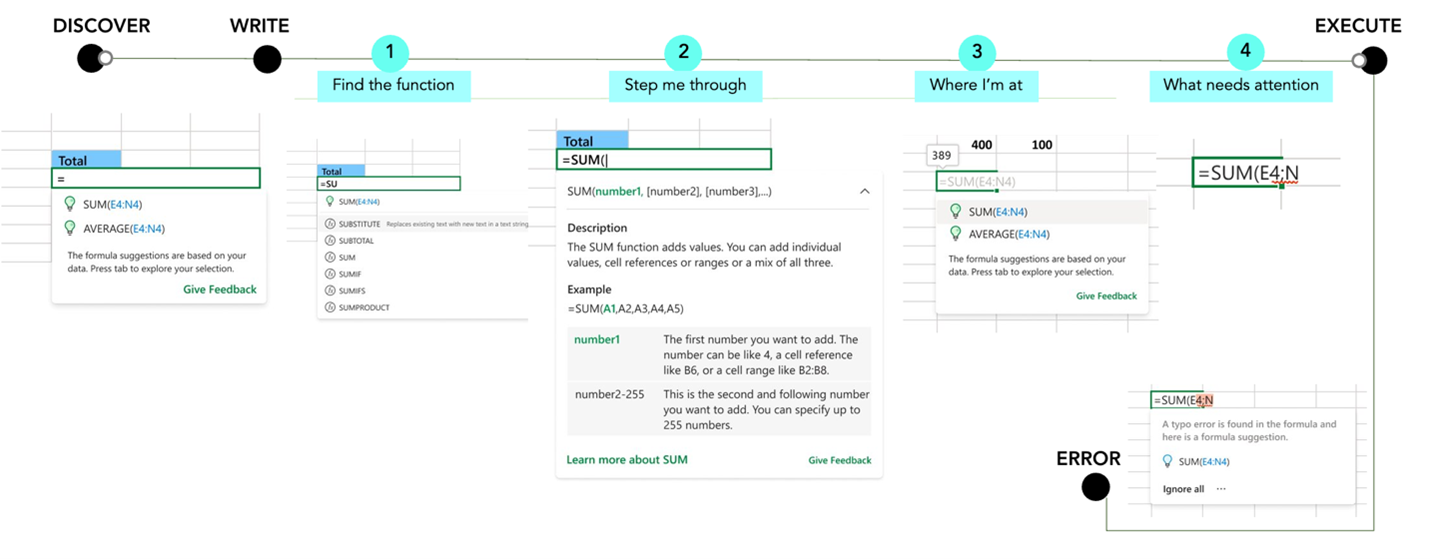
Jobs –To-Be-Done: Authoring Core Experience
The solution: Formula intelligence
Once we validated our hypothesis that a Formula Intelligence tool would be useful to all segments, our goal was to design a state-of-the-art formula authoring experience with intelligence that would enable Excel users to:
- Easily discover formulas and what they can do
- Be more efficient in automatic calculations
- Be more confident to master their data
- Achieve more with less uncertainty
- Develop a mastery path for active learning
We knew our solution would present the need for developing a new habit, or a habit change, in users. As some of our colleagues have observed, replacing the way that people have habitually done things poses some challenges. With that in mind, we wanted more than to just provide a Formula Intelligence tool; we wanted to:
- Bring Formula intelligence to Excel users without an overwhelming interruption in their workflow.
- Help Excel users to manipulate their data by intelligently prompting formula features at the right moment during their workflow.
- Help Excel users to easily understand formula functions when they need it during their workflow.
- And we wanted to ensure that we are augmenting and multiplying human skills.
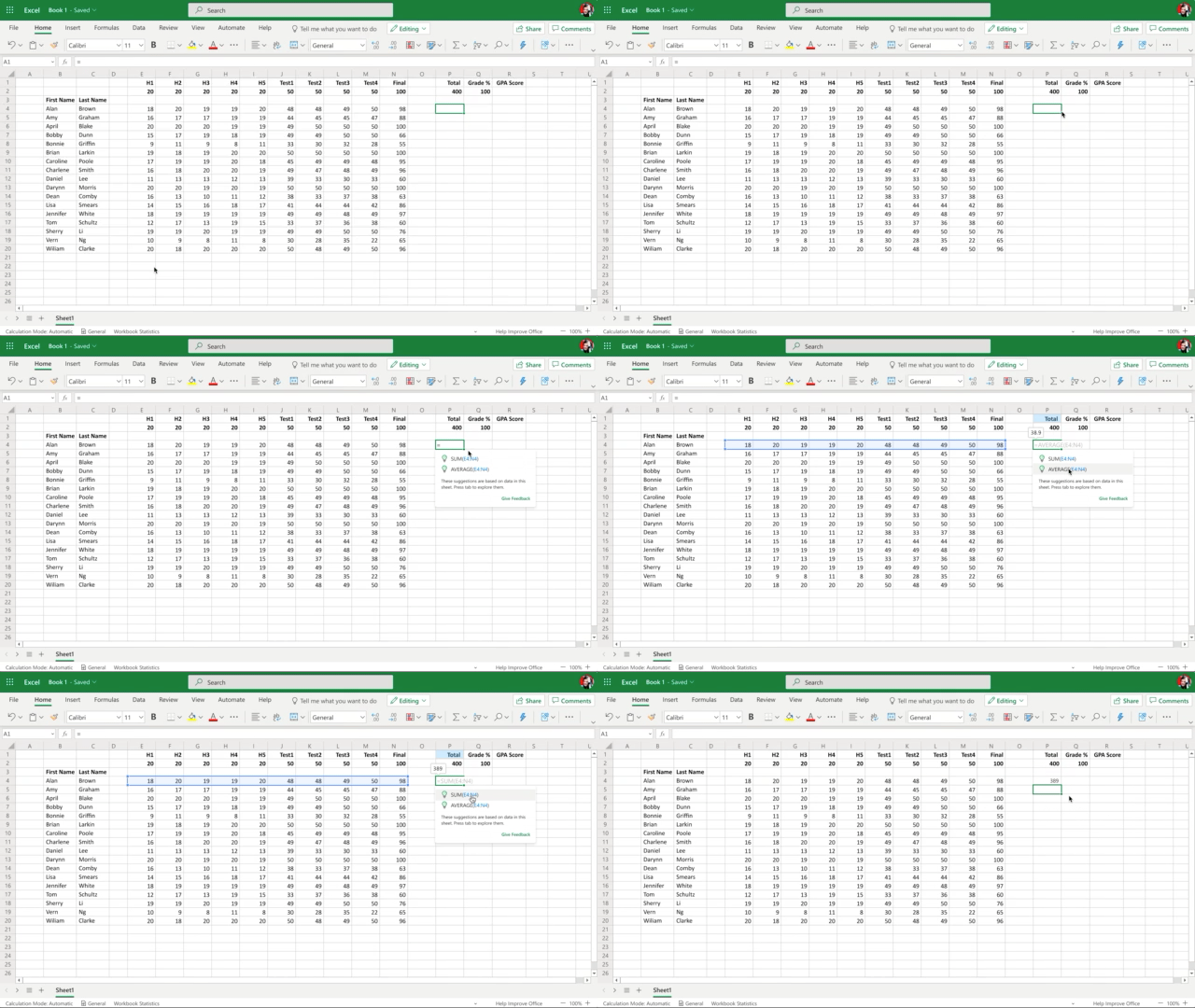
Users can easily adapt to automatic calculation with formula by saving time and increasing productivity and feeling confident writing a formula without errors.
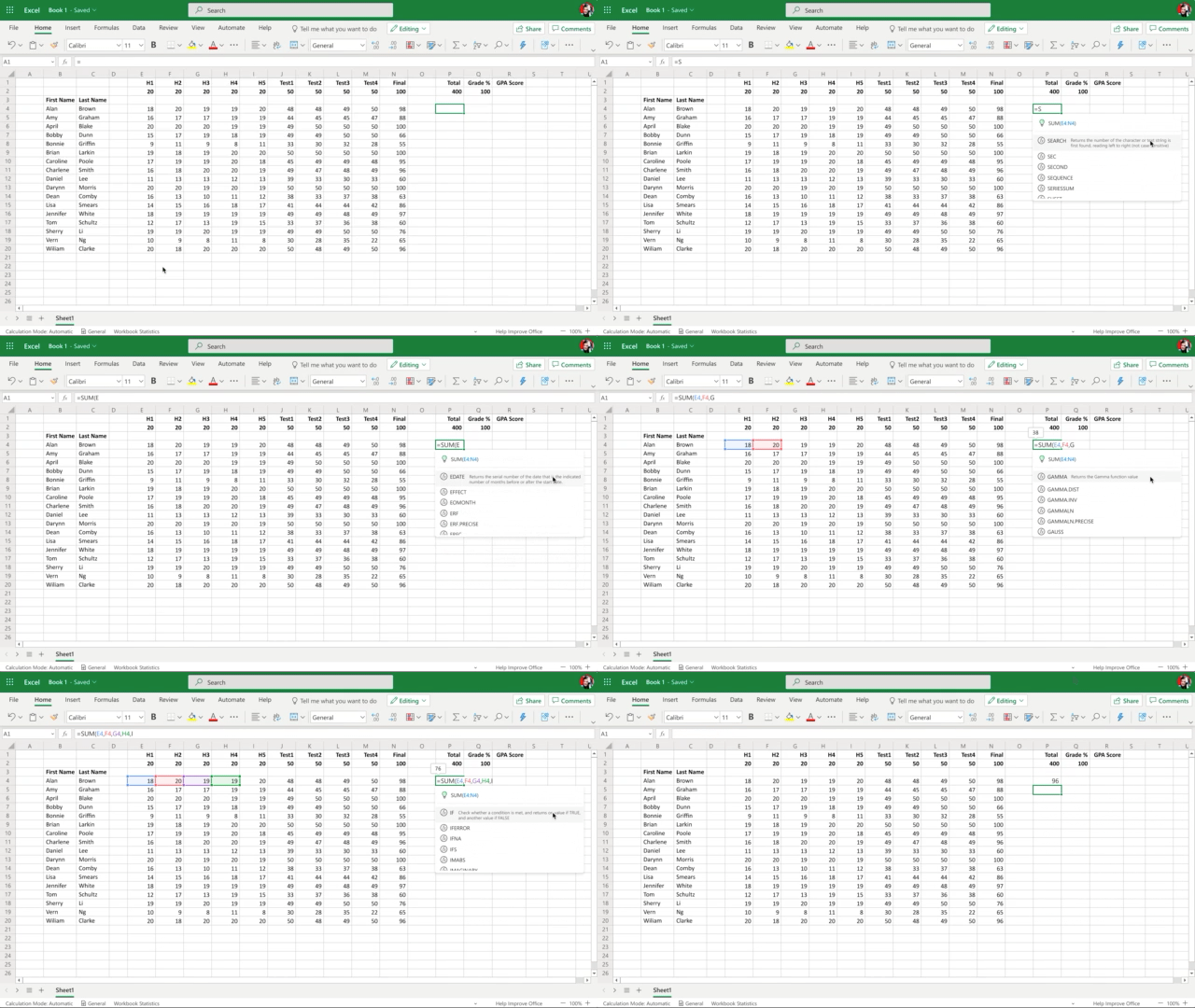
Users can easily learn to write formulas through the argument assistance card without leaving Excel.
Our research studies showed that our everyday Excel users struggle to learn Formula, using the right formula for a calculation, and memorizing the way to correctly use a function. These findings helped inform our UX directions to use the intelligent model in shaping how to smartly light up the automatic calculation capabilities to assist users to achieve their tasks efficiently without relying on a calculator. It also enabled users to efficiently learn about formulas by providing an in-context experience of examples and detailed argument descriptions. We want to minimize the gap in learning Formula and allow our customers to learn as they work in Excel. Formula intelligence empowers Excel users to easily discover and learn about Formula, saving more time and effort in doing manual calculations, and increase users’ confidence in working with their data by minimizing unnecessary errors.
Our overall ambition is to deliver authoring and comprehension experiences that elevate our customer’s skills, to make it easier to learn and understand what is happening to their data, and to make it much more straightforward to find and correct their errors along the way.
Moving forward, our goal is to unlock the power of Excel’s calculation engine to enable everyone to reach confident, correct conclusions and decisions from their data.
What do you think? Will these tools help you get more out of working with Excel? If you are a researcher, how might these research methods help you? Tweet us your thoughts at @MicrosoftRI or follow us on Facebook (opens in new tab) and join the conversation.
Lena Yeoh is a senior designer who is focused on systems thinking and User Center Design in the Software Design & Development space. She has extensive experience in transforming product teams to adopt design thinking and lean UX principles to build better experience for products across multiple platforms. She is especially passionate about helping teams connect with customers to learn about their unmet needs and inspires them to build innovative products. She is also skilled in designing for a portfolio of products across multiple platforms, driving customers connection, and crafting beautiful digital arts.
Christian Canton is a creative leader specializing in highly complex technical and creative projects, with substantial and solid experience of all major aspects of design, development, implementation and project management for multiple platforms. Christian enjoys leading diverse creative teams with producer & project management responsibilities and is recognized as a facilitator who is able to bring together senior stakeholders to deliver ‘best in class’ results.