
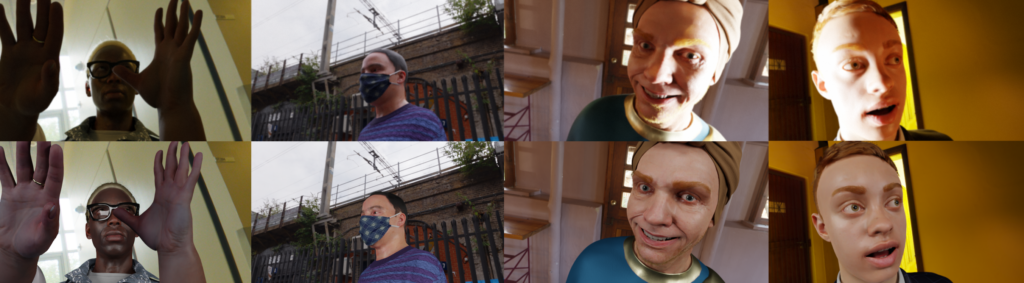
Challenge on Video Quality Enhancement for Video Conferencing
NTIRE Workshop at CVPR 2025
Introduction
Design a Video Quality Enhancement (VQE) model to enhance video quality in video conferencing scenarios by (a) improving lighting, (b) enhancing colors, (c) reducing noise, and (d) enhancing sharpness in video calls – giving a professional studio-like effect.
We provide participants with a differentiable Video Quality Assessment (VQA) model, training and test videos. The participants submit enhanced videos which are used for evaluation in our crowdsourced framework.
Motivation
Light is a crucial component of visual expression and key to controlling texture, appearance, and composition. Professional photographers often have sophisticated studio-lights and reflectors to illuminate their subjects such that the true visual cues are expressed and captured. Similarly, tech-savvy users with modern desk setups employ a sophisticated combination of key and fill lights to give themselves control over their illumination and shadow characteristics.
On the other hand, many users are constrained by their physical environment which may lead to poor positioning of ambient lighting or lack thereof. It is also commonplace to encounter flares, scattering, and specular reflections that may come from windows or mirror-like surfaces. Problems can be compounded by poor-quality cameras that may introduce sensor noise. This leads to poor visual experience during video calls and may have a negative impact on downstream tasks such as face detection and segmentation.
The current production light correction solution in Microsoft Teams – called AutoAdjust, finds a global mapping of input to output colors which is updated sporadically. Since this mapping is global, the method is sometimes unable to find a correction that works well for both foreground and background. A better approach may be Image Relighting which only performs local correction in the foreground and gives users the option to dim their background – creating a pop-out effect. A possible side effect of local correction can be the reduction of local contrast which often serves as a proxy to convey depth in 2D images – thereby making people appear dull in some cases.
Registration
Participants are required to register on the CodaLab website (opens in new tab). Email used during registration will be used to add participants to our Slack workspace (opens in new tab) which will be the default mode of day-to-day communication and where participants will submit their videos for subjective evaluation. For objective evaluation, please make your submission to the CodaLab website contains the correct (a) team name, (b) names, emails & affiliations of your team members, and (c) team captain.
Please reach out to the challenge organizers at jain.varun@microsoft.com if you need assistance with registration.
Awards & Paper Submission
Top-ranking participants will receive a winner certificate. They will also be invited to submit their paper to NTIRE 2025 and participate in the challenge report – both of which will be included in the archived proceedings of the NTIRE workshop at CVPR 2025.
Citation
If you use our method, data, or code in your research, please cite:
@inproceedings{ntire2025vqe,
  title={{NTIRE} 2025 Challenge on Video Quality Enhancement for Video Conferencing: Datasets, Methods and Results},
  author={Varun Jain and Zongwei Wu and Quan Zou and Louis Florentin and Henrik Turbell and Sandeep Siddhartha and Radu Timofte and others},
  booktitle={Proceedings of the IEEE/CVF Conference on Computer Vision and Pattern Recognition (CVPR) Workshops},
  year={2025}
}
Subjective Results
We received 5 complete submissions for both the mid-point and final evaluations. For each team’s submission, we utilized our crowdsourced framework to evaluate their 3,000-video test set. This involved presenting human raters with 270K side-by-side video comparisons. Raters were asked to provide a preference rating on a scale of 1 to 5, where 1 and 5 represent strong preference for the left and right video respectively, and 2 and 4 represent weak preference. A rating of 3 indicates no preference. Furthermore, raters were prompted to specify if their decision was primarily influenced by (a) colors, (b) image brightness, or (c) skin tone.
Here are the Bradley–Terry scores for each team that maximize the likelihood of the observed P.910 voting:

Figure 5: Interval plots illustrating the mean P.910 Bradley-Terry scores and their corresponding 95% confidence intervals for the 5 submissions, input videos, and the provided baseline. (Top) Overall preference, and (bottom) factors influencing preference.