

Imagine an AI assistant that can navigate a computer the same way humans do—clicking buttons, filling out forms, and moving between applications—all by simply interpreting what’s on the screen. This vision is becoming a reality through computer use agents—AI systems designed to operate software interfaces autonomously. Yet for these agents to function, they need to know exactly where to click and what to interact with on a screen.
This capability, called GUI grounding, enables computer use agents to locate specific elements on a graphical user interface (GUI). GUI grounding is the agent’s perception system that translates instructions like “click the Submit button” into exact screen coordinates.
Currently, grounding models succeed only 65% of the time, far from reliable enough for everyday use. A research team from Microsoft Research Asia conducted an extensive study to understand why, examining every stage of how these models are built and trained. Their work produced Phi-Ground (opens in new tab), a new model family that achieves state-of-the-art performance across all five grounding benchmarks among comparably-sized models.
The significance of GUI grounding
Computer use agents could transform how we interact with software in the digital world. These agents operate through graphical interfaces exactly as humans do, without requiring specialized APIs and allowing straightforward human oversight. This universality gives computer use agents broader potential than traditional robotic systems or specialized web automation tools.
GUI grounding serves as the agent’s interface with the digital world, the mechanism that determines whether the system succeeds or fails at its tasks. An agent that can’t reliably find what it’s looking for on screen is fundamentally limited, regardless of how well it can reason or plan.
Building better training data
Training more capable grounding models requires large-scale, high-quality data. The research team started with web pages from CommonCrawl, a massive public repository of internet content, and rendered them as screenshots to generate training examples. Yet web data contains substantial noise that can derail model training, from broken layouts and malformed pages to irrelevant content.
To address this, the team developed a multi-stage workflow to filter and refine the data, illustrated in Figure 1.

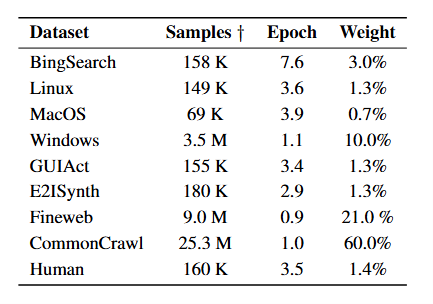
Beyond CommonCrawl, the team incorporated open-source datasets, screenshots from web searches, and manually annotated examples for everyday scenarios, e.g. grounding for office software, where precision matters most. Together, these sources formed the training foundation for the Phi-Ground model family. Table 1 shows the final composition of the training data, including how many times each dataset was used during training (epoch) and its relative importance in the learning process (weight).
How to train grounding models
The team discovered that the order in which text and images are fed into the model significantly impacts performance. They tested two approaches: inputting text before images, and the reverse. The results in Table 2 show that text-first yields substantially better outcomes.

Why does this matter? Transformer models, the architecture underlying most modern AI systems, use causal processing, meaning earlier inputs cannot be updated using information from later ones. When images come first, the model processes visual information without receiving the user’s instructions (like “click the Submit button”). When text comes first, the model interprets visual information after receiving the instructions. It knows what to search for as it processes the image. For perception tasks like grounding, this instruction-aware process directly influences results. A simple change in input order produces this effect.
Researchers also examined computational costs during testing. These costs depend not only on model size but also on the number of image tokens—the units into which images are divided for processing. For perception tasks, more image tokens generally improve performance, but at what point do the benefits plateau?
To answer this, the team investigated the relationship among model size, image token count, and training data volume. Such experiments can guide developers balancing training efficiency with application speed, which are practical concerns beyond raw parameter counts.
Figure 2 illustrates training results for six models with different sizes and image detail levels. Based on these evaluations, inference time generally aligns with the computational relationship, shown on the x-axis. Notably, many current studies report only the number of parameters when discussing model performance, overlooking computational factors like image token count, a gap that this research addresses directly.
In the experiments where the model architecture is fixed, the team found that for advanced benchmarks like ScreenSpot-Pro and UI-Vision, image token count significantly impacts performance. When the image token count falls below a certain threshold, they become a bottleneck. The model cannot perceive small interface elements, reducing accuracy. However, beyond approximately 2,000 image tokens, the benefits plateau. Additional tokens provide little additional benefit.

Evaluation results
Table 3 presents test results comparing several open-source models with fewer than 10 billion parameters across five GUI grounding benchmarks. The upper section shows results using the benchmark’s standard reference expressions, typically brief instructions or short phrases. The lower section shows results when researchers used OpenAI’s o4-mini model to generate longer, more detailed reference expressions, which were then tested by the grounding models.
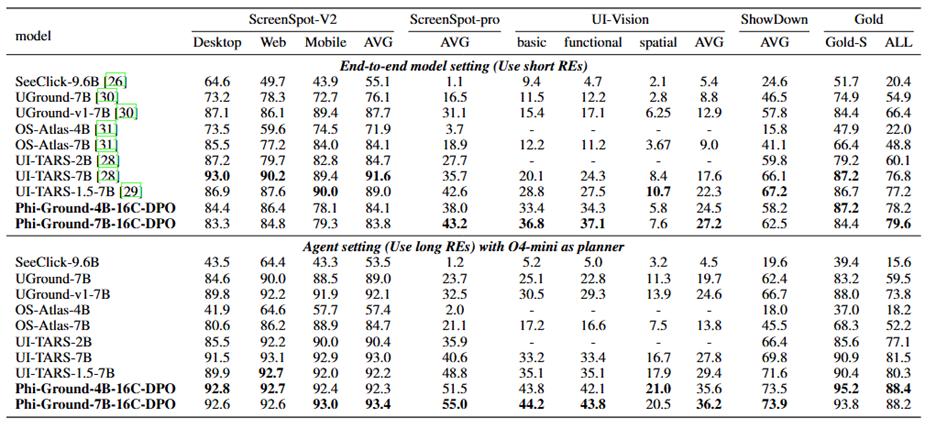
The Phi-Ground model is trained specifically for agent applications, with training data consisting primarily of various reference expressions. As a result, the model achieves state-of-the-art results across all benchmarks in the agent setting. On ScreenSpot-Pro, it reached 55% accuracy. On UI-Vision, it attained 36.2%, the highest score reported for this benchmark. The model’s performance on the Showdown benchmark surpassed that of commercial systems like OpenAI Operator and Claude Computer Use.
Enabling Copilot to understand onscreen content
The core technology of the Phi-Ground model has been integrated into the Vision Highlighting feature of Windows Copilot. As shown in Figure 3, Copilot can guide users step-by-step through visual tasks, such as helping them construct a bubble graphic.

Beyond advancing GUI grounding, this research demonstrates how systematic study of training methods can unlock performance gains across multimodal AI systems. The integration into Windows Copilot marks an early step toward computer use agents that can genuinely assist with everyday digital tasks.


 Artificial intelligence