
Code Samples
All samples use the C# language.
The Viewer sample
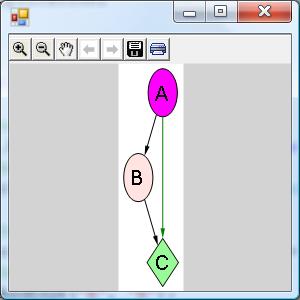
Drawing of the graph from the sample
The code snippet demonstrates the basic usage of the viewer.
using System;
using System.Collections.Generic;
using System.Windows.Forms;
class ViewerSample {
	public static void Main() {
		//create a form
		System.Windows.Forms.Form form = new
System.Windows.Forms.Form();
		//create a viewer object
		Microsoft.Msagl.GraphViewerGdi.GViewer viewer
= new Microsoft.Msagl.GraphViewerGdi.GViewer();
		//create a graph object
		Microsoft.Msagl.Drawing.Graph graph = new
Microsoft.Msagl.Drawing.Graph("graph");
//create the graph content
		graph.AddEdge("A", "B");
		graph.AddEdge("B", "C");
		graph.AddEdge("A", "C").EdgeAttr.Color =
Microsoft.Msagl.Drawing.Color.Green;
		graph.FindNode("A").Attr.Fillcolor =
Microsoft.Msagl.Drawing.Color.Magenta;
		graph.FindNode("B").Attr.Fillcolor =
Microsoft.Msagl.Drawing.Color.MistyRose;
		Microsoft.Msagl.Drawing.Node c =
graph.FindNode("C");
		c.Attr.Fillcolor =
Microsoft.Msagl.Drawing.Color.PaleGreen;
		c.Attr.Shape =
Microsoft.Msagl.Drawing.Shape.Diamond;
		//bind the graph to the viewer viewer.Graph =
graph;
		//associate the viewer with the form
		form.SuspendLayout();
		viewer.Dock =
System.Windows.Forms.DockStyle.Fill;
		form.Controls.Add(viewer);
		form.ResumeLayout();
		///show the form
		form.ShowDialog();
	   }
	}
Rendering an image sample

The image from the sample
This sample shows how to render an image by using class Microsoft.Msagl.GraphViewerGDI.GraphRenderer.
Microsoft.Msagl.Drawing.Graph graph = new
Microsoft.Msagl.Drawing.Graph("");
graph.AddEdge("A", "B");
graph.AddEdge("A", "B");
graph.FindNode("A").Attr.Fillcolor =
Microsoft.Msagl.Drawing.Color.Red;
graph.FindNode("B").Attr.Fillcolor =
Microsoft.Msagl.Drawing.Color.Blue;
Microsoft.Msagl.GraphViewerGdi.GraphRenderer renderer
= new Microsoft.Msagl.GraphViewerGdi.GraphRenderer
(graph);
renderer.CalculateLayout();
int width = 50;
Bitmap bitmap = new Bitmap(width, (int)(graph.Height *
(width / graph.Width)), PixelFormat.Format32bppPArgb);
renderer.Render(bitmap);
bitmap.Save("test.png");
Alternatively, if you have a System.Drawing.Graphics object available, you can draw by using method public void Render(Graphics graphics, Rectangle rect) taking a System.Drawing.Graphics object as an argument.
Sample of using the engine directly
This sample bypasses the layer of the Microsoft.Msagl.Drawing.dll, and Microsoft.Msagl.GraphViewerGDI.dll, and works directly with Microsoft.Msagl.dll. Notice, that in this case the user code is responsible for creation of curves of node boundaries.
using Microsoft.Msagl;
using Microsoft.Msagl.Splines;
class GLEETester {
        static void Main(string[] args) {
            double w = 10;
            double h = 10;
            MsaglGraph graph = new MsaglGraph();
            Node a = new Node("a", new Ellipse(w, h, new Point()));
            Node b = new Node("b", CurveFactory.CreateBox(w, h, new Point()));
            graph.AddNode(a); graph.AddNode(b);
            Edge e = new Edge(a, b);
            graph.AddEdge(e);
            graph.CalculateLayout();
        }
}
Please also pay attention to sample WindowsApplication which comes with the distribution and that can serve as a starting point. Comments and bugs should be e-mailed to Lev Nachmanson.
People

Lev Nachmanson
Principal Research Software Development Engineer